






The Complete Squarespace SEO Guide: Everything That Actually Matters
If you’ve been googling whether Squarespace is good for SEO, you’ve likely seen two types of opinions:
- The first is that it is perfectly fine and quite useful.
- And the second one dismisses it completely.
Which one is correct? Unfortunately, we only have the lamest answer of all: it depends. You really need to go into detail to understand this platform and check whether it can cover your specific needs.
That's exactly what we’re going to do in this guide.
So, if you've been wondering how to do SEO on Squarespace and whether it’s actually a good CMS for SEO, you're in the right place.
Is Squarespace actually good for SEO? (The honest answer)
To answer this briefly, yes, it is good for SEO.
But (of course, there is a but) it won’t be good for every use case.
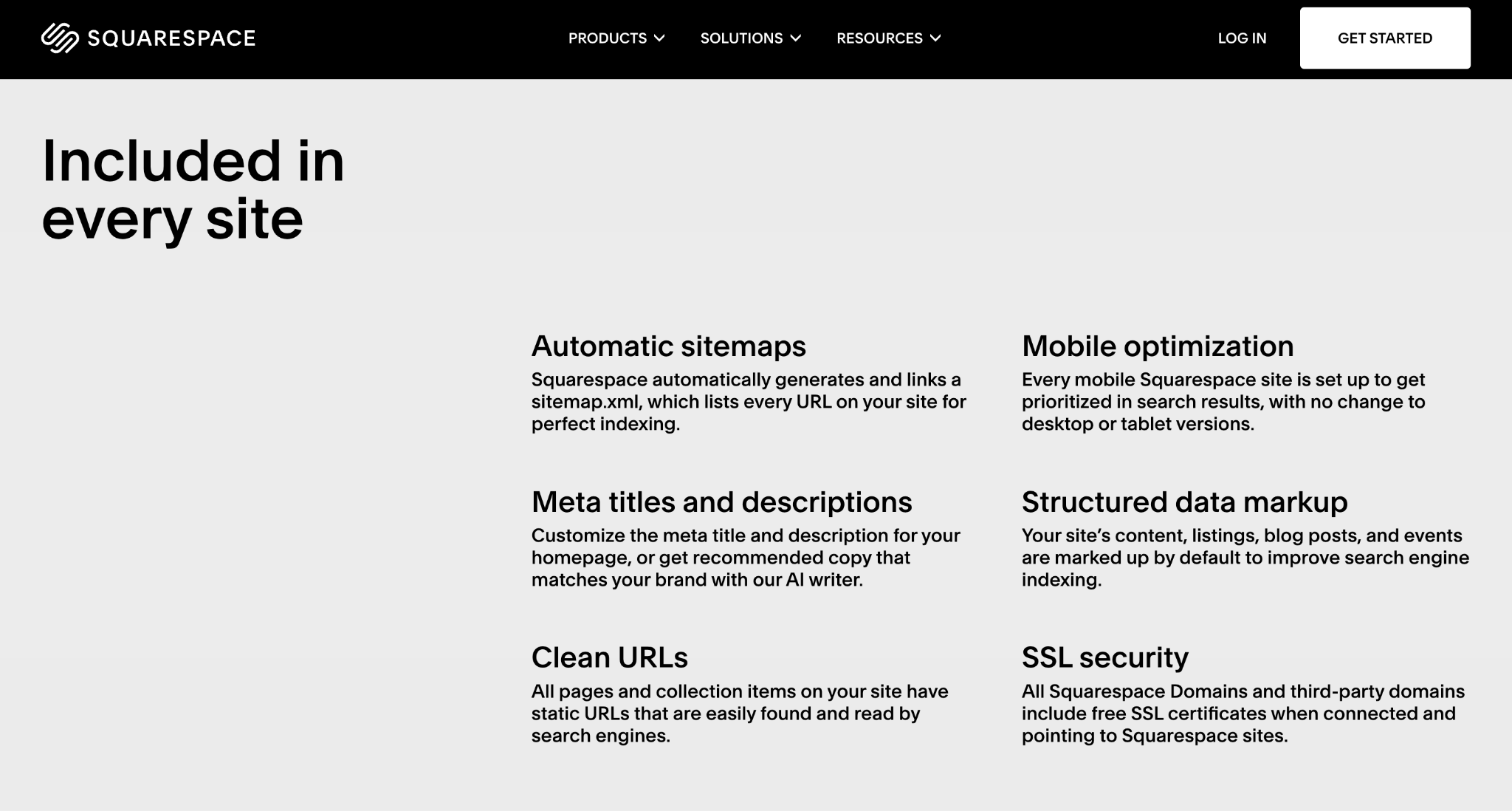
Overall, Squarespace gives you everything you need to handle the basics of search engine optimization:
- You can set your SEO titles and descriptions,
- You get clean URLs,
- Your site is mobile-friendly by default,
- There are free SSL certificates for all domains,
- You get built-in structured data (schema markup),
- There’s an automatic sitemap generated.
Source: Squarespace
If you think about it, that’s already enough to build a solid Squarespace website SEO setup for an average business website.
But of course, if you need a complex dashboard or an e-commerce store with hundreds of thousands of pages, this platform will feel way too limiting.
So, when considering this CMS, a better question to ask is whether Squarespace is SEO-friendly enough for what you are building.
And while the answer is yes for most sites, let’s check it more closely.
Things it does well
There are many things you can say about Squarespace, but no one will deny that it:
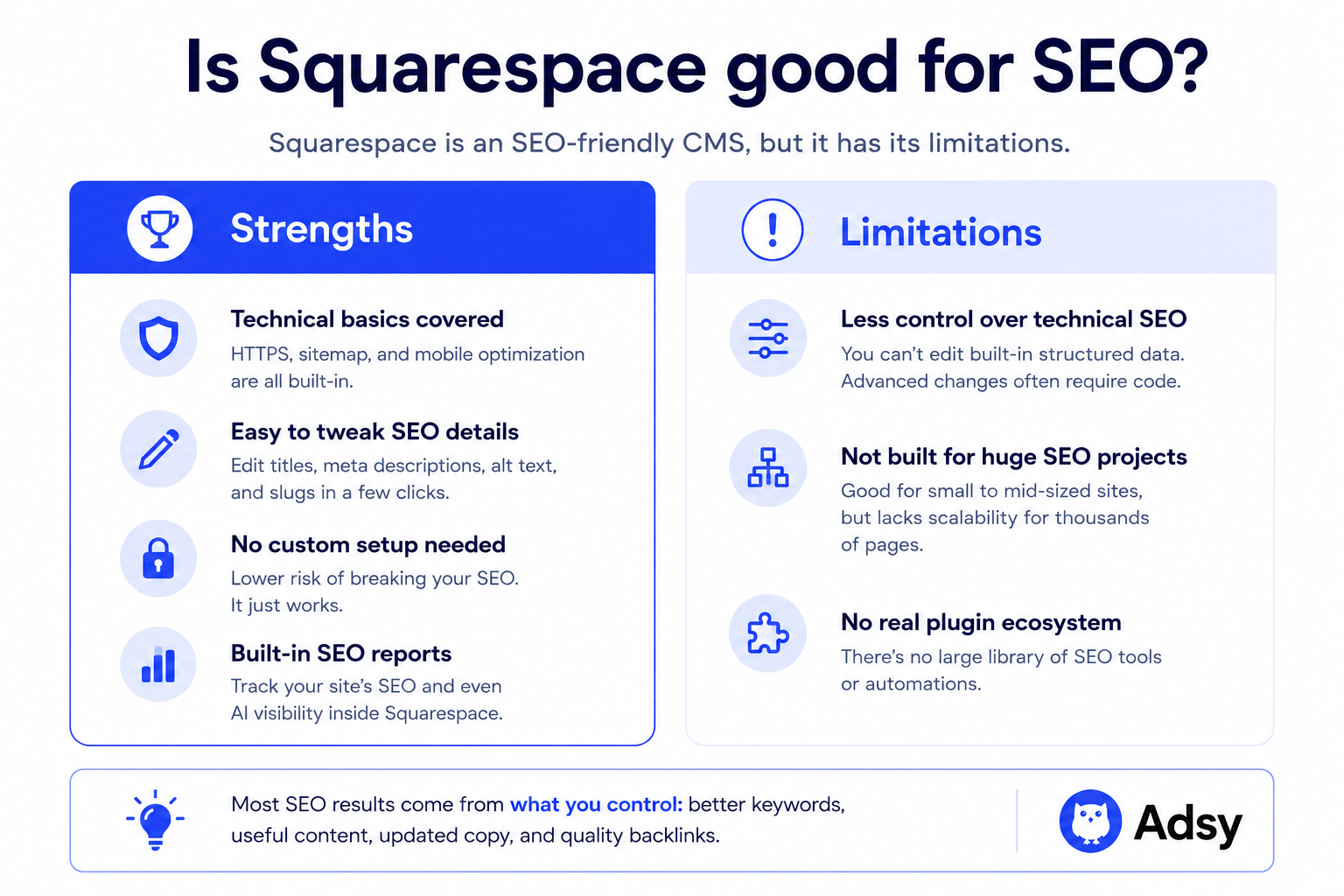
- Has all the technical foundation covered for you. You don’t need to install anything to get HTTPS, a sitemap, and mobile optimization. For anyone who’s still new to SEO, this is a big thing. It keeps everything simple, which is exactly what most sites need.
- Makes it easy to tweak basic SEO details. You can edit alt text, meta descriptions, slugs, etc., in a very straightforward interface without touching any code or installing plugins.
- Removes the need for custom setup. This makes it much harder to accidentally break your technical SEO setup. With more flexible platforms, you can do almost anything, which also means... you can break almost anything.
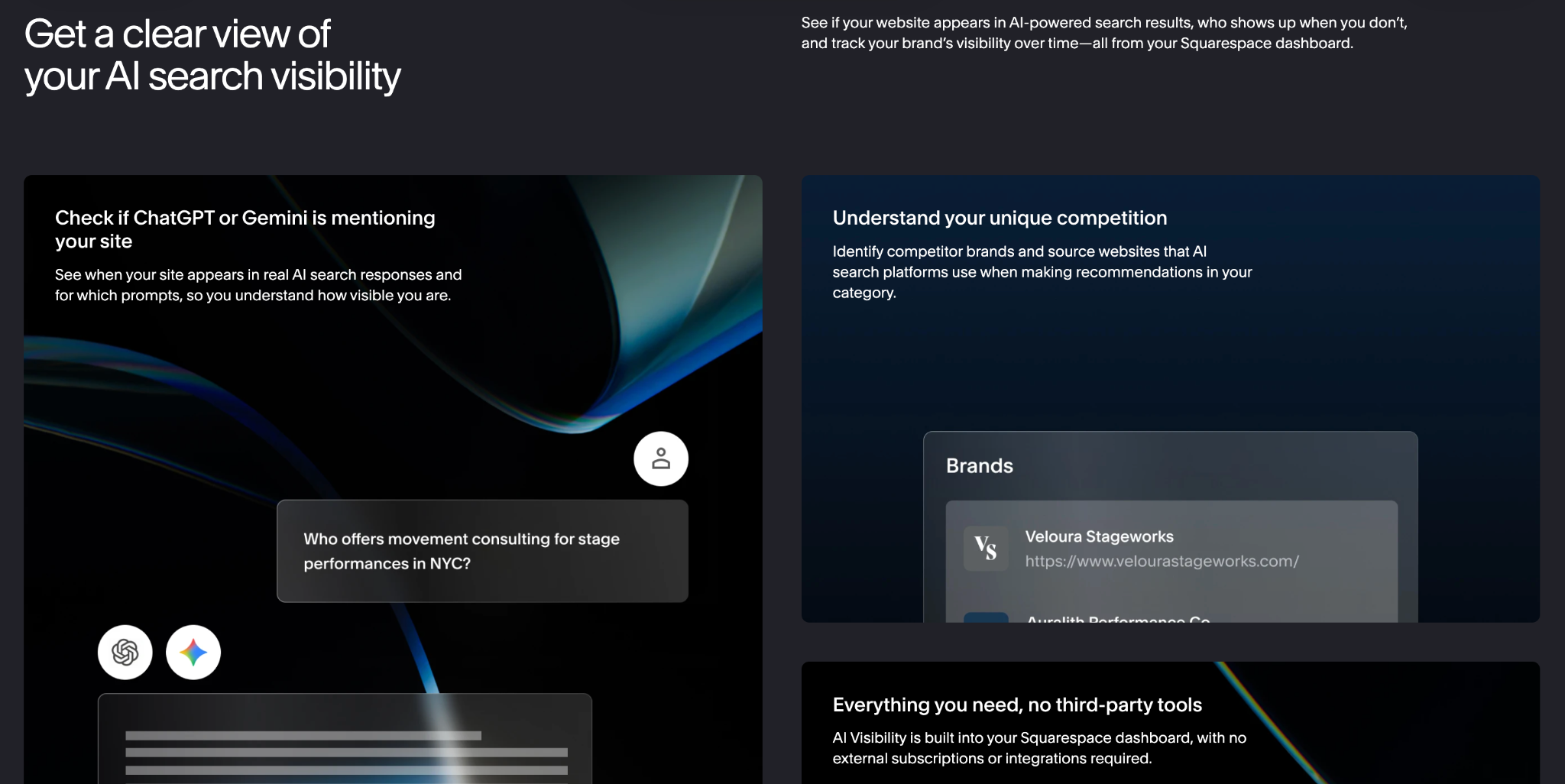
- Offers a built-in SEO report tool. You can check how your optimization is doing inside the CMS without any additional platforms. Squarespace even allows you to track your AI visibility. Of course, it won’t replace major SEO tools, but it’s a really nice feature for small teams with a limited budget.
Source: Squarespace
While you don’t get unlimited control with Squarespace, you get stability. And for a lot of sites, that’s a really good deal.
As a result, you can spend more time on things that have a direct impact on rankings:
- Choosing better keywords,
- Creating actually useful content,
- Improving and updating your copy,
- Finding good link building opportunities, etc.
Limitations
Still, Squarespace couldn’t be perfect for everyone. So, let’s take a look at some of the main limitations you can come across:
- Less control over technical SEO. If you like digging into advanced stuff, you’ll feel like you’re hitting a wall. For example, you can't edit or remove Squarespace's built-in structured data, and more advanced customizations often require code injection. For most people, that won’t matter. But it’s there, and you should know about that.
- It’s not built for huge and complex SEO projects. Squarespace can handle fairly large sites, but if you're building thousands of SEO landing pages or some complex websites, you'll probably want a CMS with more flexibility and scalability. Overall, this platform works better for service sites, personal brands, and small to mid-sized blogs.
- There’s no real plugin ecosystem. You won’t find a huge library of SEO tools that Squarespace supports. That’s not necessarily bad. It just means less automation.
Yet, most Squarespace SEO problems come down to the same few things: weak content, no backlinks, and wrong target keywords. And those have nothing to do with the CMS itself.
Squarespace isn't why your website isn’t ranking
When it comes to Squarespace and its optimization capabilities, you often hear many strong opinions. They might sound smart until you look at the real website rankings on Google.
What will you see? Right, plenty of high-ranking sites are built on Squarespace.
So, is Squarespace bad for SEO? No, because you have evidence on Google:)
Besides, comparing it to something like Magento (which is built for large, complex e-commerce setups) is just not a fair comparison.
The truth is, your choice of CMS is rarely the reason your site is stuck.
What’s actually happening most of the time is much less dramatic.
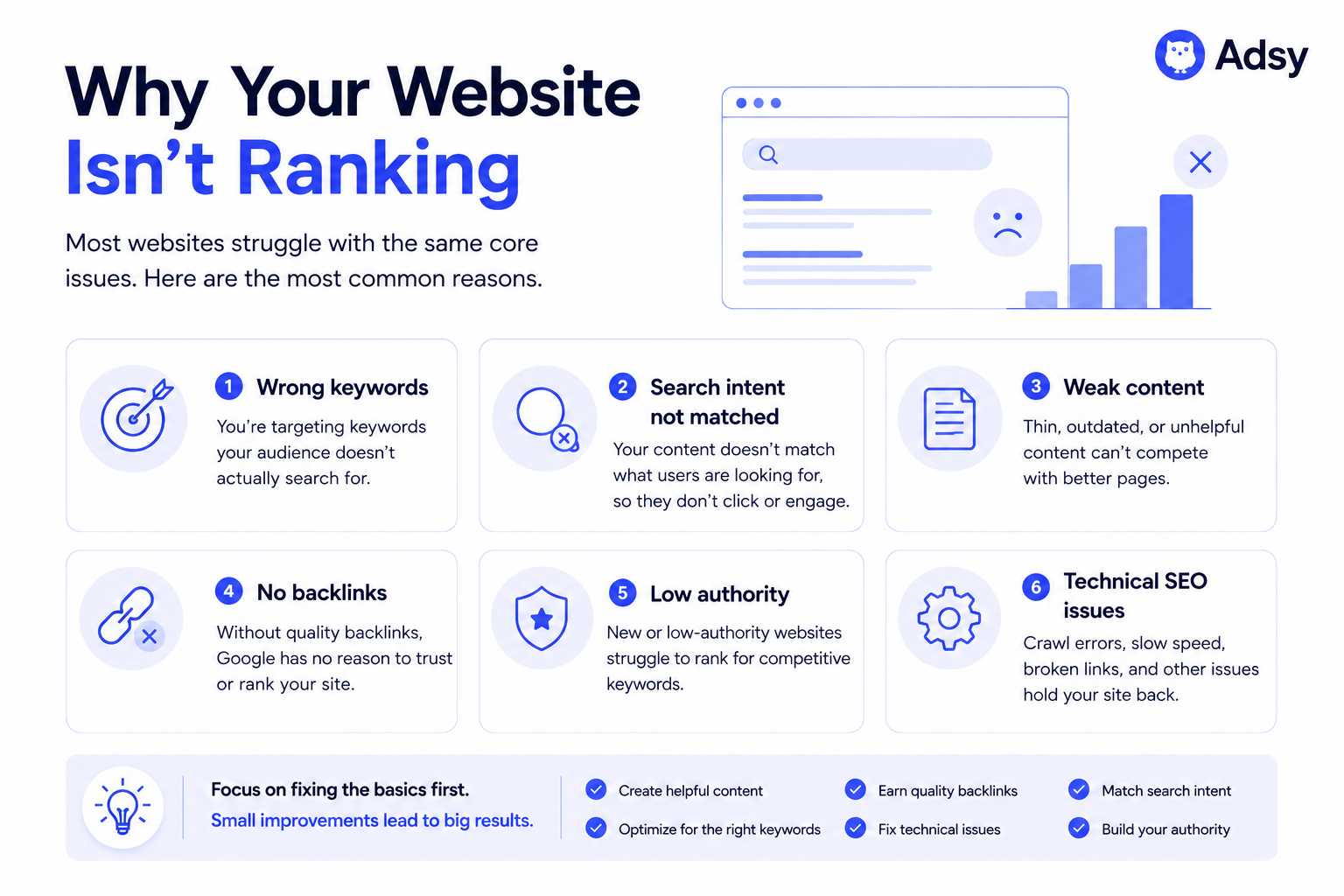
If your Squarespace website SEO is not performing well, it usually comes down to one of these:
- You’re targeting keywords that are way too competitive,
- Your content doesn’t match what people are searching for,
- You barely have any backlinks (or none at all),
- Your site has no real authority yet,
- Your pages just aren’t that useful compared to what’s already ranking.
None of that has anything to do with Squarespace.
You could move the exact same site to WordPress tomorrow, and nothing would change. You will just see the same content, same links, and pretty much the same results.
So before you start thinking about “better CMS options,” try to answer these questions:
- Have you done proper keyword research?
- Did you analyze competitors’ websites?
- Is your content better than what’s already ranking?
- Have you done anything to build authority?
If the answer is no, that’s where the problem is. And no CMS will change that. Because no CMS can do keyword research or build link authority for you.
How to improve SEO on Squarespace
Firstly, you don’t need 50 sophisticated tactics. Instead, you need to do a few things consistently, and just not overdo it by chasing unnecessary “tips and tricks.”
You can think of your SEO processes in three buckets:
- On-page (what’s on your site),
- Off-page (what happens outside your web page),
- Technical (making sure the foundation of your website doesn’t break).
That’s it. So let's take a look at the practical Squarespace SEO tips you can use.
On-page SEO
If your content isn’t right, nothing else matters. Your links, tools, or tweaks won't change the situation much. Valuable and unique content is the core of SEO.
1. Don’t go after impossible keywords
This is the mistake that's easy to fall into, especially for new websites.
You pick a keyword like “full-service digital marketing agency,” “best credit card,” etc., and see nothing ranking.
What could possibly be wrong? The thing is, you’re competing with sites that have been around for years and have thousands of backlinks. And no matter how good your content is, you won't win this competition.
What you actually need to do is go smaller.
Look for more specific keywords with lower keyword difficulty (KD).
So, for example, instead of “full-service digital marketing agency” that has a really high KD, you could choose “digital marketing agency for small businesses.”The latter will be much more realistic for a new website to rank for.

2. One page (generally) means one main keyword
Don’t try to rank a single page for everything. Better, pick one primary keyword and build the page around it. It should be in your title, in some of your headings, and in your copy.
Of course, you can have several secondary keywords. But each page should have one main search query.
Here is, for example, a page that ranks for keywords around one topic: how to generate more leads.
If they were to add another keyword set with something like “how to convert leads into sales,” it would be much harder to make that same page rank for both keyword clusters.
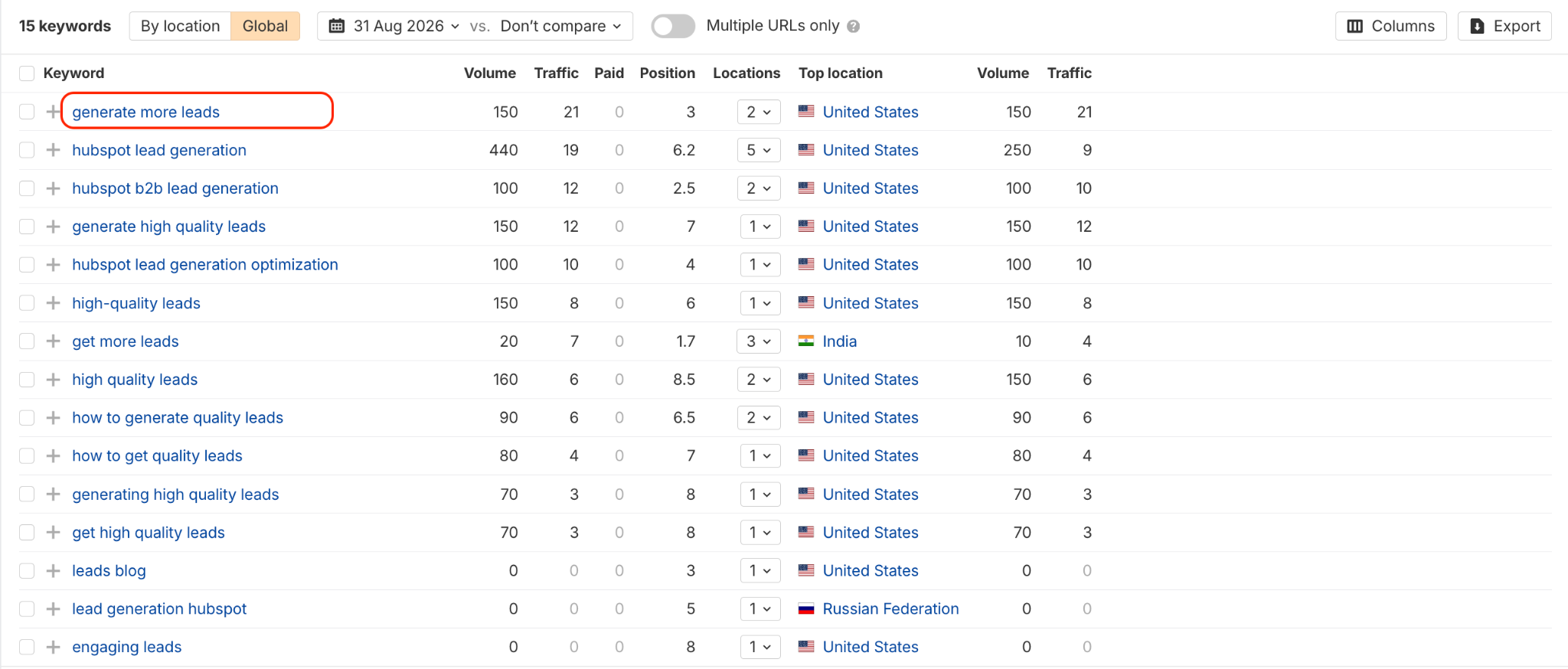
Note: Sometimes, you could make different keywords work for the same page. But it could only be the case if the search queries are related and have a very similar intent. Before trying this, it’s better to check whether at least some of your competitors already rank for both with one page.
3. Make the page genuinely better than what’s already ranking
Looking at your content with a critical eye can be tough, but it is absolutely essential.
If you just write something that is "okay," you can't expect to actually compete with a piece that is more useful, longer, more practical, more unique, and better structured.
Before you write anything, analyze what’s already ranking.
And ask yourself: how can I really create something better and more valuable for users? This one question will help you increase your chances of ranking and showing up in AI search.
4. Structure matters a lot
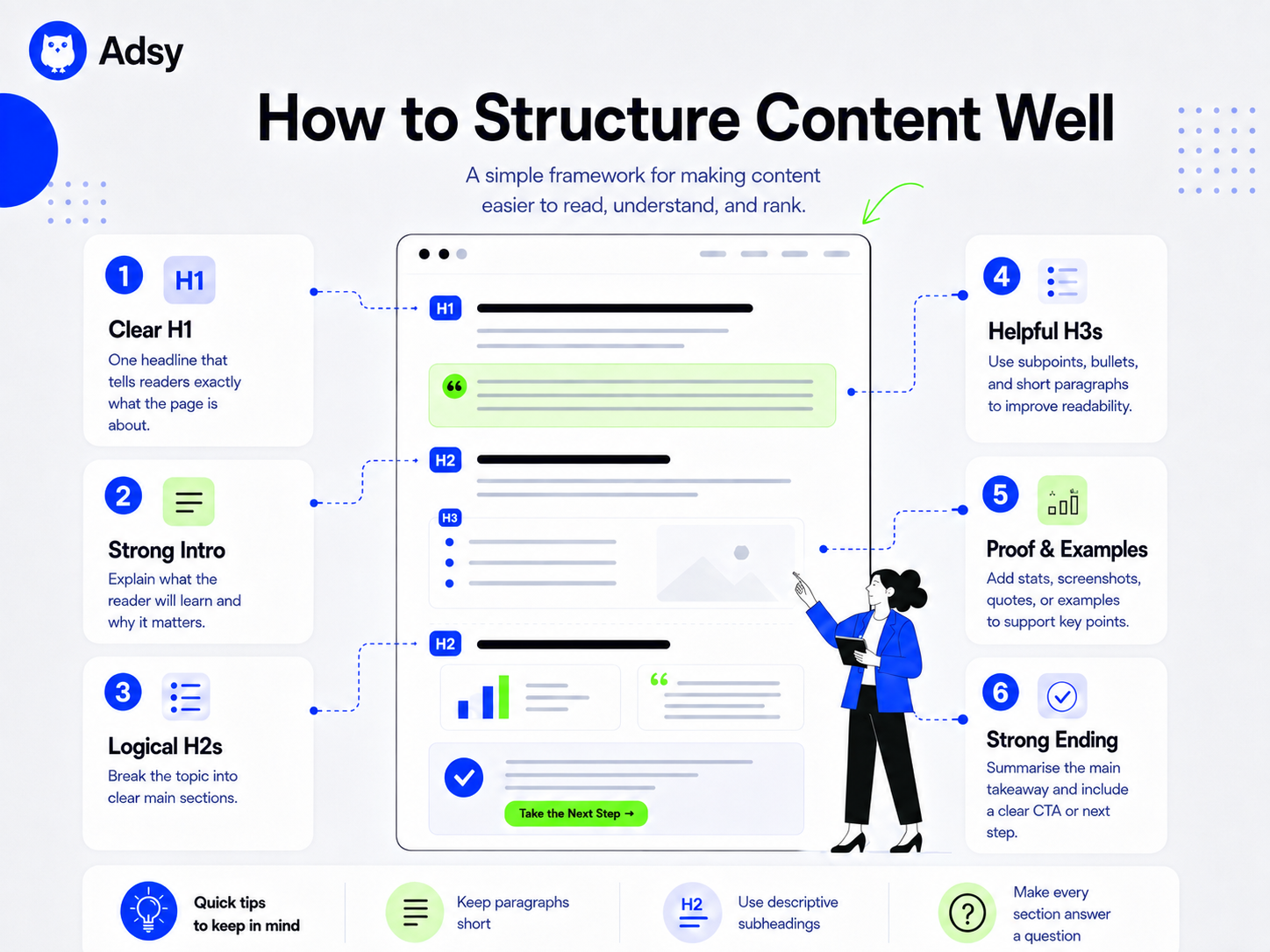
Walls of text don’t tend to rank well. Moreover, people tend not to read them.
So, always break things up into clear headings (H2, H3), short paragraphs, and lists where it makes sense.
This helps people read your content more easily. And it’s also easier for search engines to understand your page.
5. Use internal links (seriously)
Internal linking is a very important detail when it comes to on-page SEO. It’s easy to do, but the results can be quite substantial, as internal links help:
- Search engines discover your content and better understand your site’s structure,
- Pass authority from page to page,
- Keep people longer on your website (when they click on your links)
It’s really helpful to create a system where you track your internal links. It could be a simple spreadsheet or even an AI-powered document.
The most important part is to avoid having orphan pages (the ones with no links pointing to them.
Off-page SEO
This is the part that usually feels the hardest for many SEO teams. But it’s often the difference between ranking and not. If your site has no backlinks, it’s going to struggle. That’s just how SEO works.
1. Get your first backlinks
You don’t need extremely high-authority links right away. Start small, and look at the opportunities that are already in front of you:
- Create profiles in business directories,
- Exchange links with partner websites,
- Register on review platforms,
- Get on relevant local listings,
- Register social profiles at least for overall brand visibility.
If you think that there is nothing glamorous about that, you are definitely right. Yet, all these “easy” backlinks create an SEO foundation for your Squarespace website.
Another easy way to start is by using link building platforms. There, you can simply choose websites that accept guest posts and link insertions without any outreach.


2. Write things people actually want to reference
Apart from actively seeking backlinks, you also have to create content that’s worth linking to. Otherwise, it’s nearly impossible to create a sustainable link building strategy.
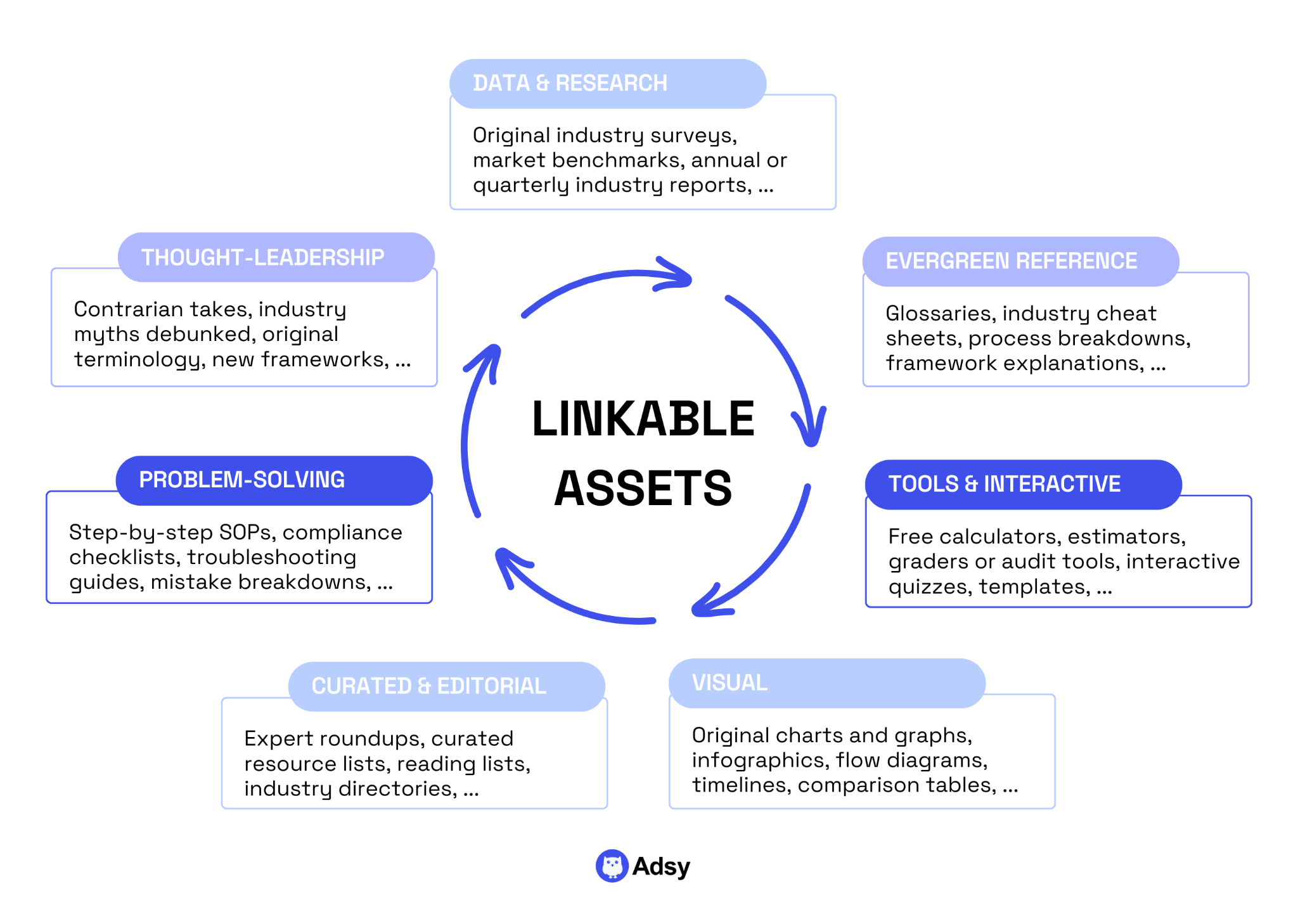
The idea is to shift from basic “guides” to linkable assets. These could be:
- Original insights from studies, research, etc.
- Your real-life observations and experiences.
- Free tools you create.
- Visuals that explain something complicated.
- Thought leadership content that challenges something people strongly believe in your industry, and so on.
Most content doesn’t get links because it’s forgettable. These days, AI can answer all the “what is…” and “how to…” questions.
So, if you want to improve your SEO, your content needs to stand out enough that someone would actually reference it.
That usually means going one step further than everyone else.
Don’t just repeat what’s already ranking, but add new points, reflections, examples, data, screenshots, all based on your own experience. Give people a reason to trust you over the other ten identical articles they’ve already looked at and closed.
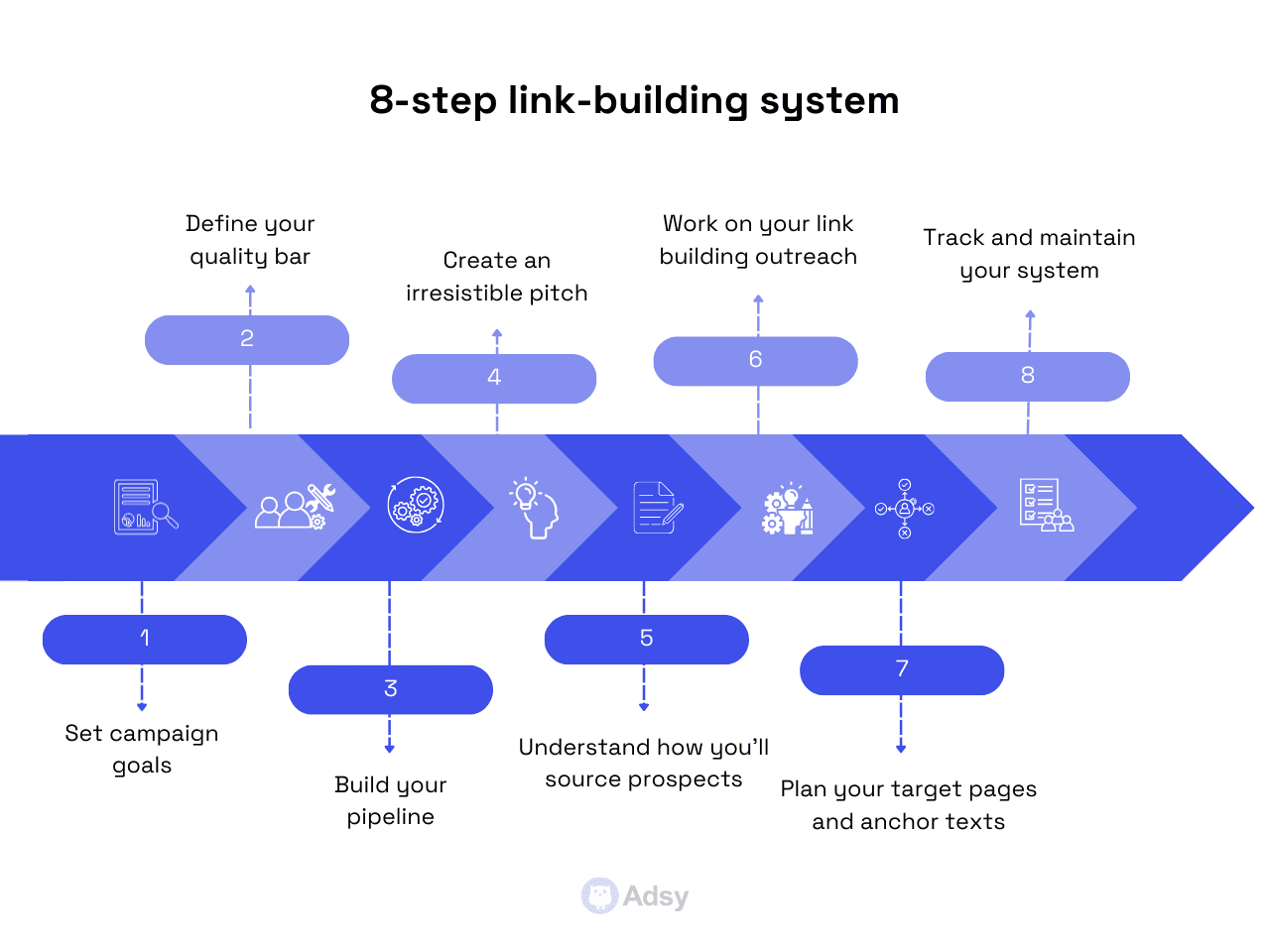
3. Build an outreach system over time
We’ve already covered the easy ways to get backlinks.
But if you want your Squarespace SEO to work in the long run, you have to build an outreach workflow that will consistently deliver high-quality backlinks.
Explaining how to build an effective link building campaign system takes much more than a couple of paragraphs. So, if you’re ready for that, we truly recommend checking this guide, where we covered every step.
Technical SEO
Squarespace handles a lot of technical optimization for you, but there are still a few things to keep in check.
1. Keep your pages fast enough
Technical SEO is impossible without page speed optimization.
So, what you can do is:
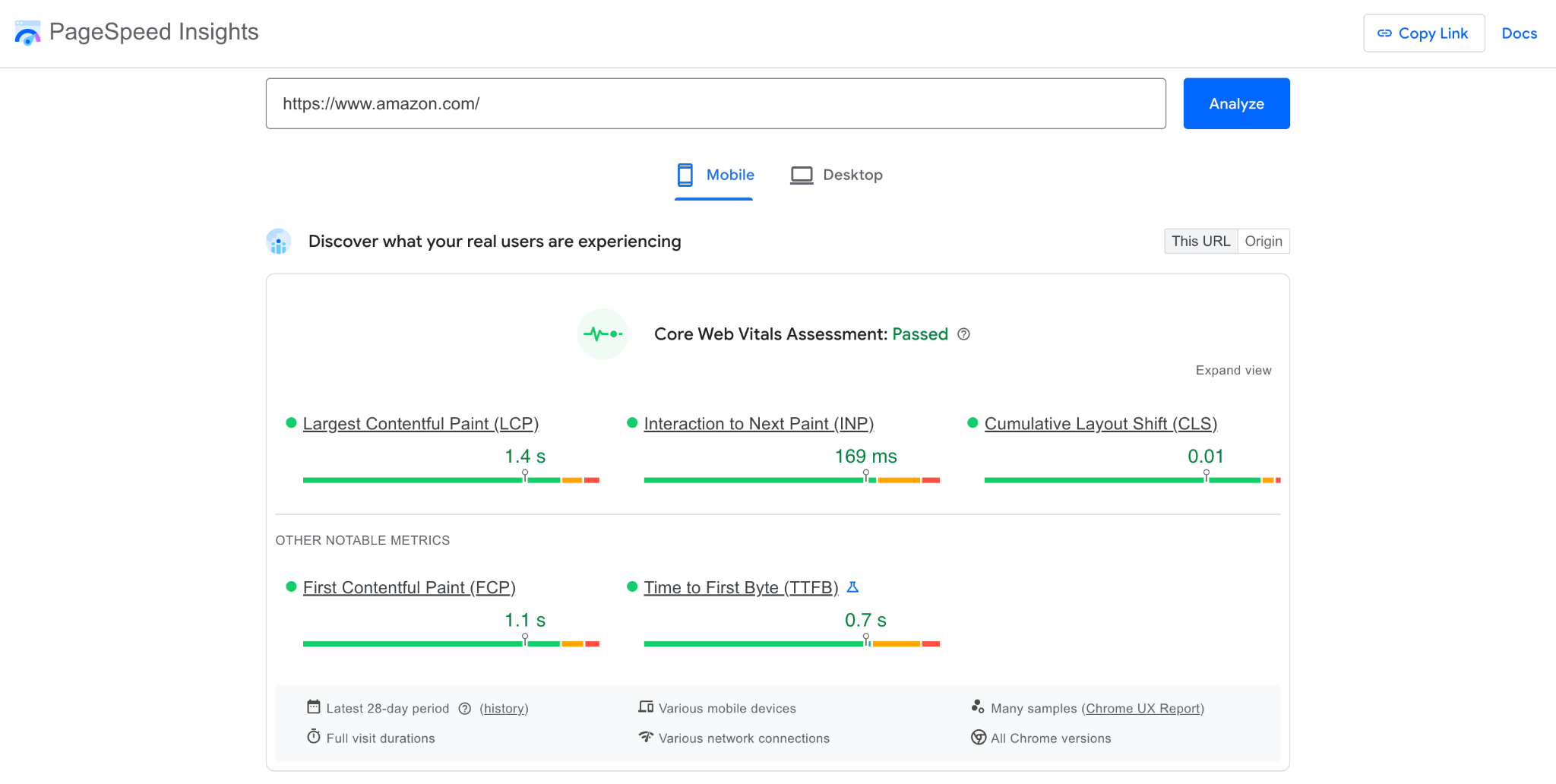
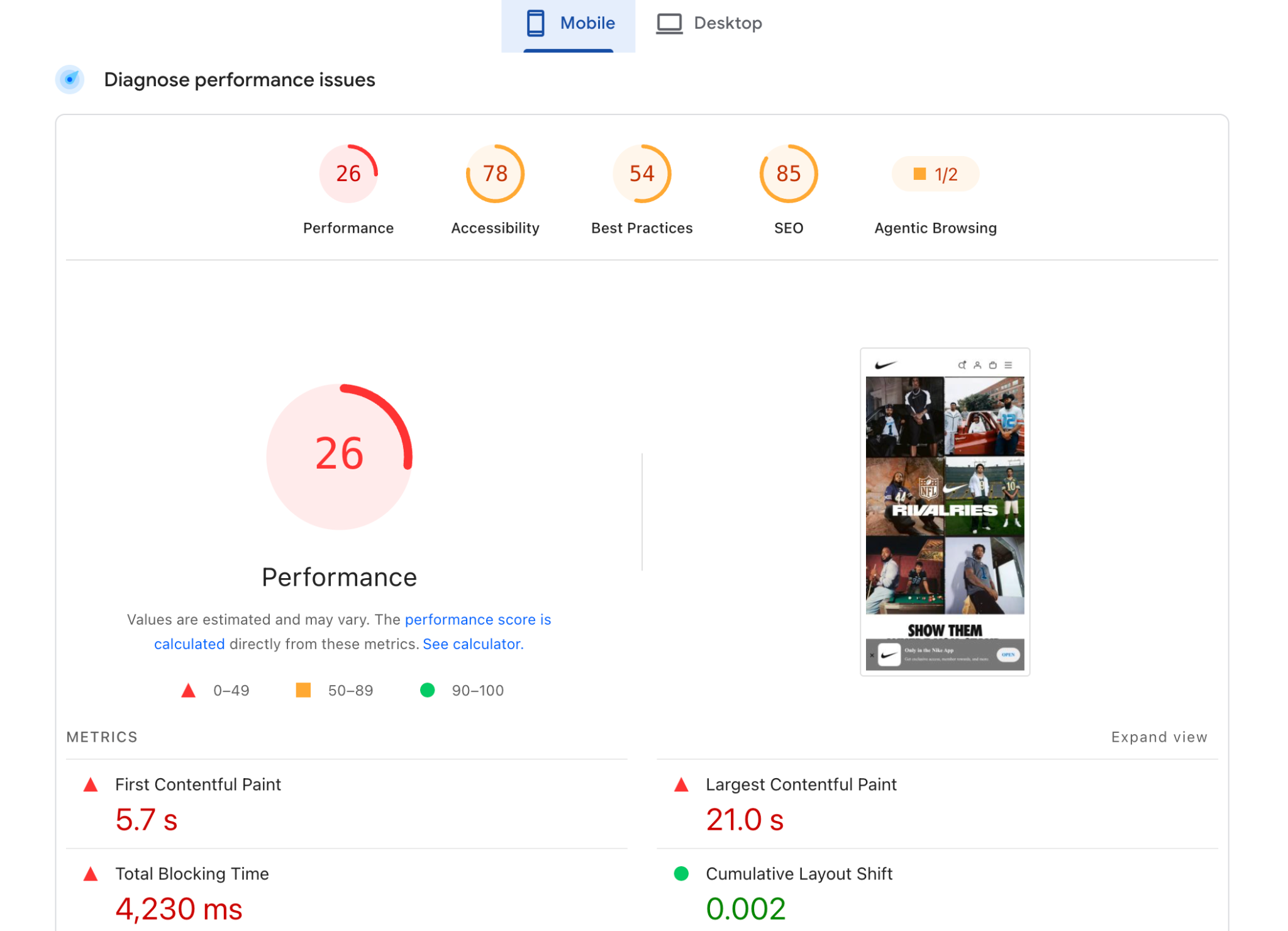
- Go to PageSpeed Insights (a free tool by Google).
- Paste your web address there and check how your site is doing.
- Check the optimization suggestions PageSpeed Insights has and fix what you can.
Source: PageSpeed Insights
Generally speaking, you always have to watch out for the obvious problems. These are things like huge, uncompressed images, too many unoptimized animations, cluttered layouts, and so on.
2. Don’t mess up your URL
Make sure you choose a good slug for SEO and user experience. How do you do that?
- Include your main keyword (e.g., project management tool, best tips for gardening, etc.).
- Use hyphens between the words (e.g., social-media-management-guide).
- Make sure your slug is descriptive and clear: it has to be obvious what your page is about.
- Avoid any random characters, numbers, years, and any information that can get outdated, unless you’re a news site.
Once your page is live, try not to change its URL, especially if it already has some internal or external links pointing to it. But if you must, make sure you set up proper redirects.
3. Make sure your pages are actually indexed
If your pages aren’t indexed, it means that users can’t find them in search results.
As a result, all the work you put into creating them basically goes to waste. That’s why it’s so important to check what’s indexed regularly.
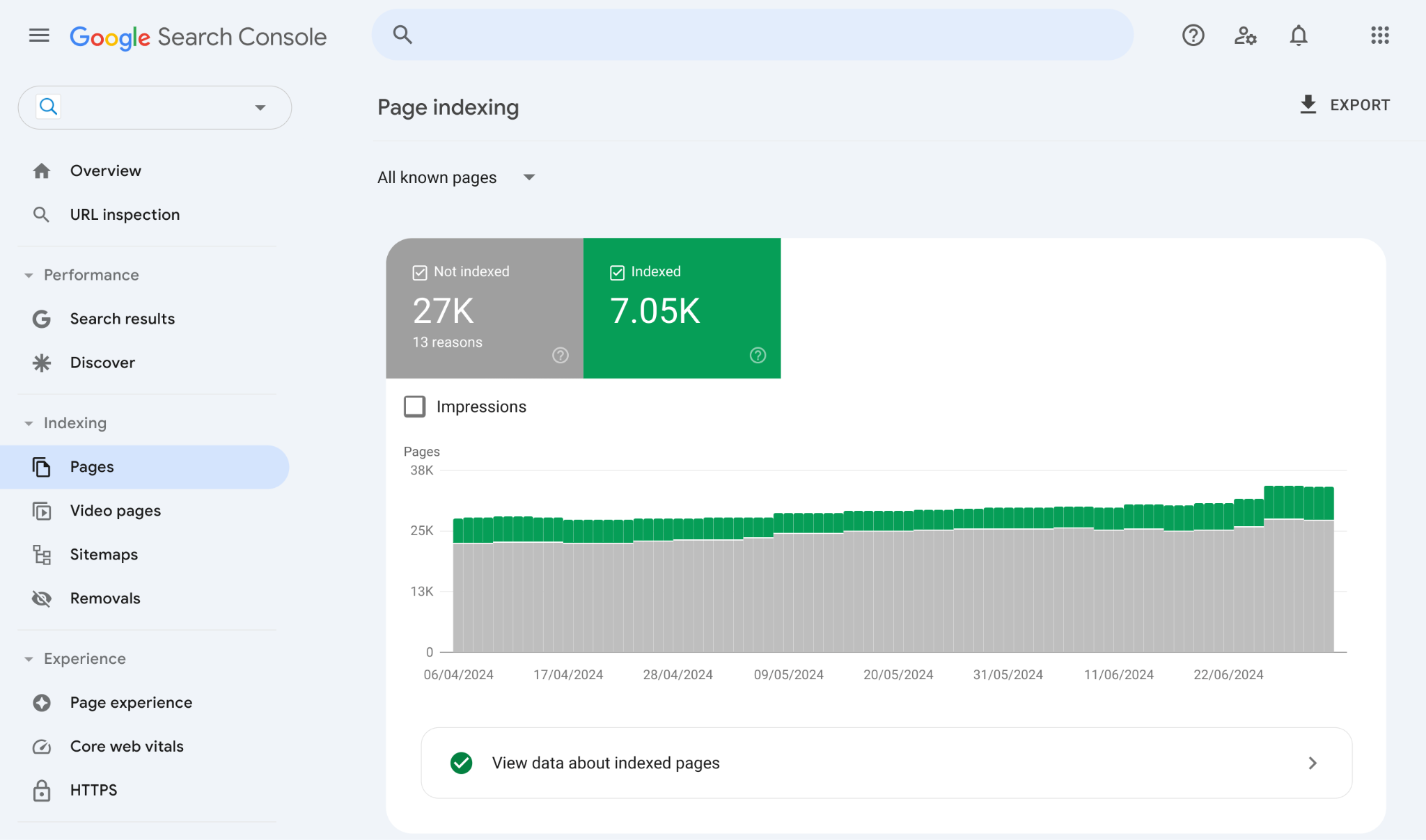
The easiest way to do that is by using your Google Search Console:
- Simply log in,
- In the left-side menu, go to Pages in the Indexing section,
- And scroll down to check what’s indexed and why some pages aren’t.
SEO tools for Squarespace
When it comes to this part, it’s easy to think that the more tools you have, the better. Yet, you don’t need 15 SEO tools to make things work.
The best possible scenario is to use a small stack that truly helps you make informed decisions.
This is what we’ll try to help you with in this section. We’ll break it down into:
- Built-in Squarespace tools (what you already have),
- Free tools (what you should connect immediately),
- Paid tools (the ones you could consider after you’ve already implemented all of the above).
Built-in
Squarespace doesn’t have a huge ecosystem of plugins, as we mentioned before.
But it does include a few built-in features that cover the basics of search engine optimization Squarespace sites need.
Traffic analytics
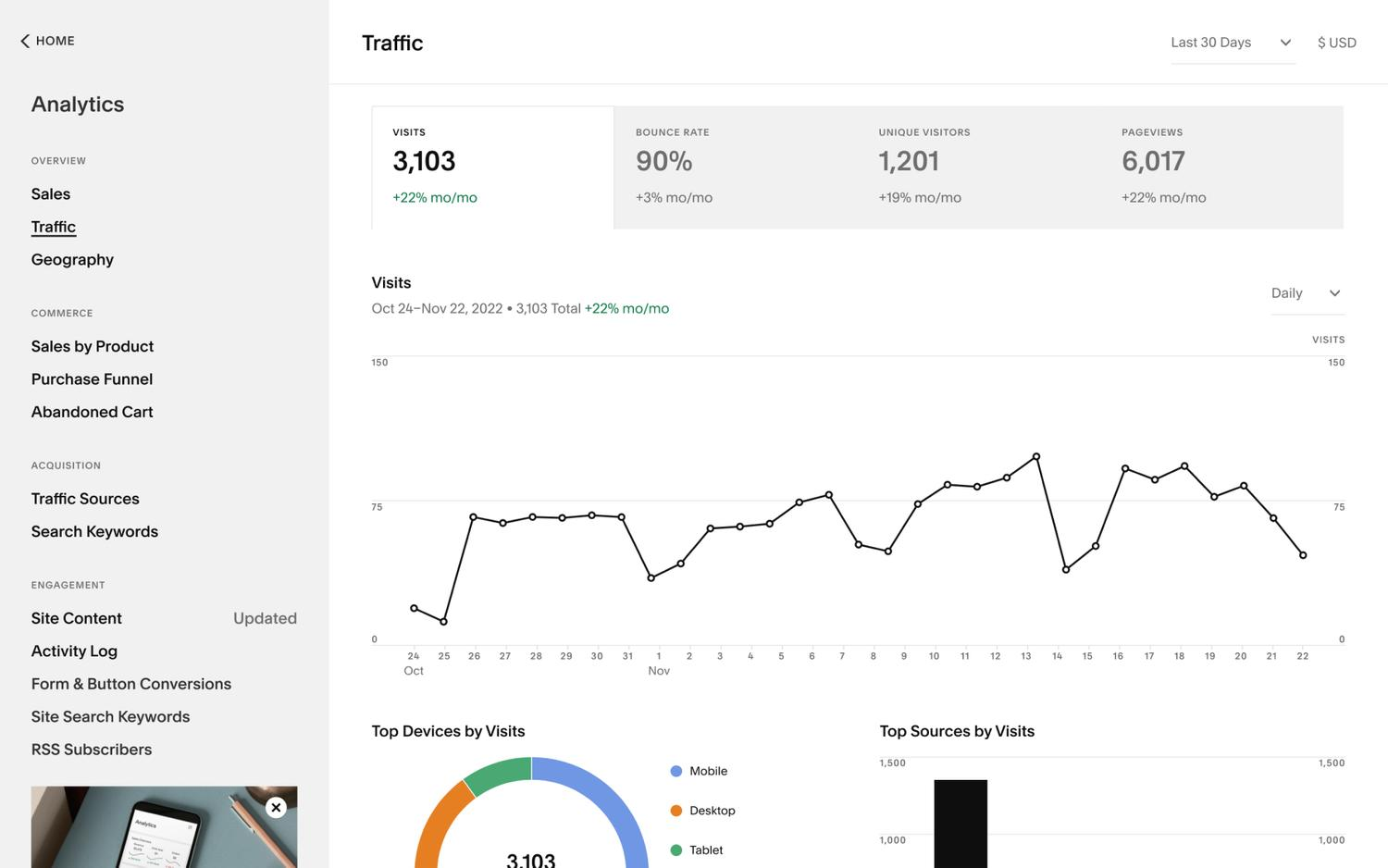
Squarespace Analytics gives you an overview of:
- Traffic (visits, unique visitors),
- Traffic sources (search, direct, social, referral),
- Top pages,
- Basic engagement metrics, etc.
It’s not super deep, but it shows you whether anything is working at all. If you’re just a beginner, it’s a really good place to start.
What to actually pay attention to:
- Are organic visits increasing over time?
- Which pages are getting search traffic?
- Are some pages getting visits while others get nothing?
Search keywords panel
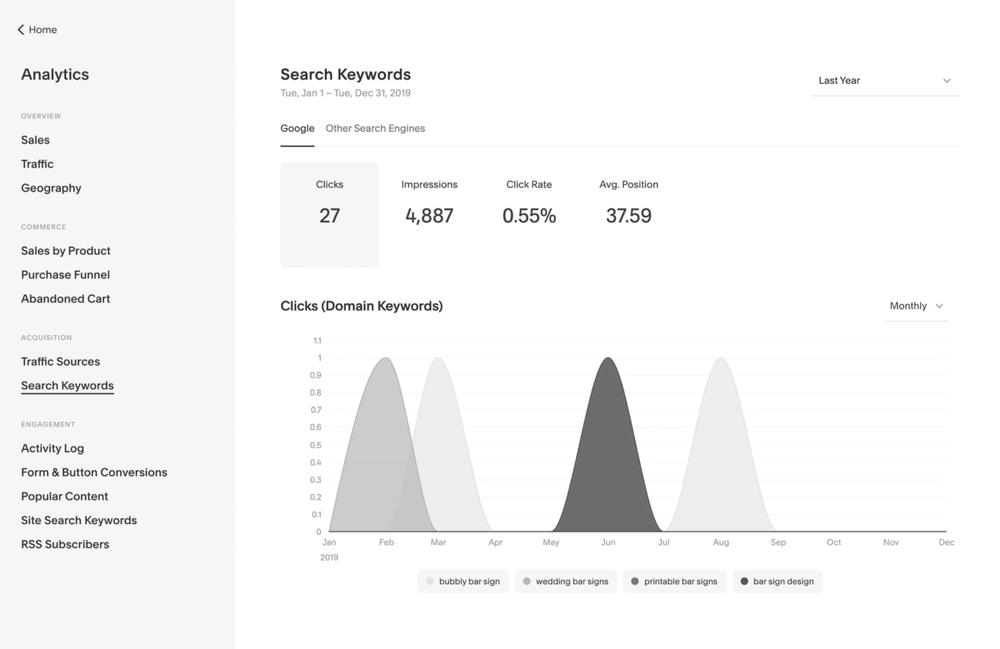
This panel shows which SEO keywords your website is ranking for. It pulls the data directly from your Google Search Console, so you can check whether:
- You’re showing up for the keywords you intended to target,
- Some random pages are ranking for unexpected terms, and so on.
Still, it’s more limited than GSC itself. So if you need to dig deeper, it’s still worth going directly to Google Search Console.
This built-in tool can help you refine your Squarespace SEO keyword strategy. But don’t rely on this alone, as it won't show you everything you need.
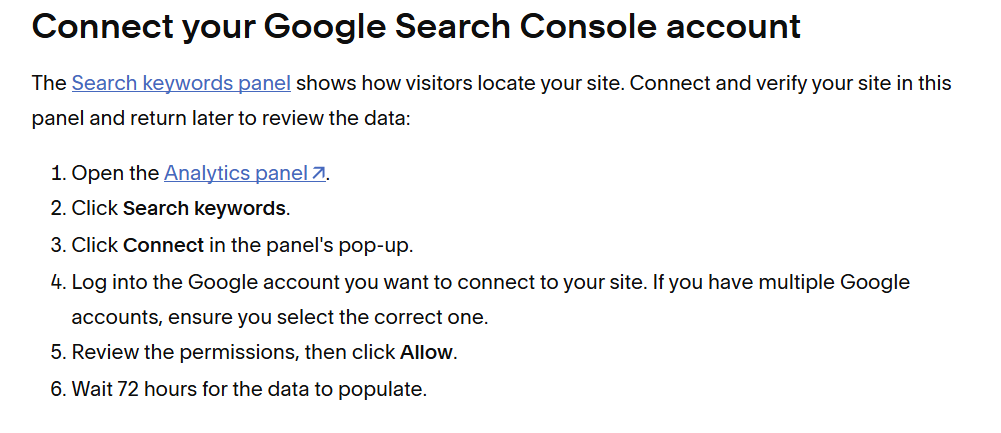
Also, to make this work, you’ll have to connect Google Search Console first.
Source: Squarespace
AI visibility

Squarespace also has a credit-based AI visibility tool. Every Squarespace plan includes these analytics, and the number of credits you get depends on your plan.
Here's what this tool can help you with:
- Check whether ChatGPT and Gemini mention your website,
- Run specific prompts you want to monitor or track autogenerated prompts for businesses in your niche,
- See whether your competitors show up in the AI answers,
- Monitor your AI visibility over time.
This can’t replace a specialized AI visibility tool, but it can give you at least a basic idea of how your website performs in AI search.
Free
Now, let’s take a look at some free tools that can help you improve your website’s optimization.
Google Search Console
Source: Google
Google Search Console is a free tool that helps you understand how your website performs in search.
Here, you can see things like:
- What keywords you rank for,
- Your rankings in Google,
- Clicks and impressions,
- Which pages are indexed and not indexed,
- What websites link to you, etc.
This is also where you’ll find your easiest wins. What does it mean?
For example, if your average position is around #12, you'll know that you can update that page, build some links to it, etc., to push it to the first page in the SERP.
Google Analytics

Source: Google
GA4 is another Google-native tool.
It shows you details like:
- How long people stay on your website,
- Which pages they visit,
- Where they leave,
- Traffic sources,
- Audience demographics, etc.
It’s also a pretty advanced tool where you can track user journeys and conversions. It takes some knowledge to set up, but it can be extremely useful.
PageSpeed Insights
Source: PageSpeed Insights
And yet another free tool by Google. PageSpeed Insights is a solution you can use without verifying your domain.
It gives you an idea about your:
- Website speed,
- Mobile performance,
- Things that can be improved, and so on.
Paid
If you are just starting, most likely, you don't need any paid tools right away. Yet, over time, they will definitely help you progress in your SEO.
SEOSpace (Squarespace plugin)
Source: Squarespace
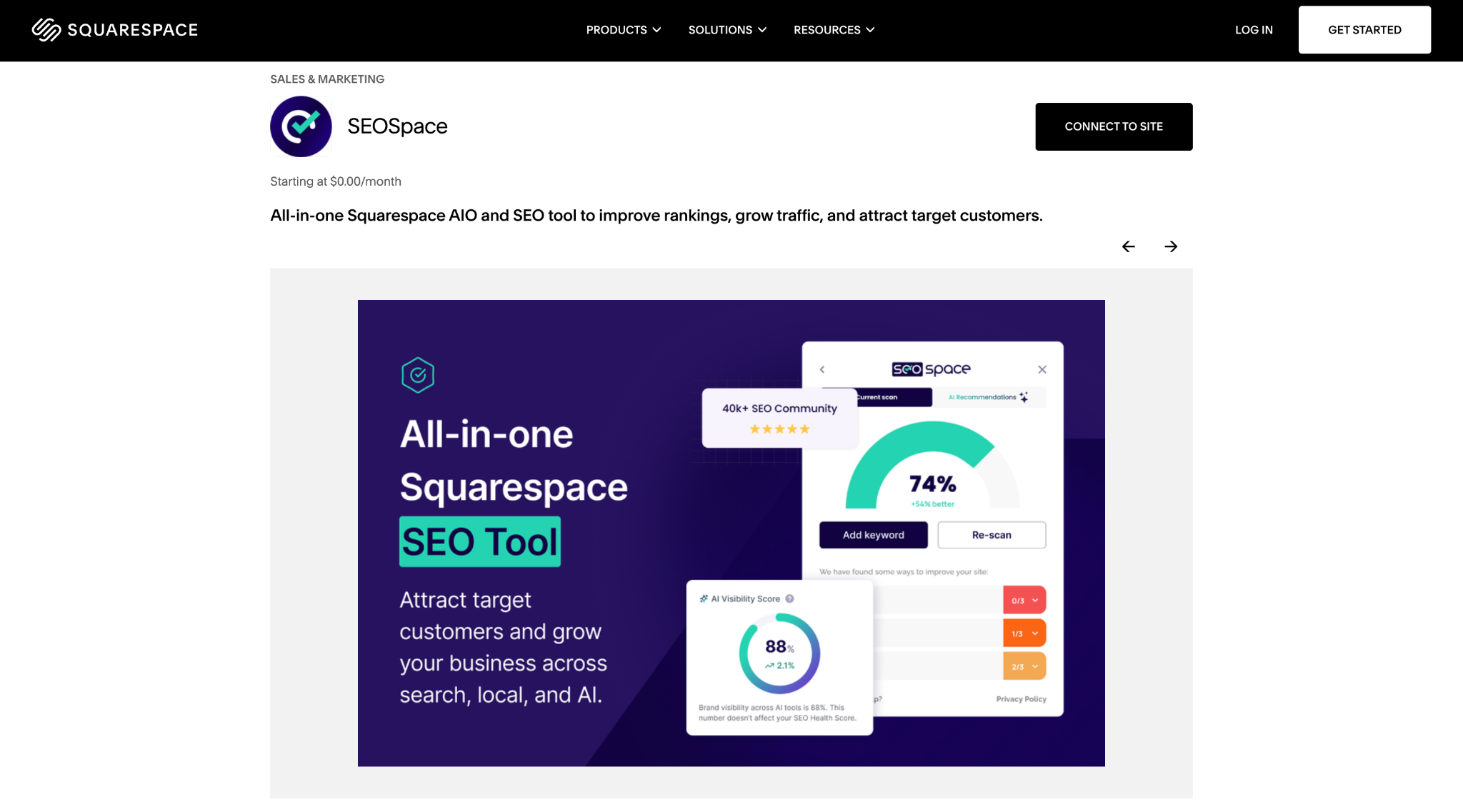
SEOSpace is one of the main SEO plugins for Squarespace. It is like a “lightweight SEO assistant.”
You get basic optimization suggestions and can:
- Run audits to see what should be fixed,
- Find keywords,
- Improve your local SEO,
- Check your AI visibility, etc.
It might not be as powerful as some of the best SEO tools, but it’s a good Squarespace-specific SEO assistant.
Ahrefs, Semrush, or any alternative
Even though Squarespace has built-in SEO tools and there are plenty of free ones, at some point, you might want a more comprehensive platform.
Here, the choice will depend on your needs, budget, etc.
So, just test different solutions to find the best fit. Most of the tools offer either free versions or free trials.
These tools help you do a lot of advanced work:
- Find actual keywords worth targeting,
- Analyze competitors,
- Track backlinks,
- Discover content and link building opportunities, and so on.
But here is an important detail: with these tools, you need to know what you’re looking for. Otherwise, what you'll get is just a very expensive dashboard.
Using platforms like these requires at least some SEO knowledge and experience. Besides, you have to understand what you’re after in your SEO journey.
Conclusion
Now you know for sure that Squarespace gives you just enough to get good SEO performance.
And the important part is that you win not by choosing a specific CMS. You win by choosing the right keywords, building pages that deserve to rank, and getting solid links.
And what really is important about Squarespace is that it supports that.
So if you’re trying to improve SEO Squarespace performance, don’t look for some hidden features inside the dashboard. Focus on best practices for optimization, and your results might surprise you.
FAQ
Is Squarespace good for SEO?
Yes, Squarespace is a good platform for SEO for most websites. It offers an easy technical setup that’s done almost automatically, making it especially useful for beginners and smaller to medium websites.
But if you have a giant e-commerce store or a website with a heavy SEO setup with thousands of landing pages, this might not be the best option.
How do I do SEO for my Squarespace website?
SEO for a Squarespace website is done the same as for any other site built on any other CMS.
Because the foundation of SEO isn’t in the platform’s settings. The real foundation is a clear structure, good keyword research, valuable content, and relevant link building.
How to improve SEO for Squarespace?
The first thing you can do is start with the basic setup. While Squarespace does most of the technical setup for you, it’s still useful to take a look at their SEO checklist to make sure you don’t miss anything.
Next, it’s all about the content, its relevance, uniqueness, value, and the links other websites send to your website.
Which is better for SEO, Wix or Squarespace?
There is no single winner here. Wix gives you more flexibility and control, as you can change canonical tags, robots.txt, structured data, etc. Squarespace handles all those automatically.
So, generally speaking:
- Squarespace might be better for those who don’t want to get too involved in the technical SEO part.
- And Wix could work better for teams that want to have more advanced controls.
But neither of the platforms will harm your rankings. Your SEO results will mainly depend on how well you understand your audience and your market, what you post, and how well your link-building strategy works.
All trademarks, logos, images, and materials are the property of their respective rights holders.
They are used solely for informational, analytical, and review purposes in accordance with applicable copyright law.




 Sign Up
 Sign Up