






How to Find and Disavow Toxic Backlinks

Sometimes, when you check your site's backlink profile, you might be.... surprised. And not pleasantly:
- A random casino page from some country you’ve never targeted.
- A shady directory that was probably built years ago.
- A random blog with ten annoying pop-ups.
How did they get there?!
Well, that's the nature of toxic backlinks. They show up without invitation and mess with your SEO. Is it too bad? Is Google judging you for hanging out with the wrong crowd? Spoiler: yep, it probably is.
What should you do, then? How should you treat those bad backlinks? And how do you even find them?
Let’s explore all the answers to these and many more questions in this article.
What qualifies as a “toxic” or “bad” backlink?
A toxic backlink is a link from another website that can hurt your site’s SEO instead of helping it. Usually, these come from PBNs, link farms, spammy sites, and other low-quality pages.
Disclaimer: not every “weird-looking” referring domain is bad, though.
The internet’s messy. Sometimes a random blog mentions you for good reasons. Maybe they genuinely liked your post or visual, or just found your product/service useful.
That’s fine.
A toxic backlink, though, is different. To put it straight, these ones either:
- Violate Google’s guidelines.
- Appear to be absolutely irrelevant.
- Come from low-quality/spam sources.
Some people still believe Google can magically detect and ignore every bad referring domain.
To an extent, yes, it’s true. Google will likely ignore most of your random and trashy URLs pointing to your site. After all, its filters have improved a lot over the years.
But not everything will be discarded. Especially, if the majority of your referring domains are unnatural, you can trigger a manual review and reduce your site’s trust.
So, here is an easy rule of thumb:
- If you have a small handful of unnatural incoming URLs, that's fine. You can usually just forget about them.
- But if you’ve got hundreds of them from unrelated sites, that’s a different story. That’s when Google might assume you’re participating in some schemes to manipulate rankings, and that’s when the problems begin.
Good vs. toxic links
Generally speaking, a good referring domain is one that brings you more credibility and authority, and a spammy backlink is one that harms them.
Here is a simple comparison table to make it clearer:
|
Good backlink |
Toxic backlink |
|
|
Where does it come from? |
A legitimate, relevant site in your niche |
A random or spammy website that links to everyone |
|
Why does it exist? |
Someone actually thought your content was worth sharing |
It was bought from some unverified sellers, exchanged, or auto-generated |
|
Anchor text |
Natural and varied (“read more here,” “this post,” your brand name) |
Keyword-stuffed nonsense |
|
SEO impact |
Builds trust and authority |
May harm search rankings |
|
Typical source |
Reputable blogs, media, industry sites |
Link farms, fake directories, hacked pages |
How to identify toxic backlinks in 5 steps
Toxic links are known for hurting your search engine rankings. They are tanking your website’s reputation and making your profile look suspicious in the eyes of Google.
But how do you identify these?
By doing a backlink audit. It is essentially how you take care of your website hygiene and keep its KPIs high.
It’s one of the best ways to check what’s going on with your website. Maybe you’ve been hit with negative SEO or built a few bad backlinks by mistake. You can fix it all.
But generally, the earlier you find it out and address it, the better.
The whole process comes down to the following five steps:
Step 1: Export your backlink list
First, you need to see what you’re working with. That’s why you need to get all your URLs pointing to your site. For this, you basically have two options:
- Google Search Console: It’s free, but the major issue with this option is that you can only analyze your referring domains manually. GSC doesn’t do that by default.
- Any SEO tool: It could be anything you prefer (Semrush, Ahrefs, Majestic, etc.). Generally, you’ll have to pay for it. But every software has some free options, either a free tool or a free trial.
Note: You can also export data from GSC and then analyze it with the SEO tool. You can also combine your GSC data with the data from your optimization software (the two sets can differ).
If you want to use GSC for the analysis, start here:
- Open Google Search Console and head to the Links report (on the left sidebar). This is Google’s own record of who’s adding URLs to you, and that's the most reliable place to start.
- Click Export external links > Latest links.
- You can download a CSV, Excel, or Google Sheets file of every incoming URL to your site (at least, the ones Google has indexed).
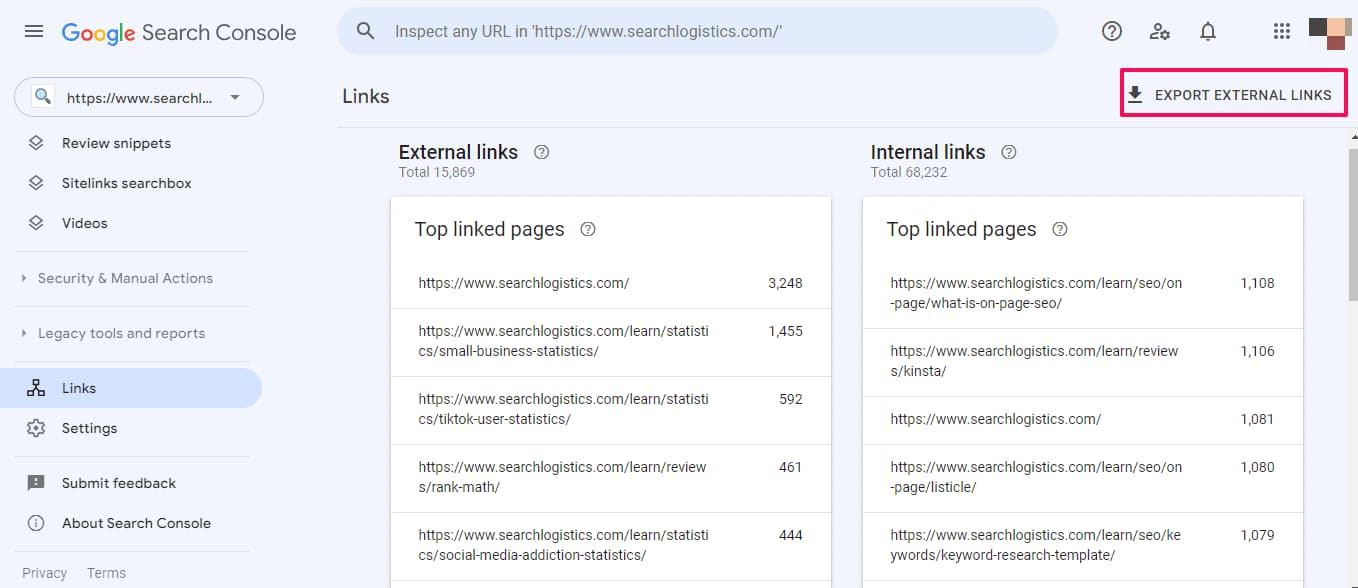
Next, you can organize your spreadsheet as you see fit. But make sure to add all the important information, such as DR/DA, anchor text, spam score, nofollow/dofollow, etc.
Step 2: Run analysis via the tool: use filtering for toxic markers
Now it’s time to start a real audit and find the” bad apples”.
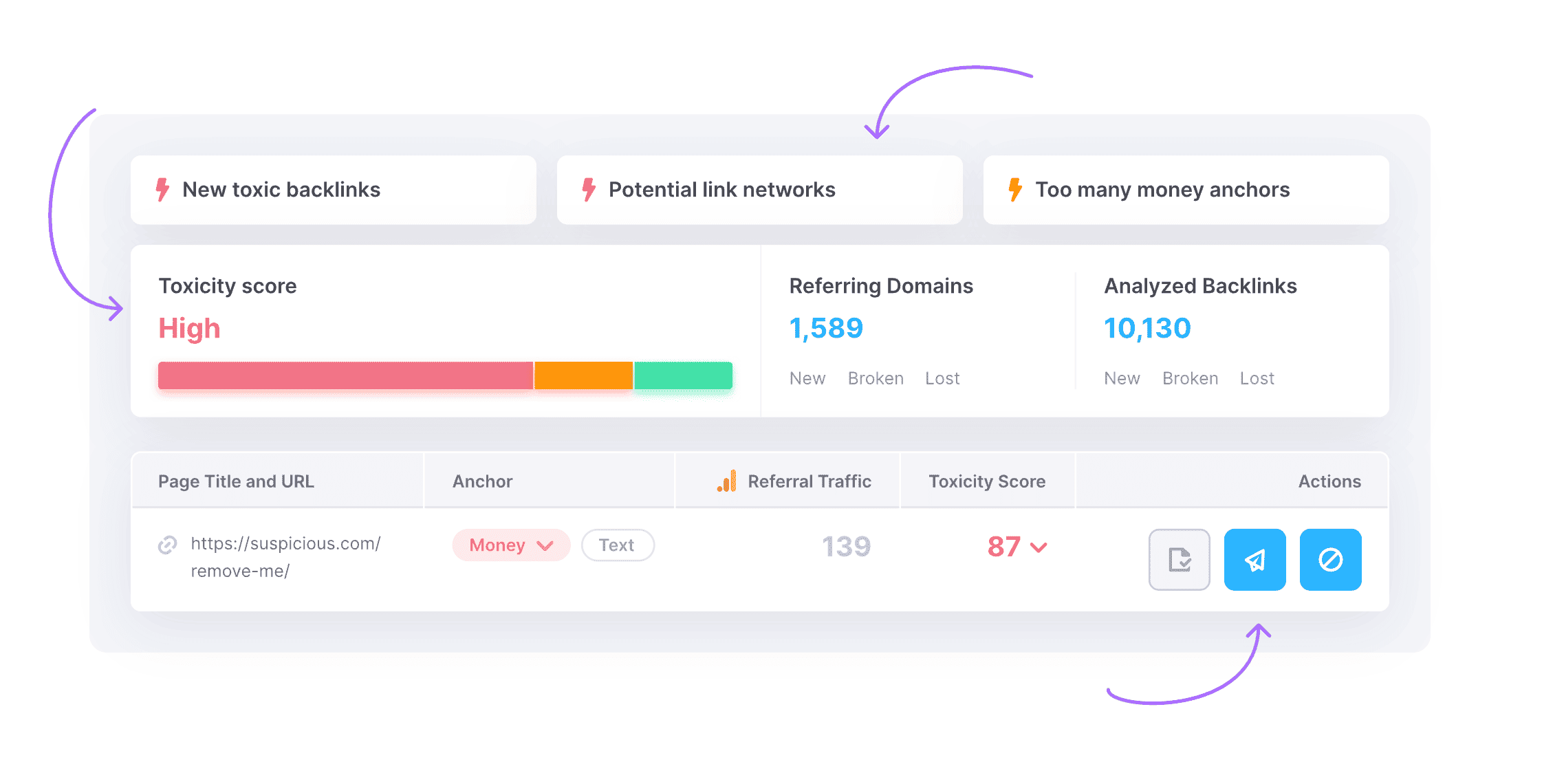
If you’re using Semrush, open the Backlink Audit tool and enter your domain. Semrush assesses your referring domains and gives each one a Toxicity Score.
Source: Semrush
How should you interpret that toxicity score? Here’s the general rule of thumb:
- 0-44: Likely safe.
- 45-59: Questionable and potentially harmful.
- 60+: Likely spam link.
Other backlink checker tools, for example, Ahrefs or Moz, don’t use the same score.
But they still have tons of metrics that can help you understand the quality of your incoming URLs. These are domain rating, referring domains, traffic, anchor text, etc.
Besides, Moz also has its own spam score.
It’s another useful metric that can help you analyze the health of your website and the sites that point to you.
Again, it’s all about the balance. If you have a couple of URLs from websites with a medium or high spam score, it’s okay. You don’t have to rush and disavow them.
But if most of your backlinks come from spammy sites, that’s where you should worry.

Source: Moz
But no matter what SEO software you choose, you have to understand the bigger picture (i.e., what counts as a toxicity marker).
Because if a new website with a low DR mentions you, it doesn’t mean it’s spam. It could just be a small business that isn’t there yet in terms of SEO. And Google understands that.
But another page could be pure spam, even if its DR is high.
The exact characteristics will depend on each particular case. Yet, overall, look for these warning signs when assessing the referring domains:
- Mentions from irrelevant or foreign-language sites.
- Domains with zero organic traffic or spammy footprints (you know these: casino, adult, pharma, payday loans, etc.).
- Pages with over-optimized anchor text: “buy cheap cars” or “best marketing software.”
- Sitewide links (in footer or sidebar) from/to random websites.
- Domains that link to hundreds of other sites, often in weird industries.
- More outbound than inbound URLs.
- Websites that have dozens of pop-ups and ads.
If a referring domain has multiple red flags and a high spam and/or toxicity score, well… yeah, that’s definitely a bad one.
Important: Don't make any final judgments here. At this point, you're just sort of surfacing suspects. Your main goal should be to create a list of “possible troubles” to review manually after.
Step 3: Tag and segment your links
Even just by looking at the data in your SEO software, you’ll already see the overall picture. But go one step further and organize all that information. It's time to erase that chaos.
There are many ways of doing it, depending on your goals. Still, today, we offer you one of the simplest and most effective strategies.
The idea is to create three categories:
- Good: Clean, relevant URLs from real sites.
- Questionable: Might be spammy, but needs further review.
- Likely toxic: Clearly bad or risky, already showing multiple warning signs.
The easiest approach is to tag them like that in your spreadsheet or in your SEO tool. You can use different names or add more categories.
|
|
What it means |
Example |
|
Good |
Relevant, trusted, editorial |
Niche media site, legit blog post |
|
Questionable |
Low traffic or semi-relevant |
Weird web directory, inactive blog |
|
Likely toxic |
From spam sites, PBNs, or link farms |
Any spammy site with low-quality content |
Step 4: Do a manual review for “likely toxic” and “questionable”
This step seems extra logical, doesn’t it? At this point, you can drop the referring domains from your “good” tab and focus on “questionable” and “likely toxic”.
Since you already have a pretty comprehensive audit from the optimization tool, the only thing left is the manual analysis.
Why? Because even the best toxic backlink checker can’t read intent or context.
So, open the URLs or domains tagged “likely toxic” and “questionable” and check them yourself. You’re looking for clear signs of spam or unnatural incoming URLs.
Here’s what you have to pay attention to:
1. Is the site legit or spam?
You’ll know when you see it:
- A genuine website will have original content, real authors, and some organic traffic.
- A spam site will have auto-generated pages, irrelevant posts, and dozens of outbound links to random pages (often, in shady niches).
Here, your goal is to focus on content quality and the overall feel of the site:
- Does it look helpful?
- Does the content seem original?
- Do they put any effort into designing some visuals?
- Do they have tons of pop-ups and ads that cover all the content?
You already have the numbers. Now, it’s time to add your human perception to the mix.
2. Anchor text and context
We’ll talk about the importance of anchor text further. But it’s quite simple: natural mentions use branded or descriptive anchors (like “read more on XYZ Blog”).
Toxic ones often use keyword-stuffed anchors meant to manipulate search results.
A typical example is “cheap online casino bonus”. Plus, yes, if they’re sending people to casinos, it’s another red flag (a pretty big one).
3. Traffic and visibility
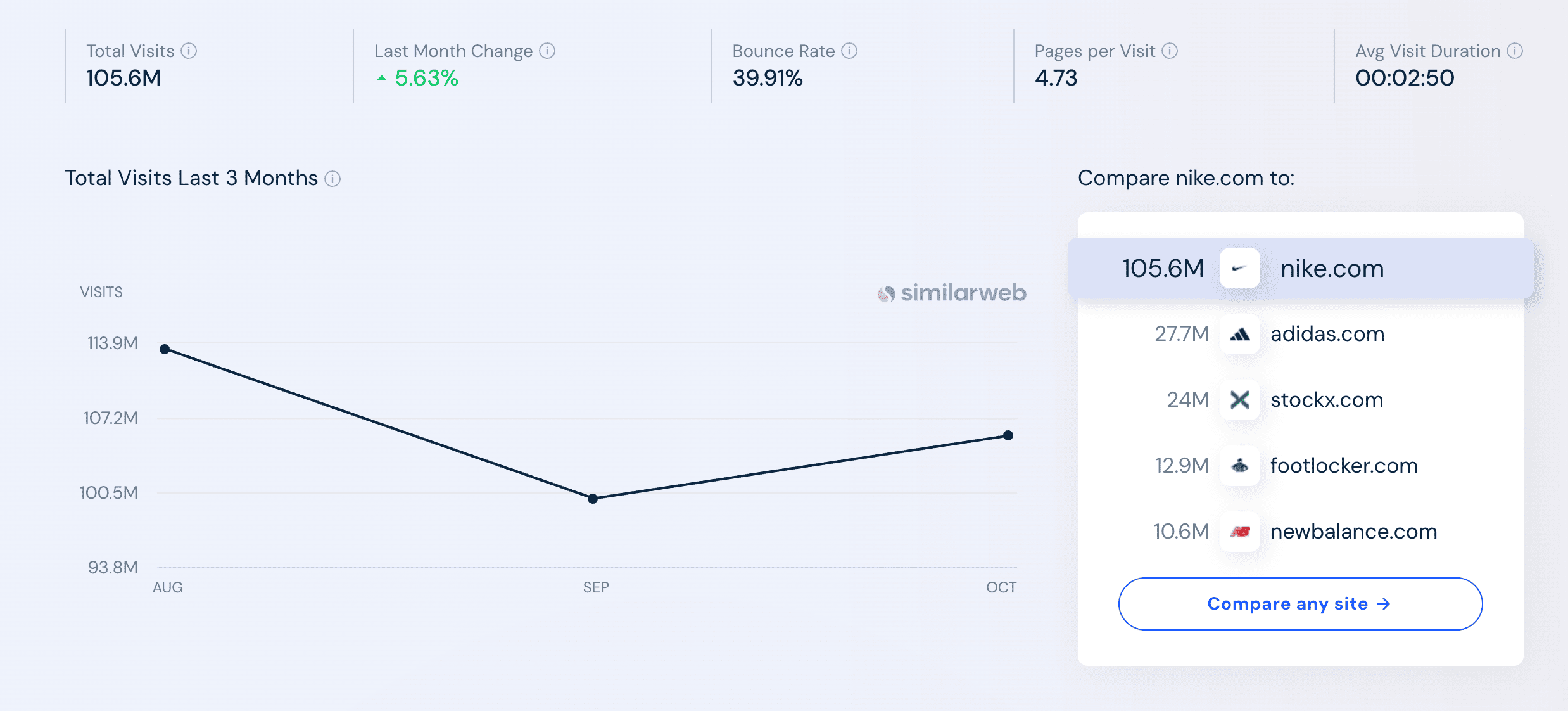
Use Ahrefs or Similarweb to see if that domain gets any organic traffic. A useful thing to check is how traffic has been changing over the last couple of months.
If it were dropping month over month, there is a very good chance the website has some issues.
Source: Similarweb
And of course, zero traffic and hundreds of outbound links are definitely bad news.
4. Network patterns
If multiple suspicious domains look identical, they’re probably part of a private blog network (more commonly known as a PBN) or some farm.
If that’s the case, this isn’t the best backlink.
PBNs might only work if you’re the one building them. But if you just get incoming URLs from them, they’ll likely be harmful.
At the very best, Google will simply discard those without giving your domain any more authority.
Step 5: Prioritize action
By now, you’ve completed a real analysis. And you know which bad backlinks are actually dangerous, and which are just low-value.
Now it’s time to prioritize referring domains removals and cleanup.
One of the best ways is to start with:
- Domains that have high toxicity scores (60+).
- Mentions from spam websites, PBNs, or known farms.
- Pages with over-optimized anchor text or exchange patterns.
- Sites with no organic traffic or negative SEO footprints (the ones we’ve already discussed above, like irrelevant URLs, too many random popups and ads, etc.).
Put your worst “offenders” in a list, and try contacting site owners first. Why? Because a polite link removal email often works for smaller blogs or legitimate directories.
If there’s no contact info or it’s clearly spammy... well, don’t waste time. Those will go into your disavow file later when we cover how to disavow backlinks.
Remove vs. disavow: Is there a difference?
Short answer: yes, there is a big difference:
- Link removal cleans the mess at its source. You simply contact the page that points to you and ask the website editor to remove your mention.
- Link disavowal tells Google to ignore the mess. It’s the process of you submitting a doc to Google to ask it to ignore particular incoming URLs.
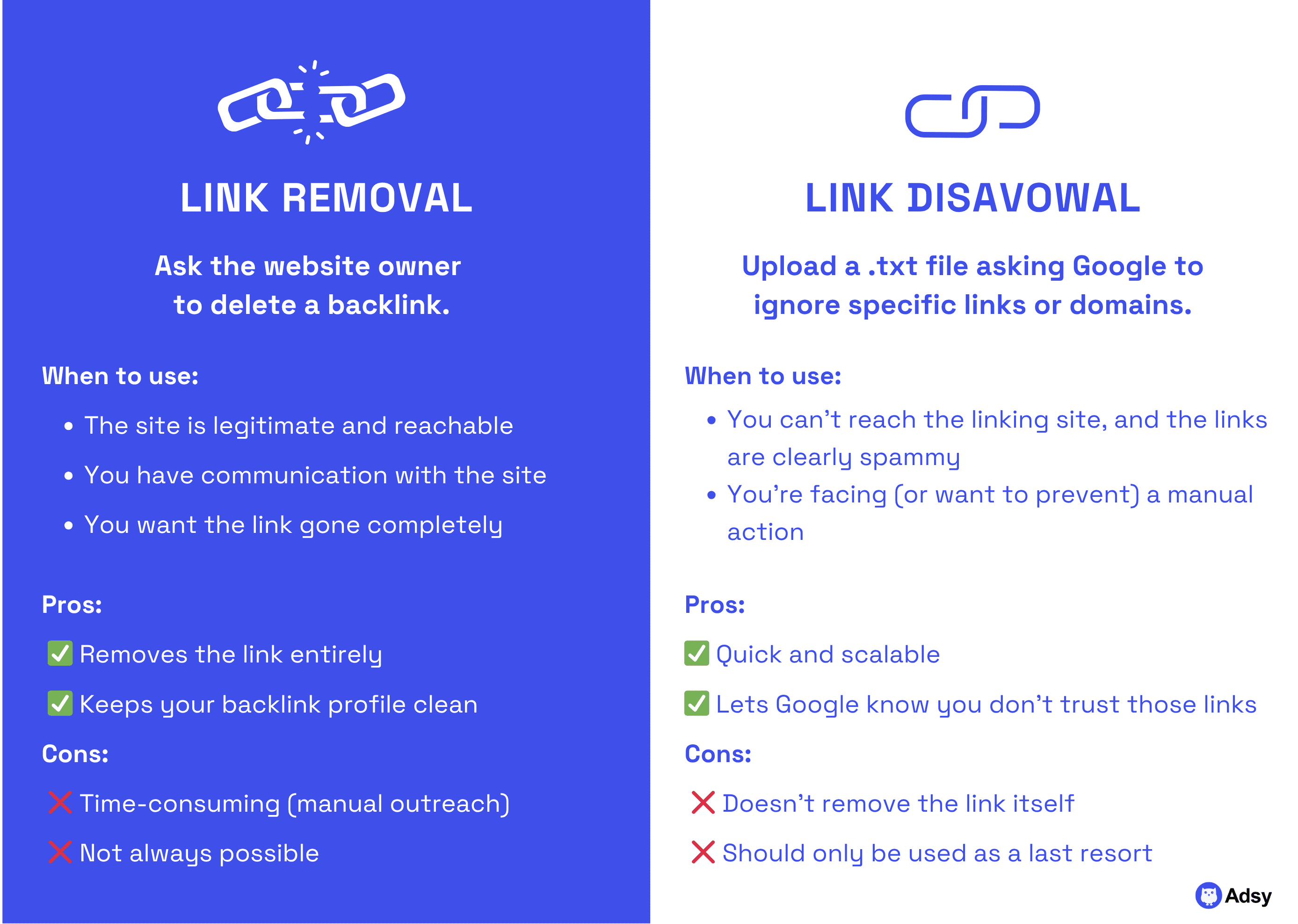
Now, let’s get into the details.
When you find toxic or spammy URLs pointing to your site, both removing and disavowing them is a good, legit option. Both protect your backlink profile’s health, but they work in very different ways.
Here’s when removal makes sense:
- The domain is real, with an actual contact page or email.
- The URL came from a previous exchange, paid partnership, or low-quality directory you can still access.
- You suspect the mention was added automatically (e.g., in blog comments), but the site isn’t malicious.
Reaching out to every page is slow, sure. But it’s the most direct way to clean your backlink profile.
If removal isn’t possible (it’s often the case), but you think that the referring domain is harming your website, use the disavow tool.
When you disavow, you’re kind of telling Google: “I know these links exist, but I didn’t build them, and I don’t want them counted.”
This process doesn’t delete the URLs from external websites, but it does tell Google’s algorithm to ignore them for SEO purposes.
Here is an important note, though: Google itself mentions that “most sites won’t need to use a disavowal tool.” So, make sure you know what you’re doing before disavowing anything.
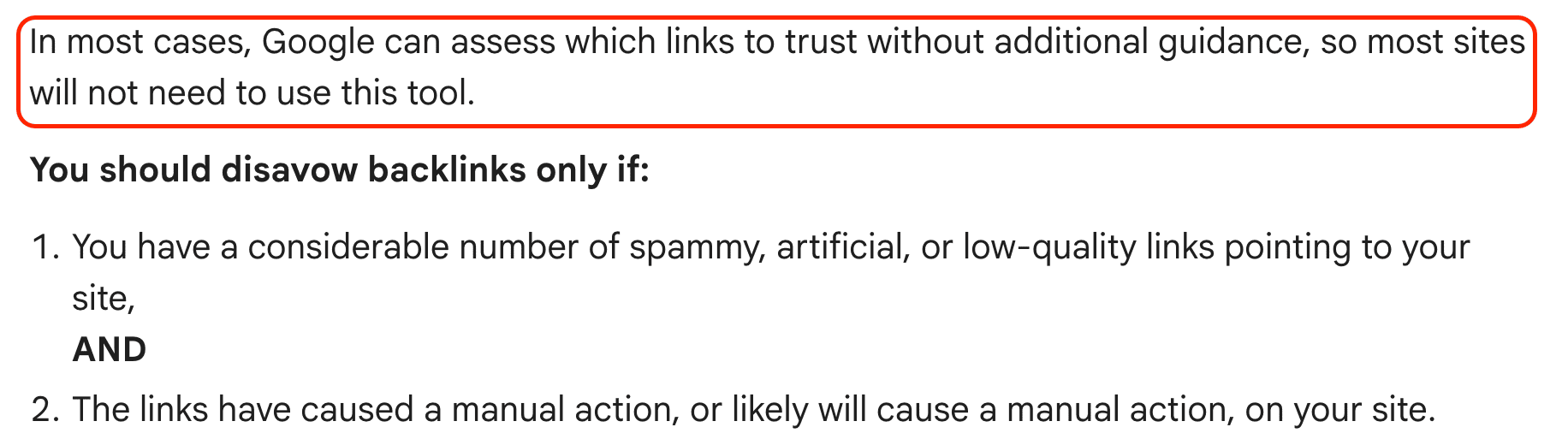
Source: Google
How to disavow links?
As you already understand the whole context of toxic URLs, it is time to finally answer the main question. How does the disavowal process work?
Step 1: Gather the links you want to disavow
From your audit, collect the domains or URLs you’ve marked as toxic and unnatural. Remember, we explained how to do this above? Well, if you actually did it, good job!
Now you have to make a big decision. Should you disavow individual URLs or whole domains?
- If only a few pages are bad (like old blog comments or forum mentions), list the exact URLs.
- If the entire referring domain is spam (like a farm or PBN), disavow the whole domain.
But if you have doubts and several pages are spammy, you can go full “Breaking Bad” and disavow the domain. It's not actually that reckless: link-building bots (aka synthetic users) tend to spam across entire sites.
Still, disavowing the whole domain usually makes sense only if the entire site is trashy.
Step 2: Create your disavow file
Your disavow file is just a simple text file (.txt) that tells Google which incoming URLs to ignore. To create it, use:
- TextEdit on Mac (save the file as plain text and UTF-8). To access these settings on a Mac, go to Format > Make Plain Text. And you can select UTF-8 when saving the file.
- Notepad on Windows (use encoding UTF-8 when saving the file).
Here’s what the file should look like:
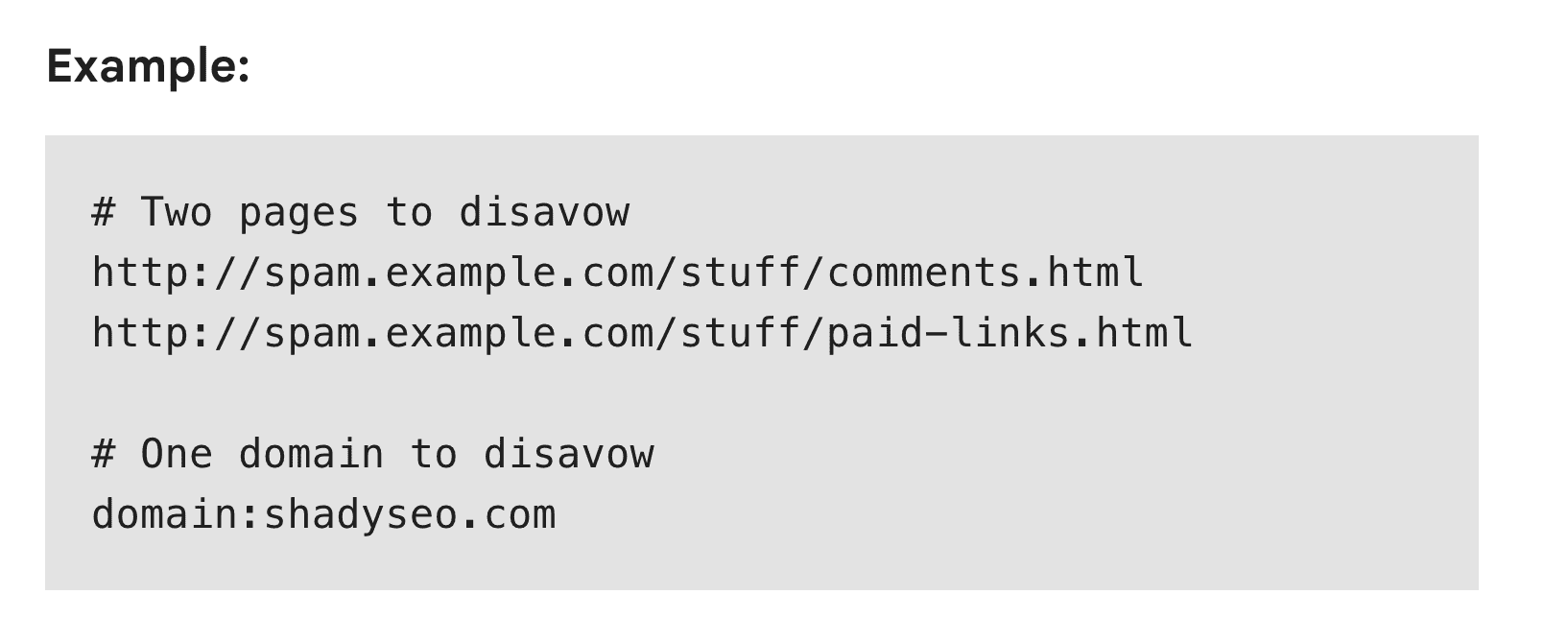
Source: Google
This is just an example. But you understand the idea.
Here are a few notes to make things easier for you:
- Use domain: before the name of the domain to disavow all its pages.
- List URLs normally to disavow single pages.
- Make sure there are no typos or formatting issues because even a tiny, small error can break the whole file.
- Important: Add each URL or domain on a new line.
- Optional: Start lines with # for comments (Google will ignore these, so these notes are just for you).
Keep this file clean and updated. After all, this is a living record of your “link hygiene.”
Step 3: Upload to Google’s disavow tool
Alright, so you’ve created your disavow file. That little .txt document full of bad backlinks and toxic domains you’d rather not be associated with. Now it’s time to tell Google to ignore these.
But, and this is important, the Disavow Tool isn’t a toy.
It’s not a “click-and-fix” button for your SEO problems. It’s a last-resort measure designed for serious cases where low-quality referring domains or negative SEO attacks are harming your search engine rankings.
If you’re not absolutely sure a URL is harmful, double-check it before disavowing it. Once disavowed, those link signals are basically gone until you upload a new file to reverse them.
To upload your file, go to the Google Search Console Disavow Tool. Choose your property and make sure it matches your verified domain in GSC. Then upload your .txt file.
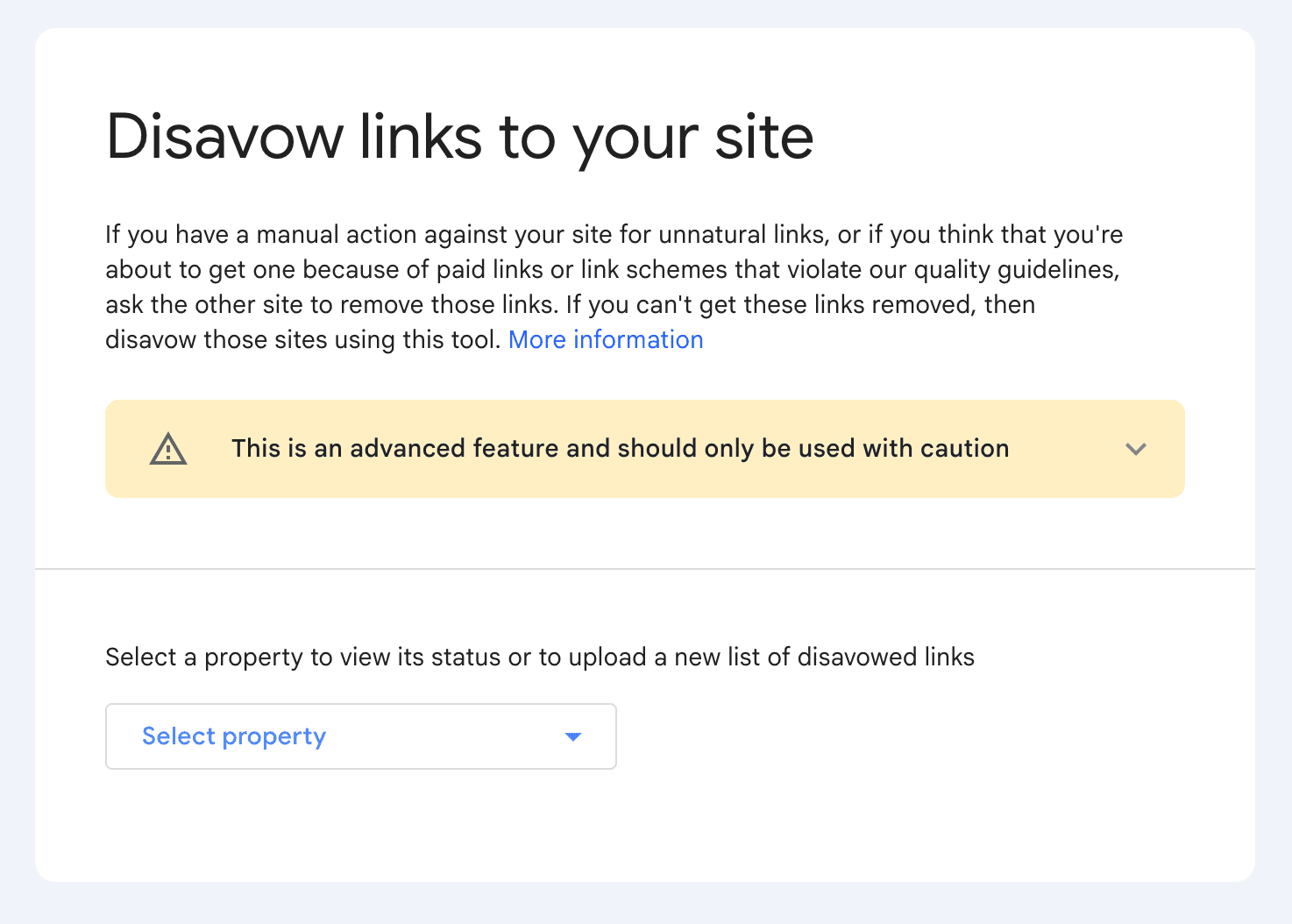
Source: Google
Once uploaded, Google will process it automatically. There’s no confirmation message from Google, though:)
But rest assured, the search engine will start taking your disavow file into account the next time your site is crawled and re-evaluated.
An important note:
You can reupload your disavow file when you get more unnatural links in the future. But remember that it replaces the previous one.
So, include both your old and new URLs. If you upload only the new ones, Google will stop ignoring the referring domains from your previous file.
Step 4: Wait and monitor
Once you’ve submitted your disavow file through Google Search Console, it’s tempting to sit there hitting refresh. But common sense probably tells you that it doesn’t work that way.
Yep, it doesn't.
Google doesn’t instantly clean up your profile or re-rank your site the next morning. The disavow process is more of a slow burn. Google needs time to crawl your site again and re-evaluate your backlinks.
This can take several weeks to a few months, depending on how often your site is crawled and how extensive your profile is.
Here’s what you want to watch for:
- Gradual improvements in search engine results pages (or SERPs).
- Stabilized or improving organic traffic.
Note: You’ll still see those referring domains in your SEO tools (whether it’s GSC or anything third-party). They won’t disappear. But Google will stop considering them when crawling your site.
6 tips to keep your backlink profile healthy
Now that you know how to remove toxic backlinks, it is time to make another, bigger step.
After all, getting rid of harmful referring domains is just one part of making your profile healthy and clean. But there’s way more to that.
You have to do everything to avoid getting those spammy mentions in the first place.
1. Be intentional with every link you build
If you want a healthy backlink profile, every referring domain should have a reason to exist. Otherwise, you will only create more mess.
Of course, you can’t control every URL that points to you from other sites. There are spam attacks, people genuinely mentioning you from their not-so-high-quality sites, etc.
But if you have any control over this, ask yourself these three things before building or accepting any link:
- Is it from a relevant site in your niche?
- Would real people actually click this URL?
- Does it add context, trust, or value to the page where it’s inserted?
If you can’t say “yes” to at least two of those, it’s probably a low-quality option. And that's definitely a good reason to avoid it.
This mindset alone filters out most spam websites, farms, and private blog networks that promise thousands of backlinks “overnight.”
And yes, whatever you do, don’t be like this SEO specialist’s client:)
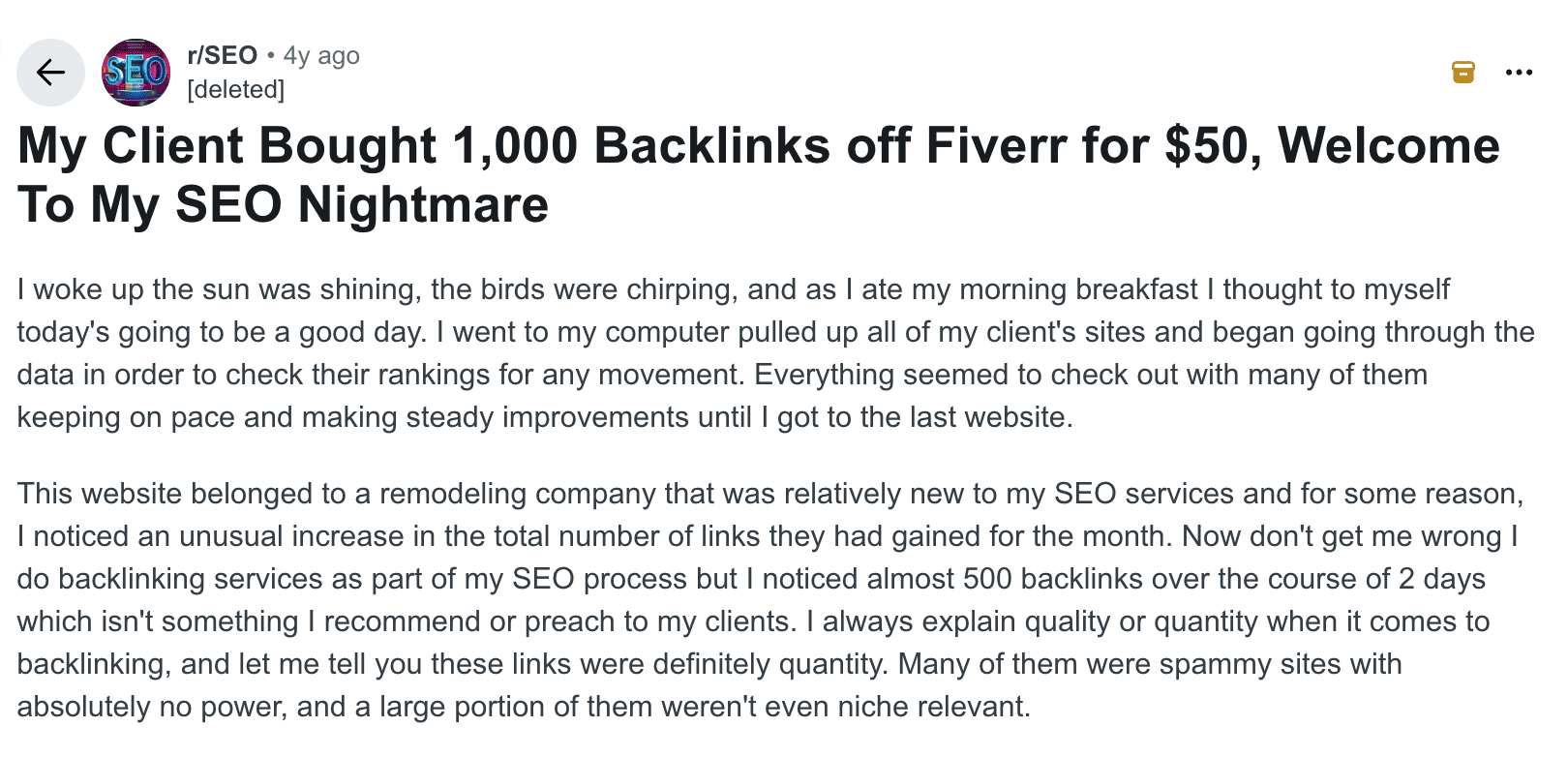
Source: Reddit
Your top priority should always be the quality.
That’s what Google appreciates. And that’s what will bring great results in the long run. If you are after reasonable SEO KPIs, you definitely need to be intentional with every referring URL you build.
2. Audit your referring domains regularly
Forgive us these metaphors, but checking your backlinks should be like brushing your teeth or paying your taxes, a routine. It is probably more satisfying, though.
For most websites, doing an audit once a month is more than enough.
This is a great opportunity to take a look at the following:
- The overall number of incoming URLs and their influence on your DR.
- New and lost mentions.
- Anchor text distribution and whether it's natural.
- Dofollow vs. nofollow ratio.
- Backlink sources and their quality.
This is a rather standard dataset you can find in pretty much any SEO tool.
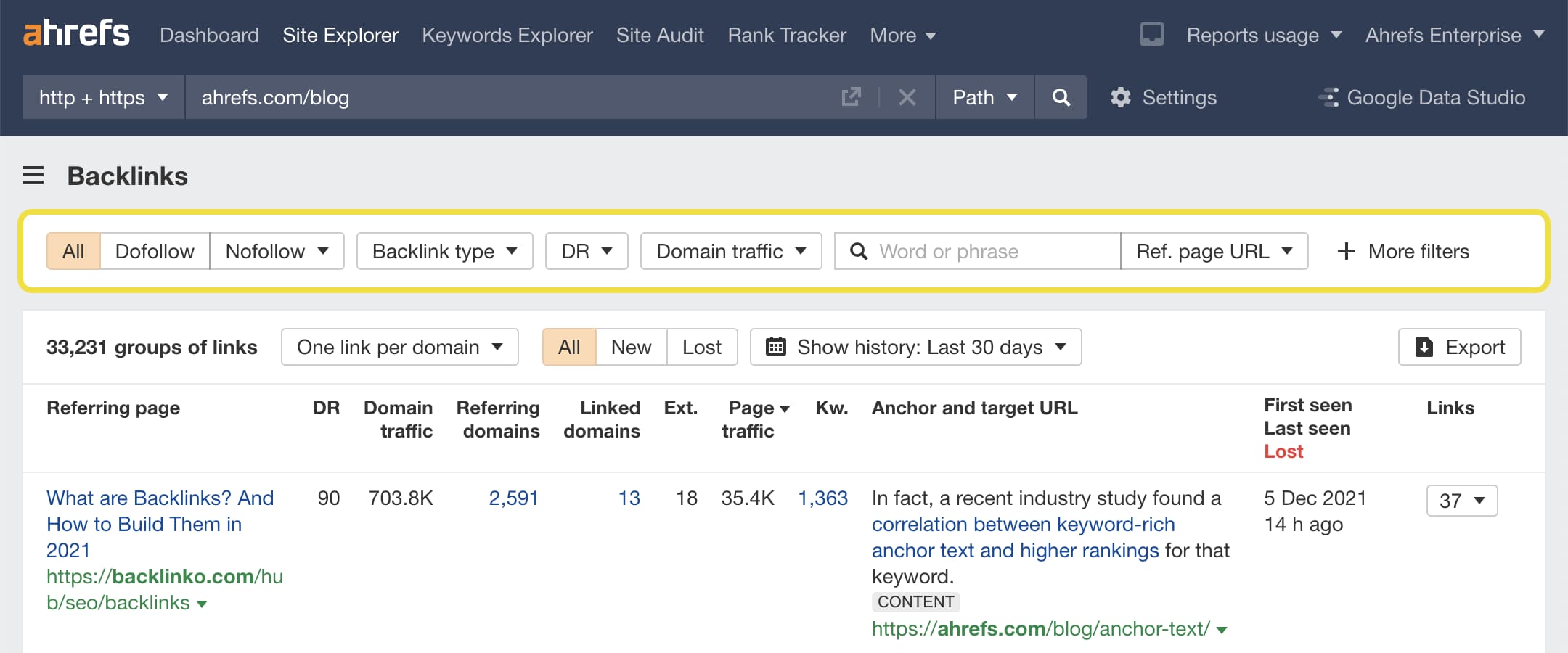
Source: Ahrefs
When you know all these metrics, it is much easier to understand the quality of your profile and whether:
- The new incoming URLs are relevant and non-toxic.
- The anchor texts are natural (without keyword stuffing).
- Referring domains have real organic traffic.
If you find spammy backlinks creeping in, take action early. Reach out for removal or prepare a disavow list before they become a ranking issue.
Tip: Even though the topic of this guide is backlinks. This audit is a great opportunity to check how your website is doing in terms of internal URLs. Ideally, you should have this under control to maximize SEO results and avoid orphan pages.
3. Don’t fall for “easy link building” offers
Every few weeks, some “SEO expert” on LinkedIn or Fiverr will offer you “500 high DA backlinks for $50.” If you’re new to search engine optimization, it sounds like an extremely good deal.
But let’s translate that into what it really is:
“500 low-quality, irrelevant, or downright harmful links from spam sites, auto-generated blogs, or PBNs that could nuke your rankings.”
Google’s algorithms are ruthless about spam.
Quality backlinks can’t cost a couple of dollars. In fact, depending on your region, niche, and site quality, the price can go over a couple of hundred dollars per one link.
If you’re interested in this topic, you can check our analysis of over 37,000 websites that accept guest posts.
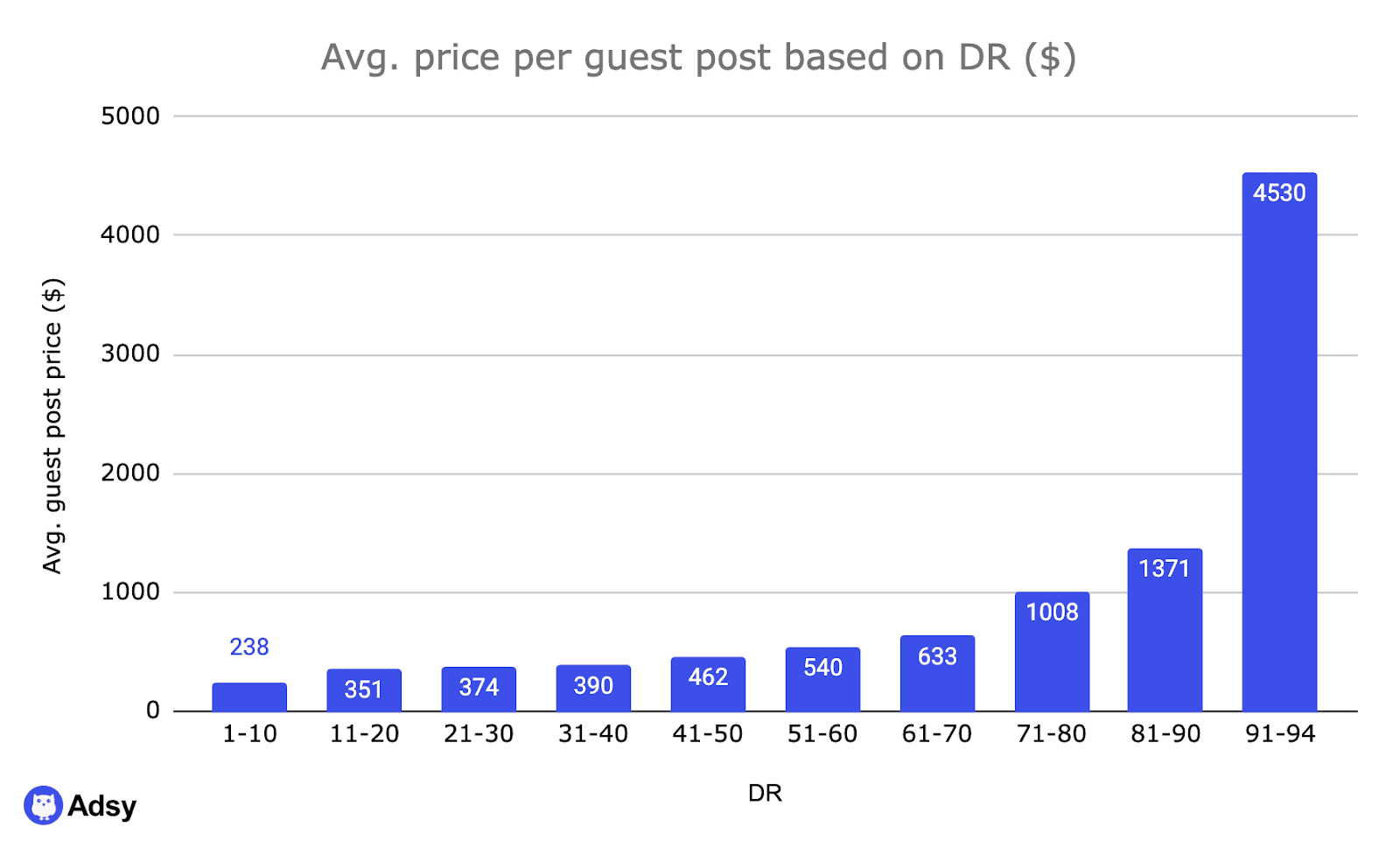
Gaining high-quality mentions on other sites is getting harder and harder, so it could be tempting to exchange links with some random pages that look a bit fishy. But it’s a road to nowhere.
Always choose quality link building only. This includes:
- Earned mentions.
- Useful guest posts on legitimate websites.
- Natural URLs that make sense contextually.


4. Diversify your link sources
A strong link profile is a natural profile. Most often, that's a mix of incoming URLs from blogs, news outlets, directories, social media, niche communities, etc.
If all your mentions come from one type of source, it looks manipulated. And it brings you one step closer to making Google associate you with some unethical SEO schemes.
So, when building your profile, aim for variety. You can get:
- Mentions in industry publications.
- Listings in legitimate directories.
- Press releases from quality media outlets.
- Guest articles on trusted blogs.
- References from partner sites or collaborations.
- Mentions earned from original research, infographics, case studies, etc.
When your referring domains look like a healthy, natural ecosystem, Google simply trusts you much more.
5. Protect yourself from negative SEO
Yes, negative SEO attacks are real. If you are in a competitive niche, you can expect deliberate attacks every now and then.
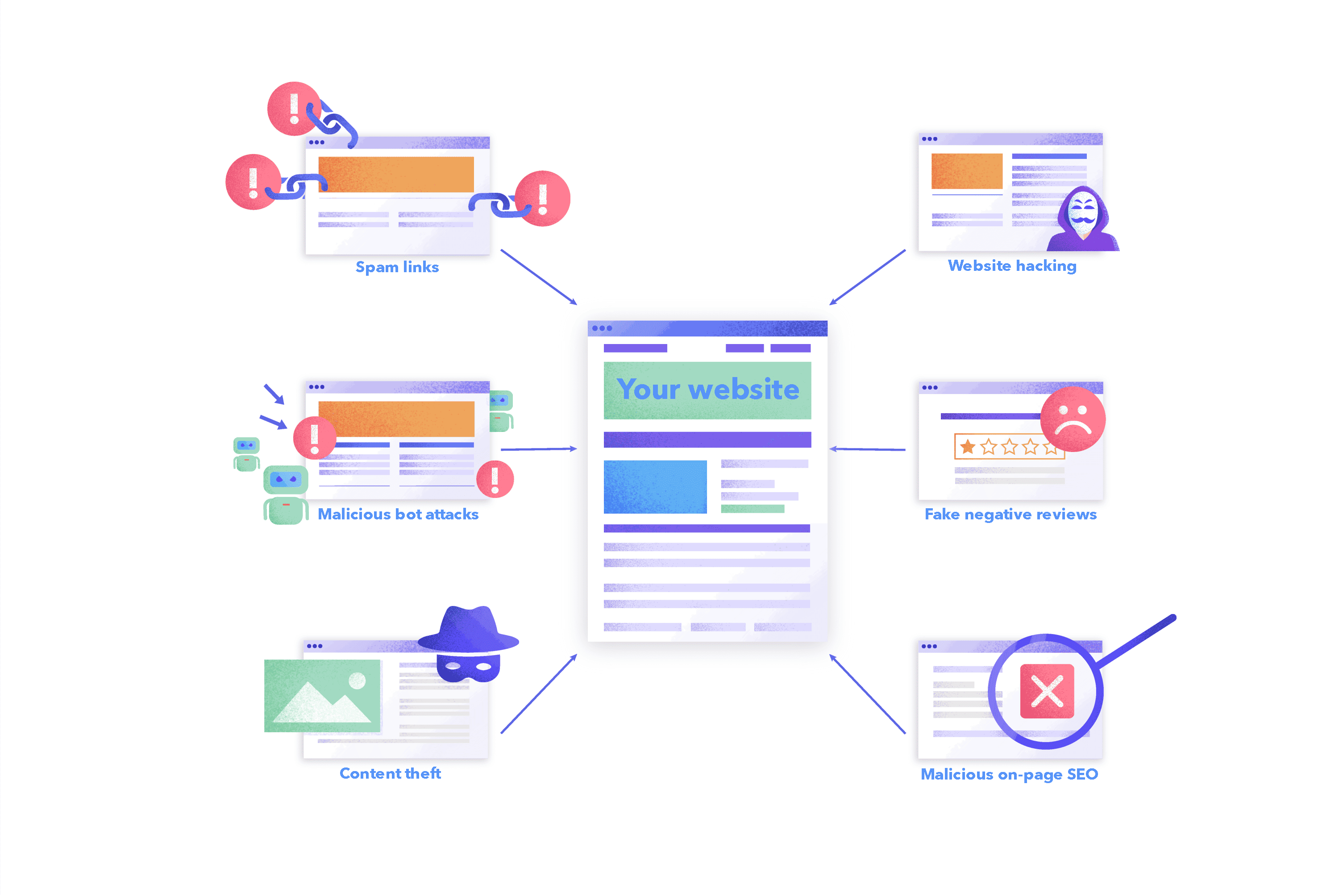
Source: SE Ranking
Here’s how to guard against it:
- Monitor new referring domains weekly using Google Search Console or toxic link checker tools.
- Set alerts in Ahrefs or Semrush for sudden spikes in incoming URLs.
- When you identify such links, disavow them ASAP.
Of course, that's not going to stop rivals from attacking you. But you can at least make sure that Google doesn’t think you’re violating search engine guidelines.
6. Watch out for over-optimized anchor text
Anchor text is one of the easily overlooked areas. But it’s also where backlink value often gets a hit.
An anchor is simply the clickable text that leads to another page. Sounds simple, right? What’s the issue, then?
The only problem is overoptimization.
It seems logical to use keywords as your anchor. After all, you make it clear to readers and search engines that you are selling “project management software,” “gardening equipment,” or whatever it is you’re selling.
But here is a thing.
If 80% of your backlinks use the same keyword-rich anchor, Google will start suspecting you’re trying to manipulate search rankings.
So how do you fix it, then? One word: diversify. And no, it’s not an investment tutorial. The idea is to mix and match different types of anchor texts.
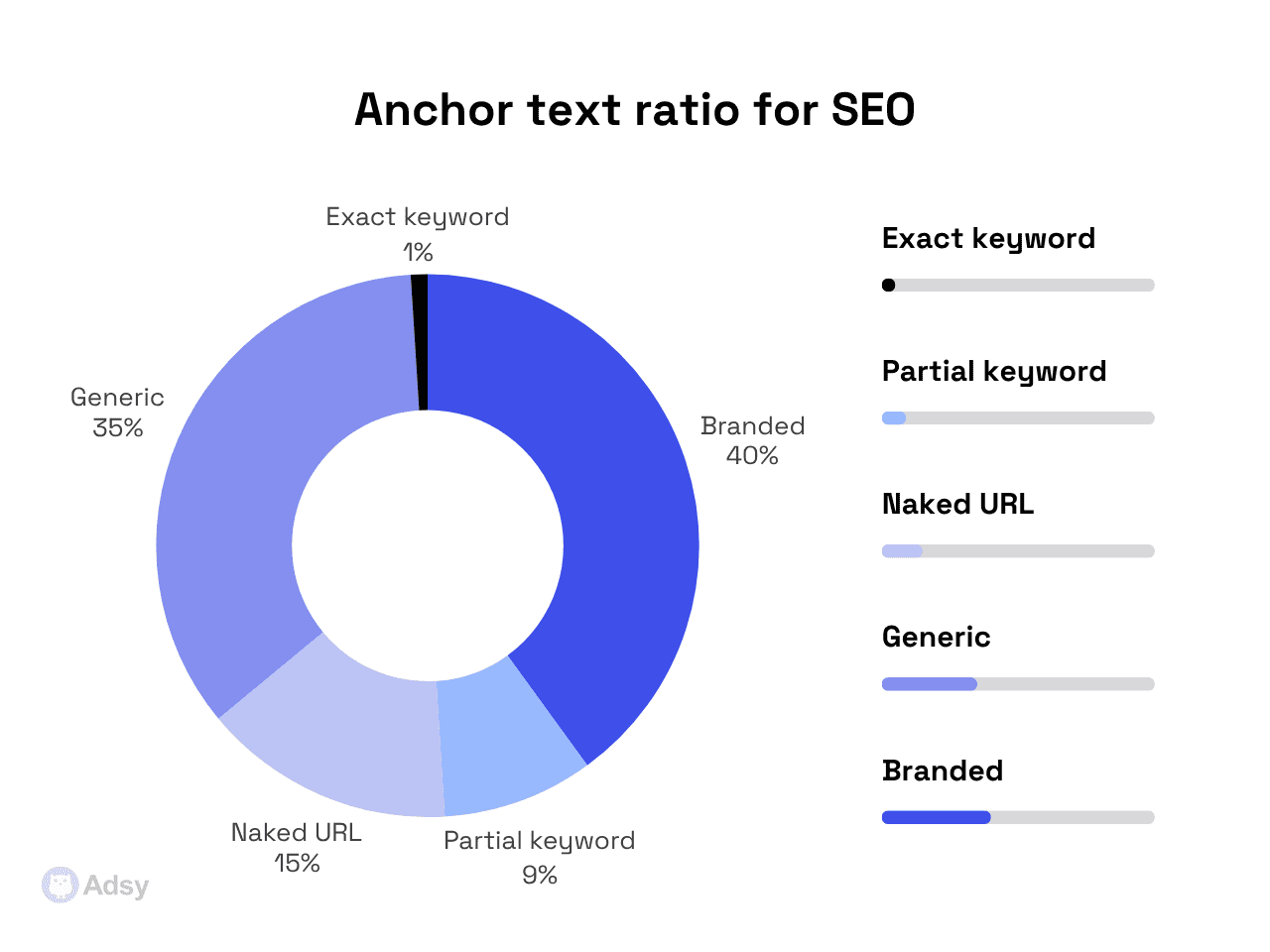
This is an approximate ratio you should aim for:
How does it work in real life?
Imagine you’re a flower delivery service in Atlanta, and your company’s name is Atlanta Bloom. This is how your anchor texts could look like:
- Exact keyword (~1%): It’s literally “flower delivery service Atlanta” or other keywords you target.
- Partial keyword (~9%): This could be a mix that includes “Atlanta,” “flowers,” etc. For example, “same-day flower delivery.”
- Branded (~40%): This is your brand name. In our case, it’s “Atlanta Bloom”.
- Naked URL (~15%): This is just your website. For example, “atlantabloom.com”.
- Generic text (~35%): It’s your typical “learn more,” but it’s better to get creative here. For example, “use this advice,” “take it to a new level,” etc.
The point is to keep your anchors sounding like something people would actually write. Contrary to a phrase pulled from a keyword list that sounds strange and unnatural.
Conclusion
Simple wisdom (and years of experience) tells us that a few high-quality backlinks from legitimate websites will always beat hundreds of spammy URLs from trashy sources. And that's what's really worth remembering.
Cleaning and maintaining your profile is hardly glamorous. Let’s be honest: it's a slow and often frustrating activity.
But it’s also what separates successful websites from those that rise and crash with every algorithm change.
FAQ
What is a bad backlink?
A bad backlink is a link that comes from a low-quality or irrelevant website.
It might not actively hurt your website, but most likely, Google will ignore it. And if you get too many of them, your backlink profile might start looking suspicious.
What are toxic backlinks?
Even though bad and toxic backlinks may be used interchangeably, they’re slightly different.
A toxic link means that it’s harmful and can actually hurt your website or even get you a Google penalty. Usually, these come from black-hat tactics and involve spamming, keyword-stuffed anchors, and other link schemes that Google doesn’t like (to say the least).
How to find toxic backlinks?
Essentially, this process comes down to:
- Exporting your backlinks: You can use free Google Search Console or any SEO tool you prefer, like Ahrefs, Semrush, Moz, or Majestic.
- Checking for any “red flags”: First, analyze their SEO metrics (zero organic traffic, declining traffic, too many outbound links (compared to inbound), PBN patterns, links to sensitive niches (adult, casino, etc.), high spam scores, and so on). Then, you can check other factors. For example, whether the domains are relevant to your niche, whether the anchor texts tend to be spammy, or whether the website posts plagiarized and AI-generated content.
How to disavow toxic backlinks?
If you want to get rid of toxic backlinks, you have two options:
- Remove them (preferred option): If you can reach out to the website owner and ask them to remove bad backlinks, it’s the best thing to do.
- Disavow them (advanced option): You can submit a disavow file to Google. But this shouldn’t be your first choice because it is an advanced feature. Google itself says that it “can assess which links to trust without additional guidance, so most sites will not need to use a disavowal tool.” Generally, you need to use it when you’ve got manual action or when you have way too many spammy links.
Now, how do you disavow a link?
- Collect the toxic URLs or domains you want Google to ignore.
- Create a clean .txt disavow file.
- Upload it through Google’s Disavow Tool.
- Wait for Google to recrawl your site.
- And monitor your rankings and organic traffic over time.
All trademarks, logos, images, and materials are the property of their respective rights holders.
They are used solely for informational, analytical, and review purposes in accordance with applicable copyright law.




 Sign Up
 Sign Up