






What Is a Featured Snippet? Examples and 6 Optimization Tips
You can spend days and weeks doing research and writing a great article based on it. But when someone searches Google for a related subject, instead of clicking on your article and reading it entirely, the person only sees three sentences that Google makes out of it based on your query.
Google’s Featured Snippet stands behind what just happened. The question is: was it really a loss or a win for your SEO?
On the one hand, having your content singled out in search results sounds like good news. But it doesn’t bring the right people to your website, and that’s exactly what gets most website owners frustrated.
So, what is a featured snippet, and why do businesses put effort into earning one?
Before you start shortening paragraphs or turning everything into a numbered list, it helps to understand what you’re aiming for. This guide covers how featured snippets work, where their value lies, and how to give your content a better chance of appearing.
What is a featured snippet?
Search for a question, get an answer, close the tab. Sometimes that’s the whole Google visit. The website supplying the answer never gets a click.
A featured snippet can make that possible.
The simplest featured snippet definition is a passage from a webpage that Google puts directly into its search results, above the source’s title and link. Someone can read the answer there or follow the link for more detail.
Suppose you want to know the difference between a 301 and a 302 redirect. A search result might explain that one is permanent and the other temporary. That gives you the meaning immediately, without asking you to work through an entire technical guide.
So, what are featured snippets likely to contain? It depends on what would answer the question:
- A short explanation for a term or concept.
- A sequence of steps for completing a task.
- A list of options worth considering.
- A table where the numbers need comparing.
For a publisher, though, the definition of featured snippet needs one qualification: the placement is Google’s decision. There’s no submission form to fill out.
The practical lesson is fairly ordinary. Answer the question where you introduce it. Readers shouldn’t need three background paragraphs before reaching the explanation they came for. Those paragraphs may belong elsewhere in the article.
Where featured snippets appear in Google Search
Near the top of the results is the usual place to look. But “near the top” doesn’t always mean the first thing on your screen. Other search features can take up space above the answer you’re looking for.
To spot a Google feature snippet, look at the order of the information. The answer comes first, followed by the page title and link. A regular search listing puts the title before the descriptive text.
For example:
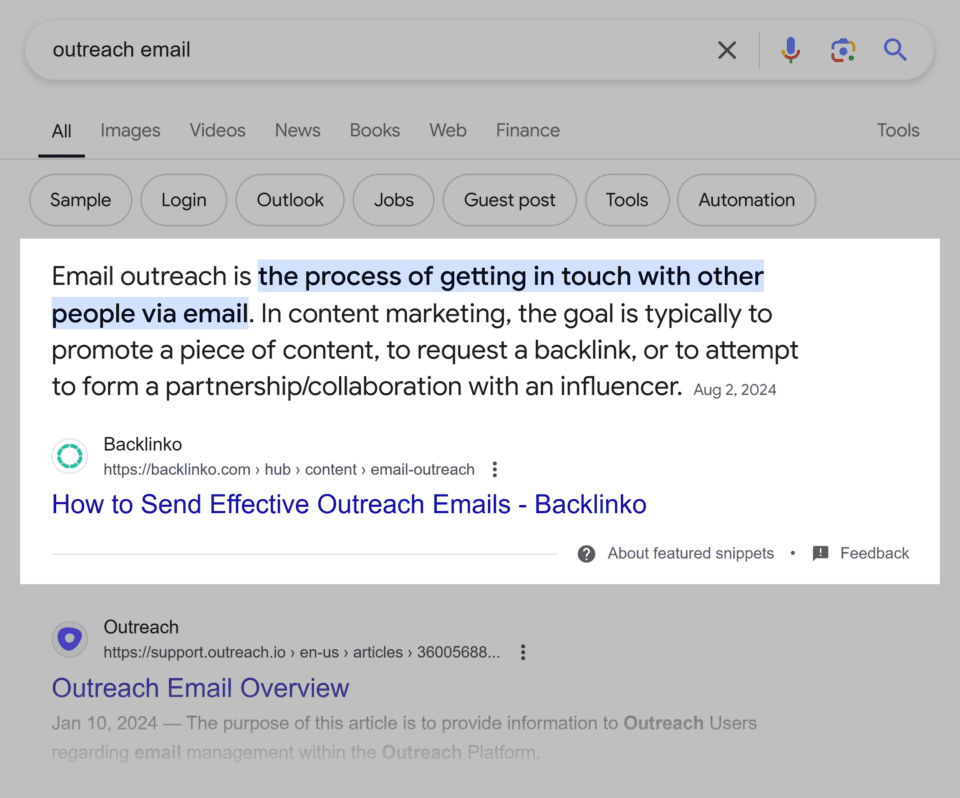
Source: Backlinko
You may also encounter these answers when opening questions in the “People also ask” section.
And some searches won’t show one at all.
When checking your own content, search for the actual question you want to answer. Notice where feature snippets appear and what sits around them. A prominent answer with a clear source link offers a different opportunity from one a reader has to scroll or expand a question to find.
How Google selects content for featured snippets
Whether to pull a particular piece of information into a featured snippet, Google’s systems have to decide whether a passage would make a useful answer to a particular search.
But not everything is so simple here. Paradoxically, a page can cover a subject thoroughly and still make the reader work too hard to find one specific detail.
Take a guide to website redirects. It might explain the technical background perfectly. But someone searching “when should you use a 301 redirect” needs a clear explanation of when it’s appropriate. A definition alone leaves the question half answered. Therefore, the chances of such information getting into featured snippets are lower.
What are the main types of featured snippets?
A question about what something means calls for a different answer than a question about prices. That helps explain why feature snippets don’t all look alike. The main types of featured snippets present answers as paragraphs, lists, or tables.
Paragraph snippets for direct answers
“What does a canonical URL mean?” is one example of a question a paragraph featured snippet can answer. As a rule, a few short sentences can explain the term perfectly (30-50 words long), and a link to the source will provide additional information for those interested.
That’s one example, though. The passage could also explain how bacteria cause disease or how birds migrate depending on the season. Paragraph snippets are a convenient way to explain the essence of a source material.
Here is one example of a paragraph featured snippet explaining the difference between SEO and PPC:
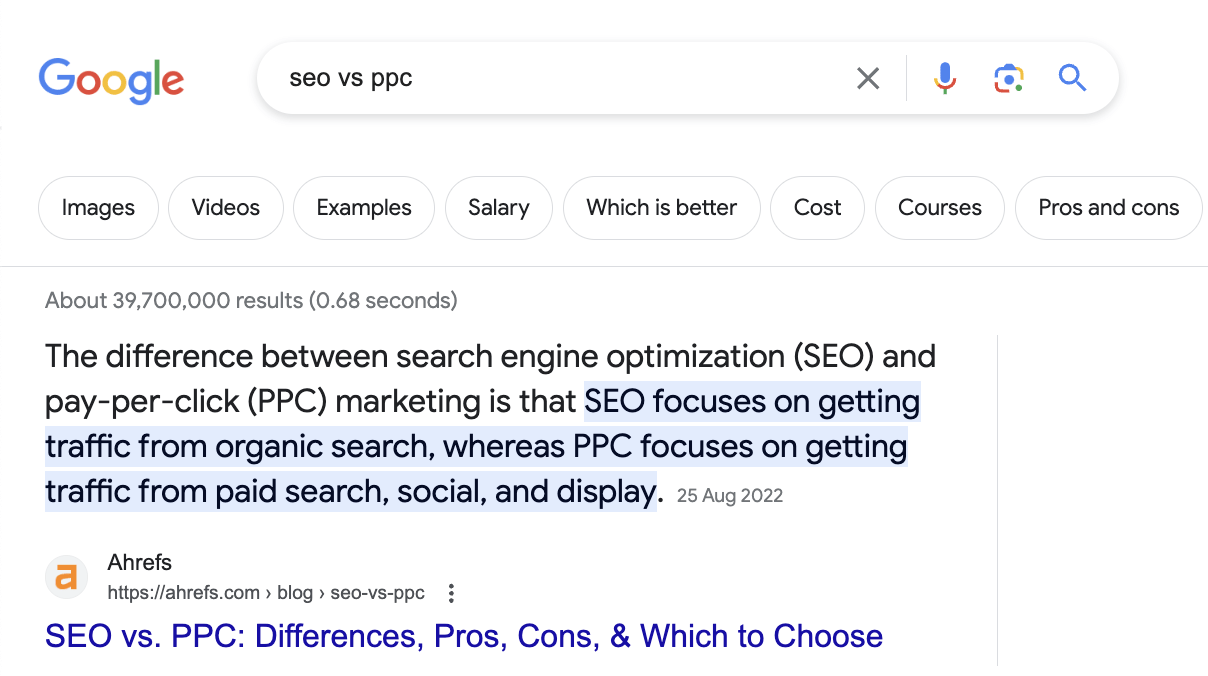
Source: Google
List snippets for steps and collections
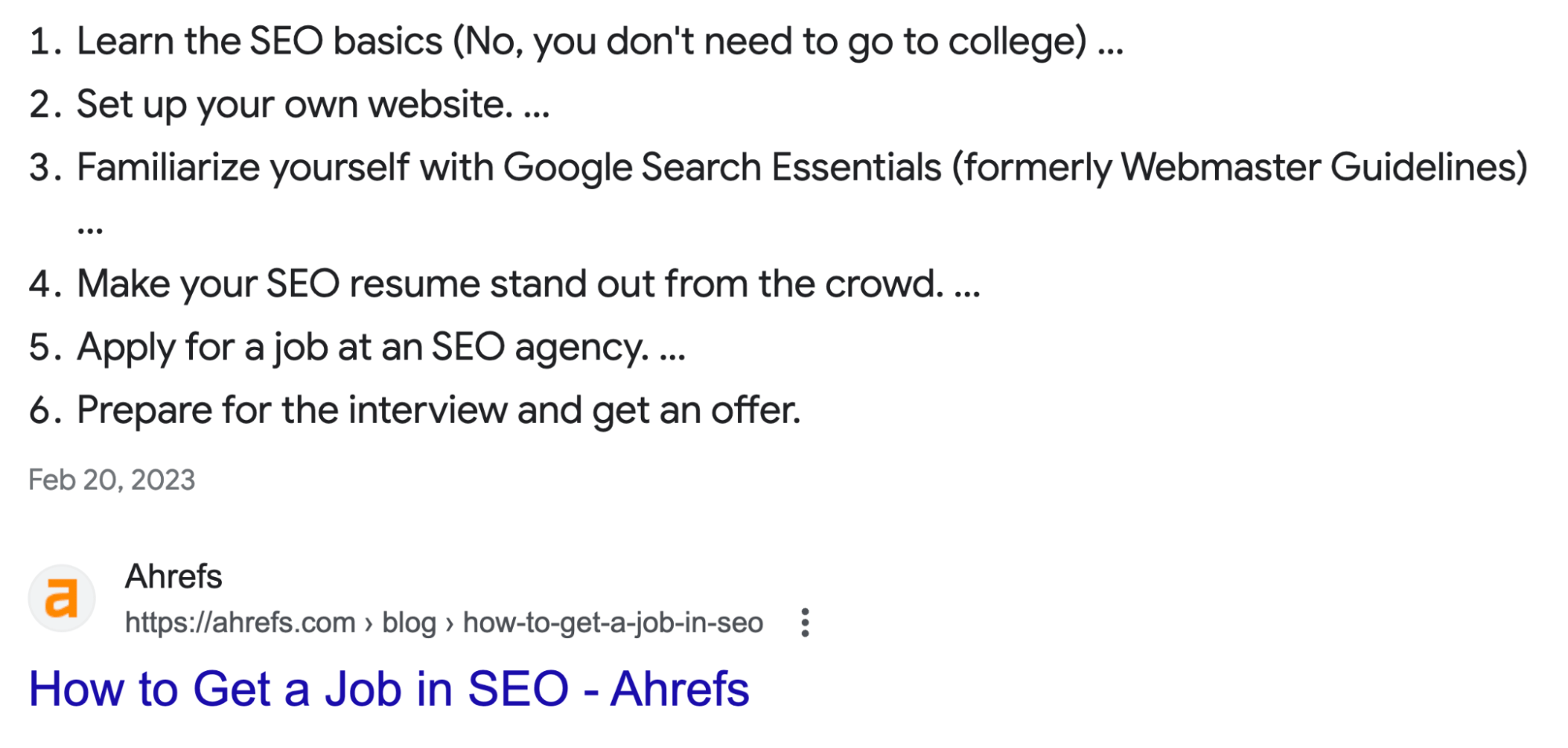
Sometimes the answer requires presenting information in several parts. That’s where list snippets are useful. A list snippet can separate these parts into entries, with numbers or bullets beside each one.
The type of query and source information define whether the answer will be a bulleted or numbered list.
For instance, a query to display a sequence for resetting a WiFI router would have numbered steps. A collection of file formats could appear as bullets.
The first has an order to follow; the second simply tells readers about all possible types of items that belong to the subject.
Table snippets for comparisons and data
How much do different laptop models cost? What are their advantages and disadvantages in terms of power, weight, or multimedia features?
A table snippet can put the different models’ prices into separate columns and then add additional ones to display all the advantages/disadvantages. The comparison is there without a paragraph explaining every figure.
These types of featured snippets operate with rows and columns. Various parameters can be displayed, including but not limited to prices, technical specifications, measurements, or dates.
Why do featured snippets matter for SEO?
Your article may have the answer someone needs. But other websites cover the same question, and readers won’t open every result to compare them.
This is where featured snippets SEO can make a difference.
So, what is a featured snippet worth to your business? It can bring more attention to your content and introduce people to your brand. For SEO, featured snippets also come with a limitation: people can read your answer without visiting your website.
Greater visibility in search results
The fact that regular listings appear below Featured Snippets and that they only provide a short description and a link is a massive differentiating factor. Featured snippets have a clear advantage here as they allocate more space for the answer.
That typically results in more attention from users.
For example, your explanation of the differences between popular Apple laptop models can give readers a table with a quick overview. They get to read part of your content (the essence that addresses their query) before choosing to follow a website.
That exposure is a key featured snippet SEO benefit. Your SEO snippet gives people something useful immediately, along with a link to explore further.
Opportunities to build brand recognition
Someone looking up email marketing terms may come across an answer from your website. Later, they search for another related topic and see your name again.
Those encounters can make an unfamiliar brand feel more familiar.
Your content becomes an introduction to your business. Of course, that doesn’t mean everyone remembers the source. Some people only read the answer. But those who notice your name have another reason to recognize it during a future search.
The trade-off between clicks and zero-click searches
Sometimes, the answer on Google is enough. Someone checks how many megabytes are in a gigabyte, gets the number, and leaves.
Your content helped. Your website received no visits.
More exposure doesn’t automatically bring more traffic. But a more involved question can leave room for a click. A short explanation of a website error, for instance, may lead someone to the full article because they still need help fixing it.
How to optimize content for featured snippets: 6 practical tips
You may already have a page that answers the right question. But the explanation is scattered across several paragraphs, or the useful part comes after a long background section.
Sometimes, optimization starts with improving what’s already there.
The following six tips cover everything from understanding the question to keeping the answer accurate. They won’t guarantee a placement. But they can make your content easier to understand and more useful to the person searching.
1. Match the answer to the query’s search intent
A reader searching “how to write a newsletter” probably has a draft to finish. Explaining what newsletters are won’t get them very far. They need help deciding what to include and where to start.
Yet a page can spend several paragraphs on the definition before offering any writing advice.
Check whether your answer starts where the reader needs it to.
The search wording can help you tell:
- “What is” suggests the reader needs to understand something before going any further.
- “How to” usually calls for a process the reader can follow.
- “What’s the difference” calls for a comparison.
Now read your answer beside the query. Does it resolve the question, or does it only discuss the same topic? If readers would need to search again, something is still missing.
Source: Ahrefs
2. Use descriptive, question-based headings
“Useful information.” “Other considerations.” “Getting started.”
Headings like these could belong to almost any article. A reader has to open the section and read a few lines just to find out what’s there.
Be more specific when you optimize your headings. For a section about newsletter frequency, “How often should you send a newsletter?” gives the reader something concrete. The answer underneath has a clear question to address.
But there’s no need to force a question into every section.
An article explaining how to create a newsletter might also have a section called “Newsletter examples.” That’s already descriptive enough. Changing it to “What are some examples of newsletters?” adds words without making the subject any clearer.
Use questions where they sound natural. Elsewhere, a short, specific heading will do.
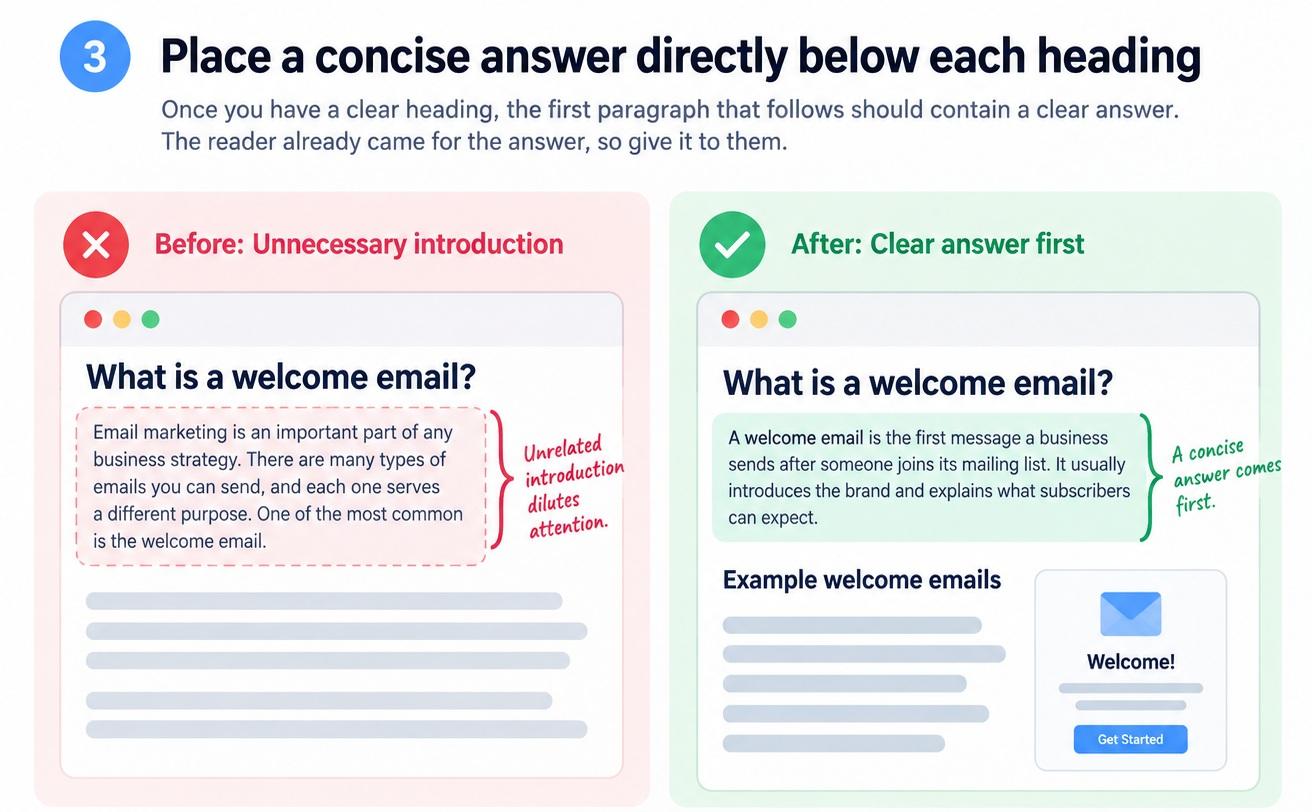
3. Place a concise answer directly below each heading
Once you have a clear heading, the first paragraph that follows should contain a clear answer. No need to write an introduction, as it usually tends to dilute attention. The reader already came for the answer, so give it to them.
For example, under “What is a welcome email?”, you could write:
“A welcome email is the first message a business sends after someone joins its mailing list. It usually introduces the brand and explains what subscribers can expect.”
That gives you a possible blog snippet to work with. You can then add sample emails or discuss what makes them effective.
But a short answer still needs enough detail to be useful.
When editing yours, check that it:
- Names the subject instead of referring to something mentioned earlier.
- Answers the question without an unrelated opening.
- Includes any condition that could change the answer.
And don’t worry if the section gets longer after that. Readers who need examples should have them. Just let them find the basic explanation first.
4. Choose paragraphs, lists, or tables to fit the answer
Sometimes, the information is already good. You just need to present it differently.
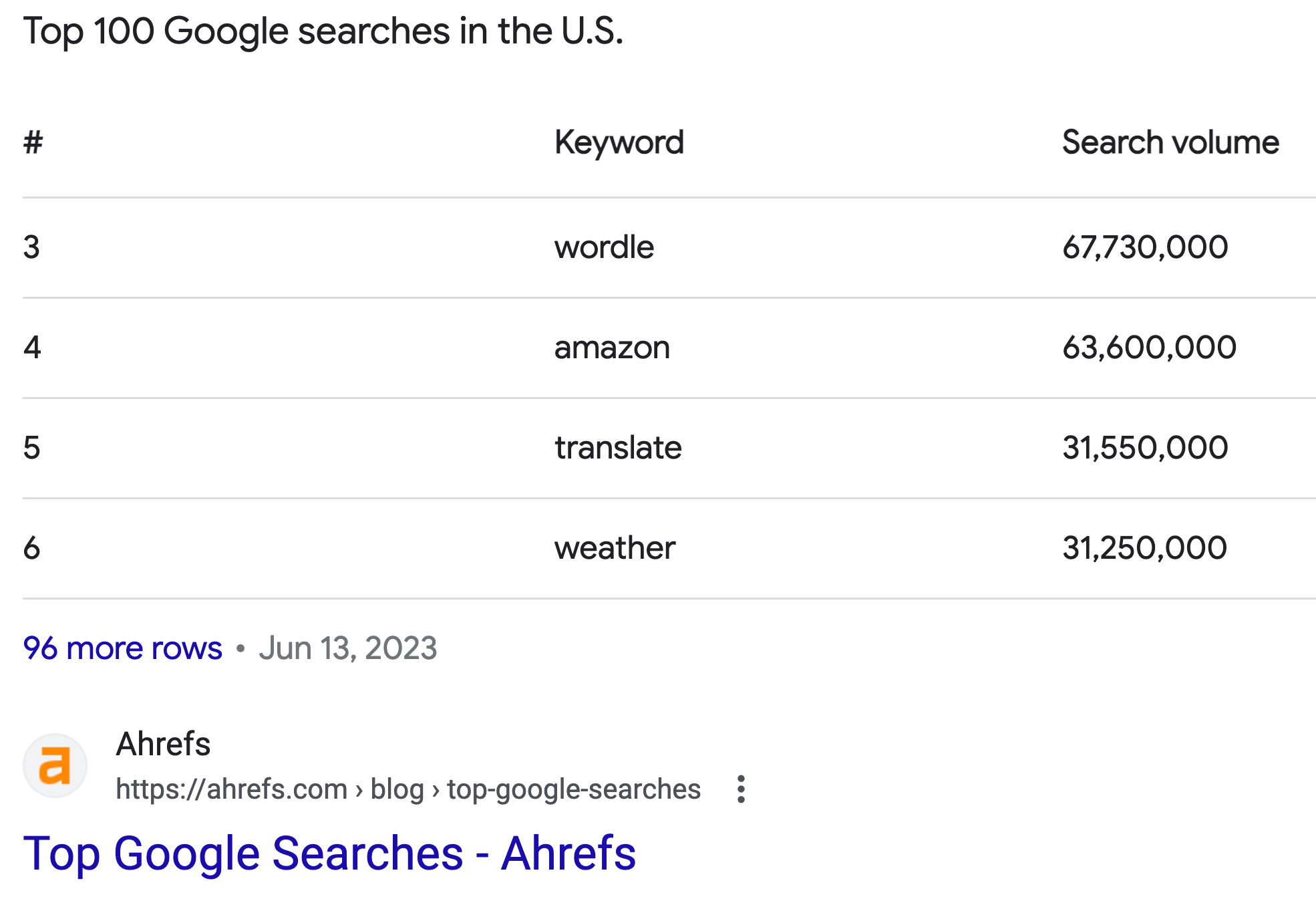
Take an article about email software. If you describe every tool in a separate paragraph, readers have to go back and forth to compare prices. Put those prices in a table, and the comparison becomes much easier.
Think about what someone will do with the answer.
- Follow instructions? Number the steps.
- Compare plans? Put matching details in rows and columns.
- Learn what a term means? A few sentences may be enough.
But what if your answer is just two sentences? Leave it as a paragraph. There’s little reason to add bullets when the explanation is already easy to follow.
You can get ideas from featured snippets examples, but check whether the same layout suits your content. Take the software comparison above. One plan might charge per user, while another charges for the whole team. Without mentioning this nuance, no price comparison would make sense.
You need to compare apples with apples or at least make it clear that some apples are of a different variety.
Source: Ahrefs
5. Support claims with original data and reliable sources
Sometimes you follow a link to a statistic and find another article linking somewhere else. Several clicks later, you still haven’t found who collected the data.
Avoid putting your readers through that.
If a number is important enough to include, it deserves a source you’ve actually checked. And you may already have useful evidence within your business:
- Survey responses from customers who agreed to share their feedback.
- Results from a test your team carried out.
- Support records showing how often a particular problem occurs.
- Published research from an organization working in your field.
- Official documentation explaining what a product can do.
Be specific about what the evidence supports. If 18 of your 25 survey respondents preferred one feature, say that. Calling it “the feature most businesses want” would go well beyond your findings.
Readers sense dishonesty, and if you undermine their trust once, regaining it will be extremely difficult. So, being meticulous with each data source is not a waste of time, but an investment in your reputation and authority.
6. Keep answers accurate and up to date
We often mistake information for the truth. If you answered one question once and satisfied someone’s hunger for information, it doesn’t mean that your answer remains accurate forever. Even physical theories and the laws of nature that we discover get updated and refined with time.
The same applies to the information on your website. The variety of information types is much greater here. Think of the ecommerce or technical information that gets out of date virtually every month.
You need to update it regularly and aim to provide as accurate answers as possible if you want your content to be constantly visible in Google’s Featured Snippets.
You don’t have to rewrite everything. Start with details that are likely to change:
- Prices, discounts, and subscription limits.
- Menu names and screenshots.
- Features added or removed from a product.
- Figures tied to a particular year.
If you already use a tool such as Semrush in your SEO work, you can conveniently integrate these information updates into your usual SEO routine. Sometimes, one correction affects several sections. A changed price might appear in the opening answer, a table, and an FAQ. Update all three.
The same applies to the technical and other terms that your website pages define, or popular concepts (such as GEO, which is now as important as SEO).
How does featured snippet optimization relate to GEO?
You’ve shortened an answer, checked the facts, and referenced a particular authoritative source to back up your claim. What about AI search? Will GE systems find your article and cite it?
GEO is an abbreviation for generative engine optimization. It’s about optimizing content for AI-generated answers, so that it will become visible to them.
The good news is that there is a useful overlap here, as most of the work you’ve done for snippets serves that purpose. No need to rewrite your content and start all over.
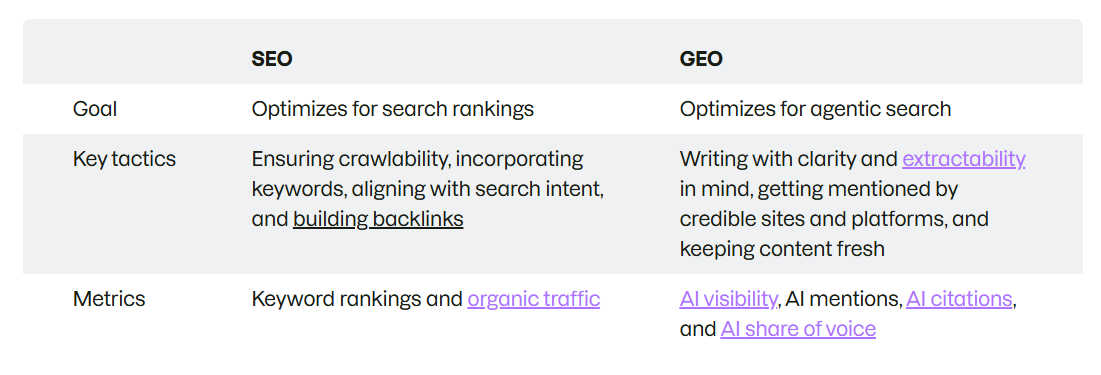
For instance, Semrush’s guide to GEO discusses this overlap with SEO. In particular, it stresses the importance of clear writing and providing structured content that AI systems can access and understand.
Source: Semrush
So, what does that all mean for the article you’re editing? Basically, you need to focus on the following four things/activities:
- Make answers understandable on their own. A passage beginning with “this method” may need the method’s name, especially if the explanation is placed several paragraphs or a page/screen above.
- Clarify names and relationships. Even for famous products, always specify the company name that stands behind it. Generative engines “feed” on entity information; that’s how they make sense of the web and its information. The entities may be company names, founders, particular experts, addresses, places, concepts, methods, etc.
- Give the page something worth citing. Include research findings, a documented example, or an explanation based on relevant experience. Connect the claims with clear evidence from reputable sources.
- Check each type of visibility separately. It helps to draw a clear line between optimization for each feature: a featured snippet is one result, while an actual link from an AI answer is another.
Let’s take an example. A biofuel-making company might describe their products in clear terms. One central definition could ideally fit a featured snippet, while specific product characteristics could be used by AI systems to give users options to consider.
The same page has two possible uses.
But neither follows automatically from the other. A snippet placement doesn’t guarantee an AI citation, and adding statistics won’t guarantee one either. The content still has to be relevant to the particular question being answered.
Common featured snippet optimization mistakes
Oftentimes, problems with featured snippet visibility happen not because you fail to follow relevant recommendations, but because you commit the same mistakes. Unwillingly, of course, because of unawareness. The problem might start with the intent or question you choose, or you may lose useful information when trying to shorten your answer.
That said, here are a few mistakes to watch for.
Targeting questions that do not match your expertise
What goes wrong. You spot a question with a featured snippet and decide to build a page around it. The topic is clearly outside the scope of your expertise, but when you look at the competitors’ pages, it might seem doable. So you rewrite what others say about this question, adding your writing style and unique perspectives.
Why it matters. There’s nothing wrong with researching an unfamiliar subject. The trouble starts when your answer depends entirely on what others have said. You may miss an exception that someone working in the field would notice immediately. Readers then get a confident explanation with an important piece missing.
How to fix it. Address the problems and answer the questions that lie within your immediate area of expertise. For topics further afield, bring in someone with relevant experience. Ask them to verify the provided answer and check the information for accuracy. Disseminate to your colleagues and friends with relevant expertise for their comments and questions.
Sacrificing useful detail for a short answer
What goes wrong. You have written an exhaustive and in-depth explanation for a featured snippet. It covers everything from A to Z, but the key problem is that it’s too long for a typical Google snippet. So you start shortening it and removing details. “Free delivery on orders over $60” becomes “free delivery.”
Why it matters. Your information about orders is concise now, but it misses the key point and leaves thousands of customers frustrated. They expect free delivery on ALL orders, but discover a delivery charge on orders below 60 at checkout. They quickly get frustrated and alienated, and may leave your store forever. What happened is that your content has created an expectation that wasn’t met.
How to fix it. When shortening your website or store information, ask a small focus group to read and evaluate the new content. A dozen interested eyes will spot more nuances and potential problems than you expect.
Using rigid word counts as a ranking formula
What goes wrong. You follow Google’s guidelines for Featured Snippets too strictly, e.g., try to make every paragraph between 40–60 words. As a result, once a clear 30-word definition gets an extra sentence that doesn’t bring any value. Similarly, a longer, 70-word explanation loses a key detail, becoming confusing for the reader. Before long, you’re more concerned about word count than what your website’s content actually delivers.
Why it matters. A word count is a bad measure when it comes to information usefulness. Two answers of exactly 50 words can differ enormously in accuracy and relevance. Besides, identical section and paragraph lengths lose natural authenticity and start to look suspiciously like machine-made content. Rankings and the likelihood of getting into Google Featured Snippets start to decline.
How to fix it. When writing, focus on the value your information brings first, then check the word count. Even the appearance (e.g., one or two paragraphs) is more important than raw word count. If a sentence doesn't bring any additional value, remove it. If an explanation misses a key detail, add it in a single sentence.
Assuming structured data guarantees a featured snippet
What goes wrong. You add structured data to a page, check that the code is valid, and expect the answer to appear in a featured snippet. When nothing happens, you look for a missing field or another schema type to try. The markup becomes the focus of the work.
Why it matters. Structured data really helps to make your content understandable to search engines. But accessible and understandable doesn’t mean it will automatically go to featured snippets. Schema markup does not guarantee a place in Google’s short answers.
How to fix it. Structured data should accompany every relevant piece of content when it supports a particular feature and helps to rank well in SERPs. But the value of your content, your answers to the users’ nascent questions, should be treated separately. Information properties such as relevance, accuracy, and freshness decide whether your answer gets to Featured Snippets, and that’s what you should be ensuring in the first place.
Conclusion
So, was it a win or a loss when someone read three sentences from your article and left? Sometimes, they simply needed a quick answer. There was never much reason for them to visit.
But other readers have something to do with that information. They need to fix an error, compare options, or explain a decision to their team.
Your best approach is to give those people a reason to keep reading.
Answer the question properly, then offer evidence, concrete numbers to back up your claims, examples, and practical details on the page. Don’t make your answer deliberately incomplete to get a click.
That gives your SEO work meaning: a clear answer in a Google Featured Snippet, followed by an article that delivers when someone decides to open it.
FAQ
Can you mark a page as a featured snippet?
No. There is no such shortcut to Google Featured Snippets. If there were, everyone would be guaranteed a place there, which would create a mess. Google’s algorithms are responsible for the evaluation and selection of which information gets into its short answers. You can optimize your information and increase its likelihood of getting into Featured Snippets, but the final decision is out of your control.
Do you need schema markup to earn a featured snippet?
No. Schema markup doesn’t guarantee you a spot in Featured Snippets. But the good news is that your page can earn a featured snippet without schema markup. Structured data is absolutely essential for search bots to access and make sense of your pages, but it has no correlation with Featured Snippets.
How long should a featured snippet answer be?
There is no ideal word-count range for a featured snippet. The key is information utility, clarity, and accuracy. Keep your answers reasonably short and clear, i.e., within a 30-45 word count range, or one short paragraph, and both users and Google algorithms would appreciate the effort.
Why do featured snippets change or disappear?
Google’s search ecosystem is a highly dynamic environment. It constantly changes depending on the search queries, your pages’ information, and competitor content. What was worthy of a place in Featured Snippets yesterday may become outdated today and be replaced by a better answer.
Can you prevent Google from using your content in a featured snippet?
Yes. There is a special command or rule that you can apply to your website or its individual pages. It’s called nosnippet, and what it essentially does is block both featured snippets and regular text snippets. However, you can also pick specific fragments of your content to be excluded from Featured Snippets, while keeping the rest of the pages available for discovery. That command/rule is called data-nosnippet.
All trademarks, logos, images, and materials are the property of their respective rights holders.
They are used solely for informational, analytical, and review purposes in accordance with applicable copyright law.



 Sign Up
 Sign Up