






Ecommerce SEO Keywords: A Complete Guide to Ranking Your Online Store

Running a successful ecommerce store is almost impossible without a solid SEO practice, and the latter is unimaginable without doing keyword research. Utilizing the right keywords in online listings has traditionally been the essence of ecommerce SEO, and it continues to be that way despite the latest shift toward AI-driven search experiences.
Ecommerce SEO keywords are the primary focus of today’s guide. On a few pages that follow, you will learn how to perform keyword research, create keyword-optimized content to rank high in search results, and apply some advanced strategies to further develop and scale your ecommerce store.
Buckle up, this is going to be a smooth and coherent, but deeply insightful and action-packed keyword ride.
What are ecommerce SEO keywords and why do they matter
Ecommerce SEO keywords have their unique features and subgroups worth exploring and clarifying upfront. They differ from all other keywords by search intent and how closely they align with buying behavior.
Understanding search intent for ecommerce queries
Search intent sounds like a technical phrase, but most of the time it’s just a fancy way of describing what’s going through a shopper’s head. People don’t search in a vacuum. They usually have a picture of the item in mind, even if they’re not great at describing it, and that picture usually slips into the query somewhere. You just need to know where to look.
It’s interesting how predictable some of these patterns become once you’ve seen enough of them. Someone types “comping light with long life battery,” and you instantly know two or three things they expect you to confirm on the product page. They want something practical and long-lasting. They want it to be sturdy enough, as it's for outdoor activities. They probably don’t want to dig through long copies to figure that out.
You can spot intent fairly quickly if you watch for clues like:
- the features they lead with;
- the tiny “for…” phrases that reveal the real purpose;
- hints of frustration or urgency;
- any detail that narrows the field dramatically.
What makes all this useful is that it paints a more human picture of your audience. Behind each clue, you begin seeing a real person with their mundane problems, weaknesses, fears, and passions. Ecommerce is all about understanding those passions and finding ways to satisfy them.
How keywords influence product discovery and rankings
Honestly, it’s hard to even talk about product rankings without talking about keywords, mostly because keywords are the first thing Google uses to sort your pages into the right buckets. If your wording doesn’t make the product obvious, the page gets thrown somewhere into the third or fourth (at best) page in SERPs, and discovery of your store becomes mission impossible.
Sometimes the issue isn’t that your page is bad — it’s that Google doesn’t understand it well enough to put it in front of the right shoppers. Be a friend to Google, make your product listings understandable to its algorithms, and that’s the key to your successful ecommerce marketing.
Still, many sellers don’t understand that, and their product pages with great photos and descriptions fail because they are labeled with weak or confusing phrases.
When you clean up your keyword signals, a few shifts almost always follow:
- You start appearing where real buyers actually browse.
- Your pages get matched with the right cluster of similar items.
- Product variations and synonyms begin working in your favor.
- Impressions spread across more stable, relevant search sets.
These changes help your product get discovered by people who weren’t looking for your brand or specific item. They were simply looking for an option that fits their needs, and the search engine finally recognizes that your page is one of those options.
Rankings then settle on top of this clearer understanding. Instead of the page bouncing in and out of irrelevant comparisons, Google stacks you against the correct set of products. And that’s usually when you start seeing upward movement — not dramatic leaps, but steadier, more predictable progress.
Types of commerce keywords: informational vs transactional
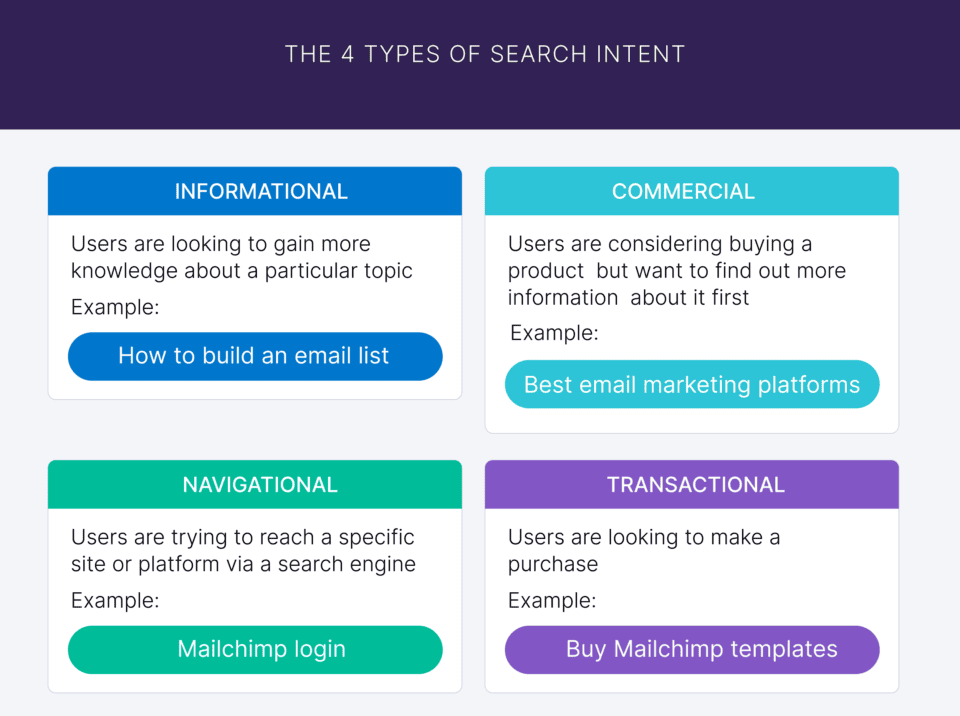
People search in stages, and that’s basically where the whole informational vs transactional keyword divide comes from. Early searches are more about understanding the landscape, and later ones are about choosing something concrete. You can see this shift clearly once you study enough real queries.
Source: Backlinko
Informational keywords come from people who are still circling the product, not ready to commit. They want information about the product, want to compare it with other similar products, and seek relevant answers. If your content is compelling enough to satisfy their hunger for information, you are on the fast lane toward making them buy (transactional request).
A few things usually make the distinction between the two keyword types clear:
- Informational intent sounds exploratory.
- Transactional intent sounds like a checklist.
- Informational queries hint at doubts.
- Transactional ones leave no doubt about what people want.
Both types sit inside the broader universe of ecommerce keywords, but they serve different goals. Informational terms give you a chance to meet shoppers before they settle on a brand. Transactional terms help you catch them right at the finish line. The best stores treat these as two sides of the same system, not competing priorities.
How to perform keyword research for ecommerce stores
All roads to ranking high in search results with the help of keywords lead through research. Keyword research is the starting point and the key to the successful ecommerce SEO strategy you build for your store. Find the best keywords, and you are ready to create content that aligns your product pages with the terms people genuinely use.
Identifying category-level keywords
Category-level keywords always feel like the part of research where you have to unlearn whatever tidy naming convention the site already uses. Stores love clever category names. Shoppers… do not. They want the dead-simplest label that gets them to the right place without any guessing involved.
Category-level keywords sit above the ordinary keyword research that you do, for instance, for product descriptions. They are the keywords people see first when browsing your shop.
SEO experts usually start by looking at what normal people say, not marketers. If someone needed to explain the category quickly in a text message, what word would they use? Nine times out of ten, that’s your real category keyword, and everything else is just us overcomplicating things.
These hints will help you find and cherry-pick category-level keywords:
- The shortest phrase that still makes sense.
- Whether your mom would understand the category name.
- The term autocomplete repeats over and over.
- How many weird synonyms show up (and which one wins by volume).
Once you land on the word that feels “obvious” (the one you probably ignored earlier), everything becomes easier. You implement it, and the traffic to your store will flow more naturally. Even your deeper keyword research gets clearer because the structure above it finally matches reality rather than wishful branding.
Finding high-intent product keywords
High-intent product keywords come from a different mental place than most searches. They aren’t exploratory, and they’re not trying to feel out the landscape. They sound like someone who already knows what they want, the color, the characteristics, even the price, and they are comparing options before making a final decision.
These keywords often combine oddly specific pieces of information. Sometimes they look almost clumsy, but that’s the point: the shopper is trying to make the search engine understand the exact version of the product they imagine.
And here is the pivotal moment: if the page they land on doesn’t reflect that same level of clarity, and doesn’t meet their expectations, the connection breaks.
These examples perfectly illustrate high-intent product keywords:
- “men’s waterproof trail running shoes, size 12 wide”;
- “office chair lumbar support adjustable armrests mesh black”;
- “queen memory foam mattress medium-soft firmness 12 inch”;
- “espresso machine 15 bar stainless steel removable tank”.
Having these terms in a keywords list usually fills in the gaps on product pages. High-intent keywords point directly to those missing pieces. They show where clarity is needed, where specifications should be visible, and where the product needs to prove itself without making the shopper zoom in or hunt around the page.
Using tools like Ahrefs, SEMrush, and Google Shopping
Using Ahrefs, SEMrush, and Google Shopping is no longer a nice-to-have or a booster for one’s keyword research; it’s a necessity and a routine.
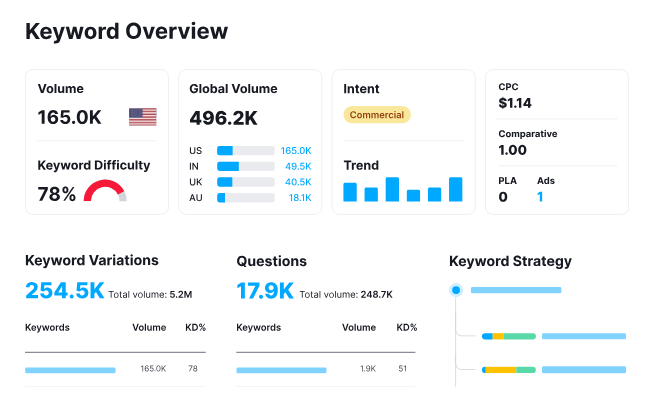
Ahrefs pulls out the heavy hitters, SEMrush reveals odd competitive angles, and Google Shopping shows the strange-but-effective product titles people tend to click. Put together, they form a kind of crooked mirror of how ecommerce SEO keywords develop in real searches.
Ahrefs might tell the story through “pet hair vacuum.” SEMrush complicates it with a chunky line like “vacuum for long hair pets, powerful suction.” Google Shopping overrides both by giving visibility to “pet vacuum handheld turbo brush,” the version shoppers gravitate toward.
Source: SEMrush
For an attentive observer, these versions may not seem too synchronized. In fact, they are different. But they all reveal a unique perspective on how users search and which terms they use. Together, they make your analysis complete.
When you begin using various SEO tools, a strange term like "keyword 43" may appear. What it means is that even a keyword that goes as far as 43 in your list can be important, and you shouldn’t discard it right away.
Pro tip: Use all tools simultaneously, as they provide holistic data that helps you form a full picture. While one or two tools might miss something important.
Discovering long-tail keywords through customer data
Digging long-tail keywords out of customer data feels like overhearing pieces of conversation you weren’t supposed to hear. Someone says, “I needed something that dries fast because the bathroom never gets sunlight,” and suddenly that’s the gold. Not the obvious product name — that weird environmental detail.
Stuff keeps popping up where it doesn’t belong. A person mentions moving houses, another mentions a cramped office, and someone else mentions their cat knocking things over. The language shifts in strange ways, and somehow those shifts point straight at what they typed into Google when they were still figuring it out.
Long-tail keywords appear in everyday customer interactions long before they show up in specialized tools like Ahrefs or SEMrush. You just need to know where and what to look for:
- Phrases that sound accidental.
- Complaints that repeat just enough.
- Details no one asked for, but everyone includes.
- Those random “oh, by the way” sentences.
It doesn’t look like research. More like overhearing strangers talking about items in a grocery line and catching the parts that matter more than they meant them to. But that’s the essence of long-tail keyword search. Employ social listening tools and ask your customer care personnel for customer data — that’s where your best long-tail keywords reside.
Creating content around ecommerce SEO keywords
You’ve cherry-picked the best keywords for your store and your product assortment. What’s next? You’d better not waste any time applying them to your content, but take a short moment to plan your moves.
Basically, there are two directions from here: one is using keywords in the content you publish directly on your site, and the other is about the content you publish elsewhere, i.e., in blogs, buying guides, and in user-generated content.
Let’s take a look from the outside and explore your external content possibilities first.
Using blog posts to capture top-of-funnel keywords
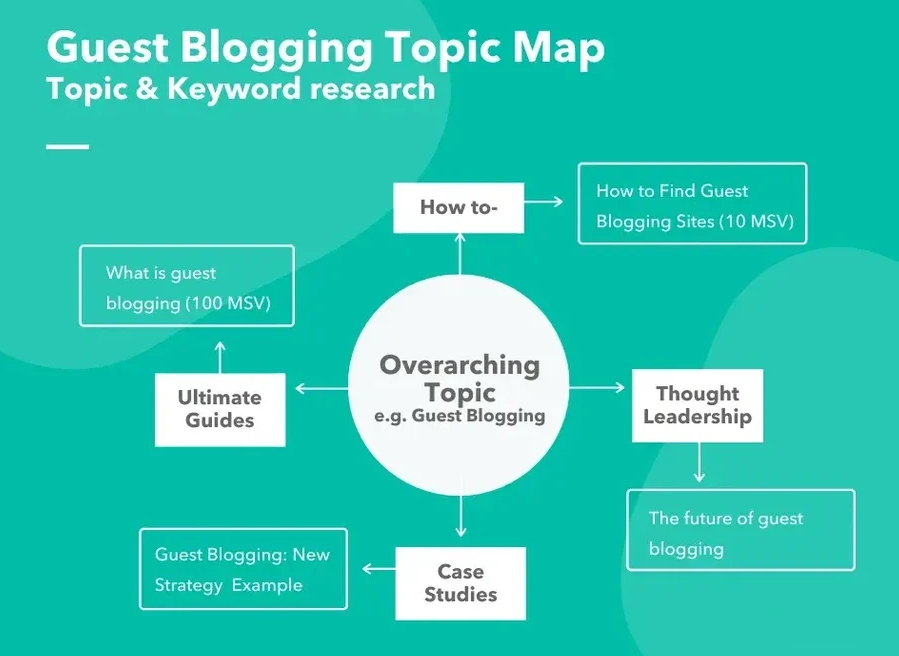
Using blog posts to capture top-of-funnel interest means writing for people who don’t yet have a shopping list, only a feeling that something could be improved. They might be typing broad, slightly clumsy queries into search, hoping someone will put the pieces together for them.
Source: Hubspot
A blog article can be that translation layer between raw concern and a specific solution. Totally worth your time and effort.
Instead of focusing on a single SKU, these articles speak about situations: small apartments, noisy neighbors, tight budgets, hectic schedules. People recognize themselves in those situations faster than they recognize themselves in a spec sheet.
Good top-of-funnel blog content usually:
- Starts from a relatable pain point or question (the so-called “hook”).
- Maps that pinpoint a few clear solution paths.
- Mentions product categories only after the reader feels understood.
- Leaves room for the reader to decide what matters most (no pressure on the reader).
This approach shifts the store from “just another seller” to “the place that explained things clearly.” Later, when the reader is comparing models or searching for the best version of something, that earlier experience often tips the scales.
Developing buying guides that drive category traffic
A buying guide that drives category traffic doesn’t try to answer every question. It tries to answer the right ones — the ones that give shoppers enough confidence to continue without second-guessing every click.
At the top of the marketing funnel, people want orientation more than specifics. A good guide gives them that, and doesn’t overwhelm with details or excessive pressure (“buy now”, “click here”, “your best chance”, etc.).
Instead of treating the guide as a long product brochure, it works better as a conversation starter. It helps people sort the big decisions from the small ones and gives them a sense of what “good enough” looks like versus what genuinely changes the experience.
Guides tend to work best when they include:
- Simple explanations of features buyers often misunderstand.
- A breakdown of different user scenarios and what suits each.
- A gentle comparison of categories, not specific SKUs.
- Visual cues or examples that help readers picture their own needs.
Once the guide gives readers enough introductory information, they naturally click into the category that fits their situation. They already know what to expect, what to ignore, and what to compare. The guide did its job not by pushing them forward, but by helping them feel capable of making the next step.
The trick is to make the buyers think that the decision is absolutely theirs, that they were not pushed or enticed in any way by the contents of the guide.
Leveraging user-generated content in SEO strategy
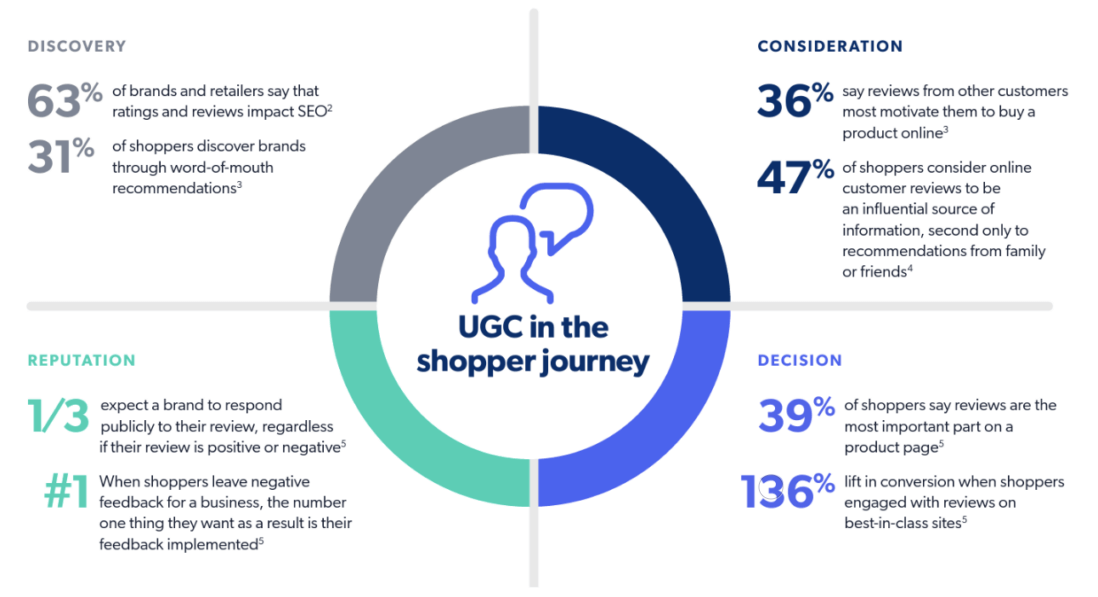
Leveraging user-generated content in SEO means treating every review, question, and customer photo caption as a small data point. None of them looks important on its own. But together, they reveal what people care about enough to mention without being prompted. That’s the kind of insight keyword tools struggle to fake.
User-generated content is the content that users make on their own, which further promotes and popularizes your brand and products. Examples may include user-made videos, reviews, unpacking videos, and so on.
Source: Bizaarvoice
This kind of content naturally expands the range of phrases associated with a page. A single item can end up ranking for problems it solves indirectly, just because multiple reviewers described those situations in their own words. Search engines notice that variety and treat the page as relevant for a wider set of queries.
Some of the richest material tends to appear in:
- Longer reviews that read more like short stories (published mostly on Facebook and X).
- Q&A threads where multiple people chime in with variations (a good example platform is Reddit).
- Phrases that keep popping up across different product lines.
- Comments comparing this product to “the last one” they owned (watch for YouTube comments).
Pulling those phrases into headings, microcopy, and support articles helps close the gap between what the store says and what the customer actually looks for.
Done consistently, it turns user-generated content into a living source of ideas that keeps the SEO strategy tied to real behavior around commerce keywords.
Applying keywords to your ecommerce site
The second phase of your keyword delivery should be focused on your internal resources, i.e., your site and online store. Some begin with this phase, and, as a rule, they get results (traffic and boosts to the ecommerce platform rankings) faster. But the drawback of starting with the store first is that many store owners forget to move on to the second, external dimension.
How to optimize category page titles and meta tags
Optimizing category page titles and meta tags usually starts with cutting out the extra fluff. This is a natural flaw, as marketers are ordinary people who also tend to make their first copy drafts excessively wordy and long.
And shoppers also skim these bits faster than anything else, so the text has to behave more like a sign than a headline. It’s strange how a single vague word can make someone feel like they clicked into the wrong part of the site, but it happens constantly.
The trick is keeping things simple. A good title shouldn’t read like an ad; it should read like a sign above a store aisle. The meta description can then give a quick direction, nothing more.
Here are some useful things to refine:
- Write for scanners, not readers (for instance, in the intro sentence above, the following trimmed phrase would perform better: “Useful things to refine”, i.e., without the “here are some…” part).
- Remove adjectives that don’t add clarity.
- Use the meta description to set expectations (e.g., “wide selection,” “eco-friendly options”).
- Check how competitors label similar categories.
For example:
Title: “Outdoor Furniture Sets for Patios & Balconies”
Meta description: “Browse weather-resistant patio sets, lounge chairs, and outdoor tables for small and large spaces.”
In this example, the title gives just enough extra info to provide context (not just abstract furniture sets, but the ones for patios and balconies).
The meta description then fills in the missing pieces by naming the types of items people usually expect in this space, and highlights that those are weather-resistant — exactly what you would expect in a robust, high-performing outdoor furniture set.
Optimizing product descriptions
Most product descriptions fail because they assume the reader is patient. They aren’t. People scan for something that matches their mental checklist — and if the page doesn’t hit one or two of those points quickly, they vanish. Say “thank you” to the rapidly diminishing attention span, especially on social media.
Search engines do a version of the same thing, scanning for signals to group the page under the right ecommerce SEO keywords.
So the job is mostly about removing anything that slows the scan and lifting the things that matter.
Check out these places; they are worth tightening up:
- Beautifully sounding sections that bury the only useful info under this eloquent fluff.
- Missing clarity around who the item is for.
- Unfriendly formatting that breaks the reader’s flow.
- Assumptions that shoppers know industry jargon (some of them do, but not all).
Once those parts are handled, that’s when people start trusting the page more. They scroll less anxiously. They stop wondering if the description hid something important. And because their questions get answered naturally, they’re more willing to commit without jumping back to the search results to endlessly compare.
SEO best practices for image alt tags and filenames
There’s no magic trick to alt tags; they just work when they’re not trying to be anything other than descriptive. The more literal they are, the more useful they become.
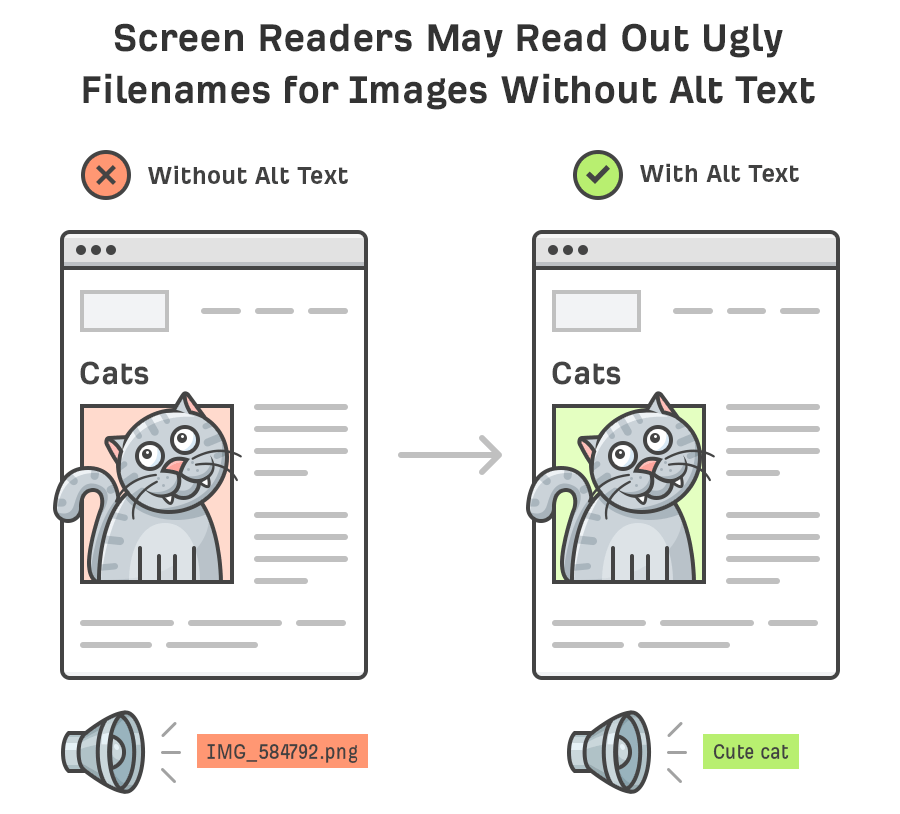
Source: Ahrefs
Filenames follow the same path: if they read like something a person might name the file when actually organizing their computer, they usually perform better.
Both are worth your extra attention, as their SEO gains are far greater than the free time you might get by neglecting them.
Some loose reminders that help more than templates do:
- Describe the thing in your own words (think more about utility and less about marketing).
- When describing, use hyphens, not underscores.
- Make variants obvious in the text.
- Don’t cram five adjectives where one is enough.
For example:
Filename: womens-hiking-backpack-40l-green.jpg
Alt: “women’s 40-liter green hiking backpack with padded straps.”
Both say what the product is and what’s visible — nothing more. The shopper gets the info about the backpack’s capacity (40 liters) and its color.
Once you clean these essential elements, other SEO improvements start stacking much faster. And since most modern online shopping is about images and browsing images, the recommendations we give here can deliver instant gains or simply steer you in the right direction.
Keyword clustering and organizing your store
Did you know that you can do much more than just spread the keywords across internal and external content? Ecommerce SEO keywords hold more potential, which you can tap into by leveraging several advanced techniques. More about them in the few subchapters that follow.
Building keyword clusters around product categories
Keyword clusters around product categories solve the problem of “our category page ranks for everything except what we want.” Clustering is like hosting a family meeting for your keywords: some of them contribute, some of them create drama, and some of them you should’ve removed from the list ages ago.
Clusters show what matters. And more importantly, they show what doesn’t. Many “important” keywords you’re emotionally attached to will be rejected by the cluster like a bad audition.
You’ll see early signs of a cluster when:
- Unrelated queries keep showing up like uninvited guests.
- Customers describe the product more clearly than your supplier ever has.
- Long-tail terms subtly reveal what the main term refuses to say.
Let’s take this example:
A blender-related cluster tends to include “smash ice without crying,” “easy clean,” “smoothies in 10 seconds,” and “quiet-ish motor.”
Yes, you’ve read it right, “quiet-ish.” People want honesty, not marketing spin.
Once you accept the cluster’s structure, everything else gets simpler. Categories behave. Pages stop stealing each other’s traffic. And you finally understand what your audience has been trying to tell you while you were busy optimizing the wrong phrase.
Mapping clusters to product and landing pages
Mapping keyword clusters to product and landing pages can be compared to assigning roommates in a shared apartment. All with different characters, and they require thoughtful matching.
For that reason, some keywords get along beautifully; others should never be allowed in the same room, or they’ll ruin the whole ranking potential out of spite. Once you understand that logic, the process will become more transparent and manageable.
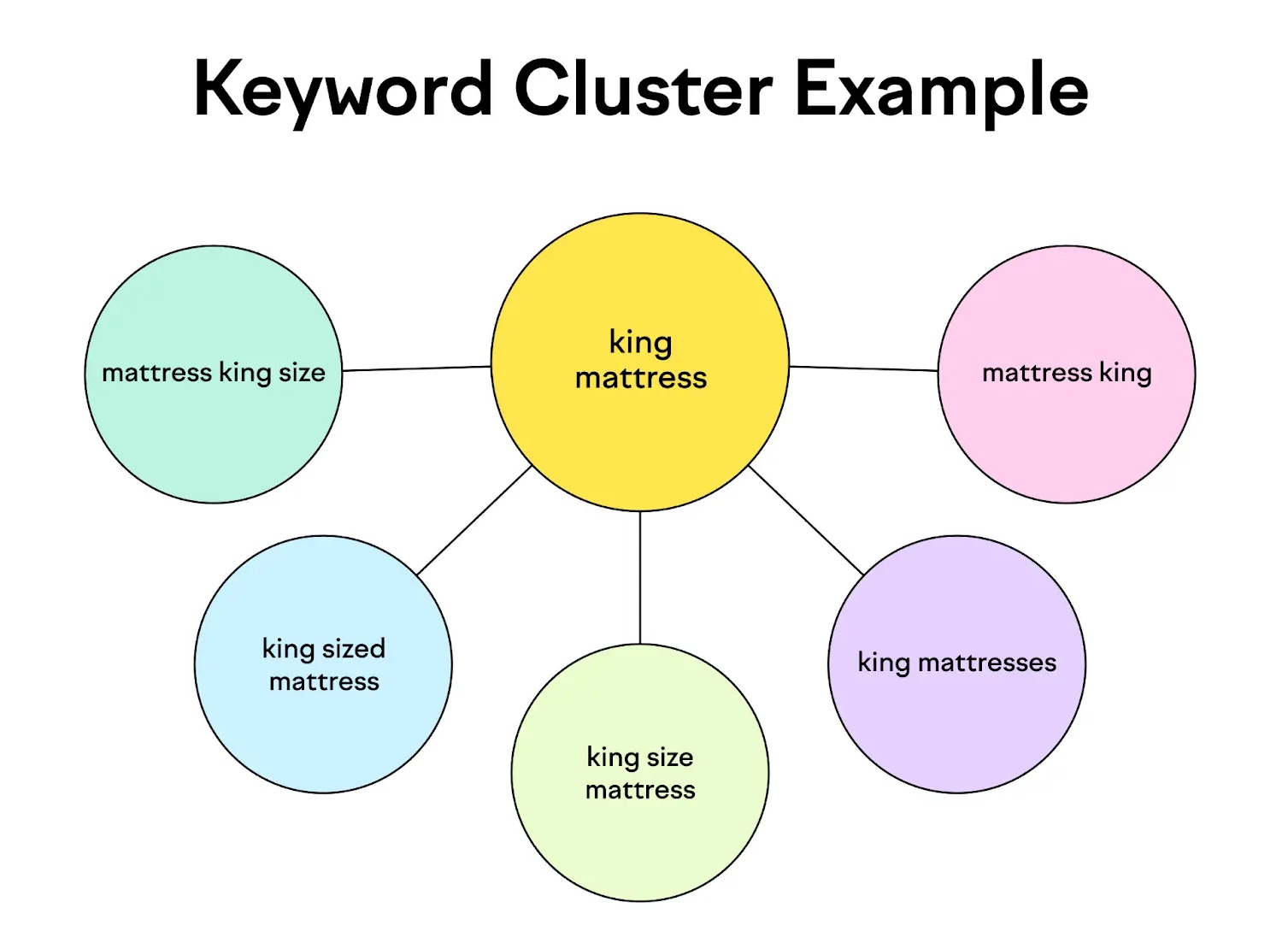
Source: SEMrush
Clusters already hint at where they belong. For instance, broad terms want big rooms. Specific terms want their own corners. And the ones that sound slightly confused usually fit somewhere in between.
You’ll figure out the layout faster if you watch for:
- Broad, theme-defining terms, gravitating toward category pages.
- Feature or spec-heavy phrases sticking naturally to product pages.
- Comparison or “best for X” searches, leaning toward landing pages.
- Strange long-tail phrases behaving like supporting text, not heroes.
Once clusters settle into the right spaces, the site finally stops fighting itself. Pages quit cannibalizing each other. Rankings calm down. And you no longer feel like you’re doing duct-tape SEO just to keep the structure from collapsing.
Using filtering options to capture long-tail variants
Using filtering options to capture long-tail variants is one of those things that looks painfully obvious once you’ve done it, but somehow gets ignored for years. Filters tend to collect all the odd, overly specific searches shoppers make — the ones you’d never dare target with a full page. And yet those are often the keywords that bring in the most determined buyers.
It takes a perfect match between a filter and search behavior for your landing page to start collecting user clicks. Search engines notice this and rank your store higher in their results pages. And, as we know, most ecommerce platforms (Etsy, eBay, Amazon, etc.) are search engines in their own way, as they process users’ requests the same way their bigger counterparts like Google do.
With filters, your store starts showing up for terms you didn’t even know you were ranking for, and you look smarter than you actually are.
Filters also reduce decision fatigue. Instead of overwhelming shoppers with endless product grids, you let them carve out their own path. And as they do that, the long-tail naturally connects to your structure.
So while filters rarely earn praise as a sexy SEO tactic, they quietly do the heavy lifting. They catch users who know exactly what they want but refuse to type it in a simple way.
Avoiding keyword cannibalization in large catalogs
Avoiding keyword cannibalization in large catalogs is basically crowd control for pages that refuse to mind their own business. The bigger the catalog gets, the more likely it is that two very confident pages start chasing the same keyword like it’s the last seat on a bus. Google notices the chaos long before you do.
The trouble usually starts when pages forget their roles. A category page talks too broadly, a product page talks too ambitiously, and suddenly they’re both competing for a keyword neither of them can fully own.
You can usually spot cannibalization when:
- Two pages mysteriously trade positions every few days.
- Organic traffic drops, but nothing “looks broken”.
- Your titles start sounding interchangeable.
- Google seems undecided about which page it prefers.
Fixing the problem of cannibalization is mostly about assigning the correct roles. Make the category page the authority, let the product pages focus on specifics, and reserve nuanced keywords for dedicated landing pages. Almost like delegating responsibilities to your subordinates when working in a team or a project group.
When the hierarchy makes sense again, the ranking drama fades, and the catalog stops stepping on its own feet.
Tracking the performance of your SEO keywords
Keywords in the content of your store, outside in blog posts and user guides, properly mapped clusters with fine keyword filters — all these work fine with a bit of luck and a meticulous configuration. However, for a stable peak performance over a long run, you’ll need more than luck. You’ll need performance tracking and, of course, swift reaction to potential derailing or problems.
Monitoring keyword rankings and visibility
Monitoring keyword rankings and visibility is the part of SEO everyone swears they’ll “totally stay on top of,” and then three months later, nobody remembers when they last opened a tracking tool.
You can hear top management saying how important monitoring is, but they rarely take any action based on the results. But this is the moment where your keyword work either pays off or quietly unravels behind your back. Rankings aren’t static. They wobble, drift, and occasionally plummet for reasons you won’t catch unless you’re watching closely, and dare to take the necessary actions.
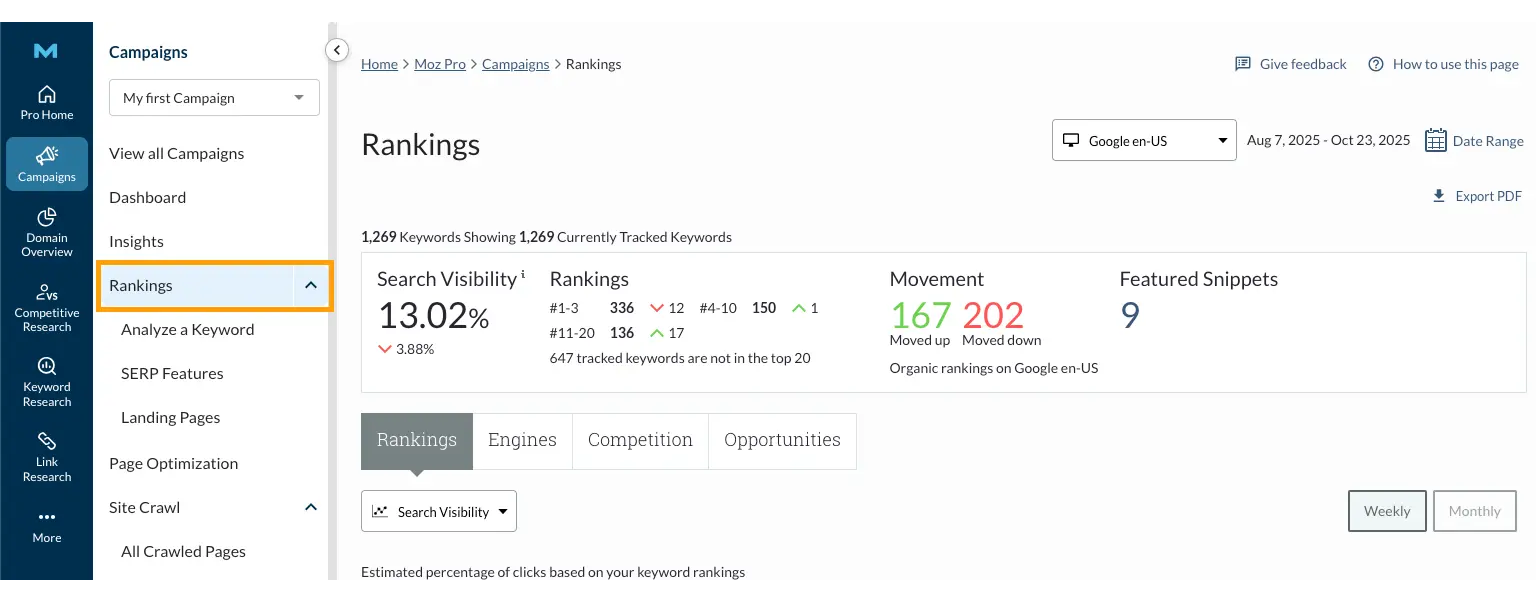
Source: Moz
Visibility gives you an early warning. If impressions fall before rankings change, it means the SERP landscape is shifting — sometimes quietly, sometimes aggressively. Either way, ignoring it is an invitation for trouble.
You’ll know monitoring is overdue when:
- Keywords stop sending traffic despite holding roughly the same position.
- Search Console graphs develop suspicious dips or plateaus.
- Competitors appear out of nowhere with uncanny timing.
- Your top pages lose impressions, but nobody changed anything.
The thing with monitoring, even if it's well-established and practiced regularly, is that everybody likes to see good results and wins. It’s an occasion to celebrate and rest on one's laurels. But only a few take discretionary effort and actually do something to act upon bad results.
Taking corrective actions systematically gives you lead time to adjust content, improve internal links, or catch competitor surges before they become a real threat.
Measuring the revenue impact
Rankings are fun to look at, impressions are nice for presentations, but none of it pays the bills. Revenue does. And SEO has a strange way of improving everything except the one number the finance team actually watches. So you track it — not because you enjoy spreadsheets, but because you want proof that your keyword decisions aren’t just “good vibes and optimism.”
Revenue impact becomes clearer when you stop tracking keywords as abstract achievements and start seeing how they behave inside customer journeys. Some keywords bring curious window-shoppers; others bring people who already have their credit card in hand. And mixing those up is the fastest way to confuse yourself.
You’ll know SEO is influencing revenue when:
- Keywords with strong intent start producing repeatable transactions.
- Specific clusters correlate with higher AOV, not just traffic.
- Organic users convert faster than other channels.
Once you track these patterns regularly, the whole thing becomes easier to manage. Not “simple,” but at least predictable.
Revenue impact tells you which keywords actually matter and which ones are just cluttering your dashboard. And honestly, that clarity alone saves you a few premature panic attacks.
Evaluating CTR and conversion rates for key terms
Two kinds of questions come to mind when thinking about evaluating CTR and conversion rates (CR) for key terms:
- “Did anyone notice us?”
- “Did they care enough to buy?”
SEO loves complicating this, but the truth is simple. CTR shows interest. Conversions show intent fulfilled. When one is high and the other is not so high, or just low, there must be something wrong with your keyword strategy.
Honestly, CTR drops for many reasons — uninspiring titles, boring descriptions, or just competitors doing a better job at convincing their prospects.
Conversion drops for entirely different reasons, including pages that don’t match intent or too many steps between “curious” and “purchase.”
The warning signs usually look like:
- Lots of impressions, a sad CTR, and nobody knows why.
- Strong CTR, but users bounce the moment they see the page.
- Conversions clustered around a few surprising keywords.
- Higher-funnel terms (i.e., more general ones) converting better than supposedly “high intent” ones.
CTR tells you how your brand performs at the SERP level. Conversion rate tells you how it performs on your own turf. When both metrics line up, you know the keyword is doing exactly what it should. When they don’t, it’s time for corrective actions.
Advanced strategies to scale ecommerce growth
The beauty of keyword optimization is that there is hardly any limit to how far you can push and how much you can do. In particular, you can push the envelope by applying a few advanced strategies, including leveraging sales events and seasonal trends, keyword localization, and applying the latest technologies like AI to streamline virtually any aspect of your keyword work.
More about each strategy in this final chapter.
Incorporating seasonal trends and sales events
Incorporating seasonal trends and sales events is basically agreeing to live with the fact that people don’t shop rationally. They shop in waves… emotional waves. One minute, nobody cares about your product; the next minute, everyone wants three of them because some holiday told them to. So yes, you adapt the keywords, even if it feels like chasing a moving target.
The key is to be one step ahead of customer mood or behavior shifts. Adapting the keyword strategy once the shift has happened is already too late. Put every transitional holiday in your keyword calendar and prepare the necessary action plan for each event.
Seasonal behavior isn’t subtle. It barges in. You see the clues early, but pretending they’re not there never ends well.
You usually feel the shift when:
- People start searching in oddly frantic ways.
- Categories that slept all year suddenly wake up.
- Search data looks louder than normal (for no polite reason).
That’s when reacting is almost too late. Just book these early trends in your SEO calendar and develop plans to prepare for them the next time they hit your ecommerce business.
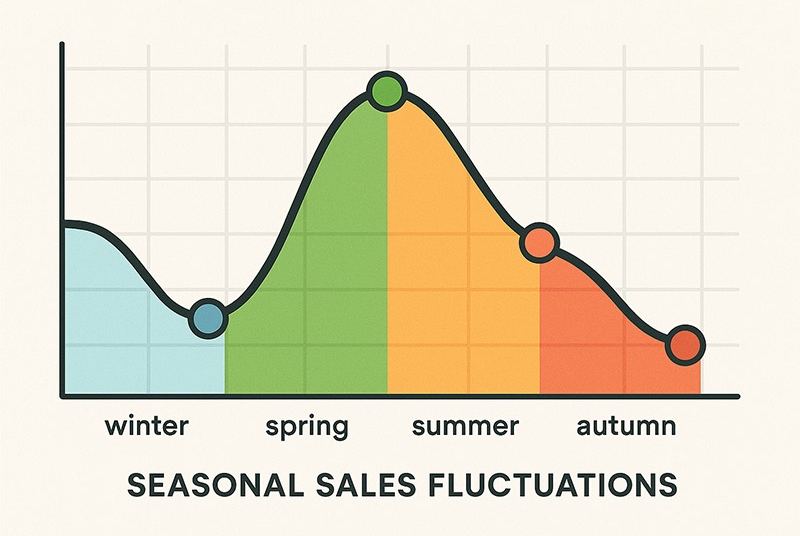
Source: Smallenterprisemag
Seasonal alignment isn’t about rewriting your entire site. It’s more like tilting the messaging so it matches what people are already thinking about. And if you time it right, it feels effortless — like you predicted demand. If you time it wrong, you end up looking surprised by events that happen every single year.
Localized keyword research for global markets
Localized keyword research for global markets is where SEO meets reality. You can’t ship the same keywords worldwide and hope culture, language, and search habits automatically adapt. They won’t. Every region edits your strategy whether you like it or not.
This is also where you discover that “translations” and “local keywords” are two completely different animals. One gets understood. The other gets ignored.
The following four tools can help you conduct localized research for your ecommerce SEO keywords: Google Keyword Planner, Moz Keyword Explorer, Ahrefs Keywords Explorer, and SEMrush Keyword Magic Tool.
The goal isn’t to reinvent your entire SEO strategy for each market. It’s to adjust the angles, so people actually recognize what you’re offering.
When you find the language people naturally use, everything — CTR, conversions, even product trust — will improve. Localization isn’t flair, which you can easily skip. It’s a practical tool that respects and leverages how people talk.
Applying AI to analyze keyword opportunities faster
We are on the edge of the second quarter of the 21st century, and it means that the exponential technological growth has led to some noticeable breakthroughs. AI may not be sentient yet, nor at the stage of artificial general intelligence (the equivalent of the human brain), but its ability to help us perform routine, data-intensive tasks on a computer is remarkable.
SEO and keyword analysis are no exception. AI-powered tools that utilize the so-called machine meaning algorithms and deep neural networks can filter noise from real demand and guide you straight to profitable keyword themes.
However, AI is not a substitute for the experienced human brain, but it certainly helps speed your keyword research and analysis in the following ways:
- Uncover emerging keyword patterns weeks before they show up in traditional SEO tools.
- Group massive keyword sets into intent-based clusters automatically.
- Forecast keyword difficulty and traffic potential with real-time models.
- Detect seasonality shifts and demand spikes with far higher accuracy than a human expert can do.
- Identify content gaps by comparing your pages to top competitors at scale.
AI tools can also simplify complex datasets that no single human brain is capable of processing, so your decisions can rely on insight, not intuition. The ability of AI to make sense of big data and find patterns, regularities, and outliers is outstanding. It would take months for a human SEO to process the same volume of search data that an AI-powered algorithm can do within minutes.
Which AI tools can do that? There are purely new SEO tools and the old-faithful ones that only recently started to integrate AI capabilities into their code. For example, new tools include:
- WriterZen (Keyword Golden Ratio + AI Topic Clustering).
- Clearscope.
- MarketMuse.
At the same time, the old SEO giants with similar capabilities are:
- Ahrefs (Keywords Explorer + future AI features).
- SEMrush Keyword Insights / SEMrush AI tools.
- Surfer SEO (Content Planner + SERP Analyzer).
Couple these tools with a seasoned SEO specialist to check and interpret results, and your ecommerce keywords work will be at a whole new level. The key is keeping an experienced human in the loop and employing not a single, but at least several tools from the list above to cross-check your findings.
Conclusion
When doing ecommerce SEO keywords professionally, there are no trifles. Every single aspect, be it keyword research, on-page keyword optimization, or off-page dissemination, counts toward the general goals for your ecommerce business — improved search visibility, discoverability, and higher traffic that work together to turn casual browsers into steady customers.
The key is to approach this work systematically, implementing one activity at a time and making each project translate into a well-established business process. For example, you map keyword clusters to product and landing pages once, but later you should make it a routine process that consistently brings results and adds to the overall SEO success.
Start with keyword research, employ some credible SEO tools like Ahrefs and SEMrush, then optimize every on-page element like image alt tags, product category names, and meta descriptions. Those will be the quick wins, as your online store ranking will immediately notice the improvement, and more qualified visitors will come to your store and move smoothly from interest to checkout.
All trademarks, logos, images, and materials are the property of their respective rights holders.
They are used solely for informational, analytical, and review purposes in accordance with applicable copyright law.



 Sign Up
 Sign Up