




SaaS SEO Strategy for Startups: Where to Begin and What to Prioritize
There’s always something more urgent than SEO when you’re running a SaaS startup. A feature needs fixing, a customer needs help, and the website can wait another week. Then another week passes.
Finding time for SEO is one problem. Knowing what deserves that time is another. A long list of recommendations doesn’t help much when your team can only handle a few of them.
This guide will help you put your SaaS SEO strategy in order, with a clearer idea of where to begin and what can wait.
What makes an SEO strategy different for SaaS startups?
A SaaS SEO strategy is a plan for helping people find your software through search and become customers. The usual SEO principles still apply. But the product you’re selling changes what people need to know before they’re ready to try it.
With software, a visit doesn’t necessarily lead straight to a purchase. SaaS customers are picky, even finicky, if you will.
A typical SaaS customer discovers your product, compares it with a tool they already use, and discusses it with their team. Even after signing up for a trial, they may need time to decide whether it’s worth paying for.
Tellingly, that decision can take months. In one HubSpot survey, 60% of B2B buyers took between one and six months to purchase a solution. Your website may need to help them through several rounds of research before they’re ready to commit.
This creates a few meaningful differences for SaaS startups:
- There can be several people involved. The person researching your software may need approval from a manager or someone responsible for the budget.
- Customers are choosing an ongoing service. They are particularly interested in how well your solution fits their existing systems, and may ask for your support with integrations.
- A signup is only part of the result. You can have thousands of free users, but only a handful of them would actually decide to continue and pay for the full software version. But even paying customers can cancel anytime.
Quite naturally, the result may be a very fragile environment for those startups, which have not earned a solid reputation yet and depend heavily on the first customer impressions.
For any startup, there’s also the question of how well you know your market. Your product and audience may still be changing. That means your SaaS SEO strategy will need room for what you learn from the people who actually use the software.
Where should your startup begin with SEO?
Before you start working on a SaaS SEO strategy, take a look at how people currently become your customers. Some may come through recommendations. Others may find your product through ads or posts on social media. If you already have a few customers, you have something useful to work with.
Ask them what made them look for a product like yours. What were they using before? What wasn’t working? Their answers can help you understand the problem from the customer’s side, which may be different from how your team describes it.
Then, look at your website. Imagine someone visiting it without knowing anything about your business. Can they understand who the software is for, what it does, and how to try it?
Here is a concise list of the things that your startup SEO should begin with:
- A description of the customers you want to reach.
- One main action you want them to take on your website.
- Any information you already have about visits and signups.
- The time and budget you can give to SEO.
You don’t have to get all this information from interviews. Support requests, website data, and conversations with your team can fill in the gaps. The process below shows how to bring those sources together.
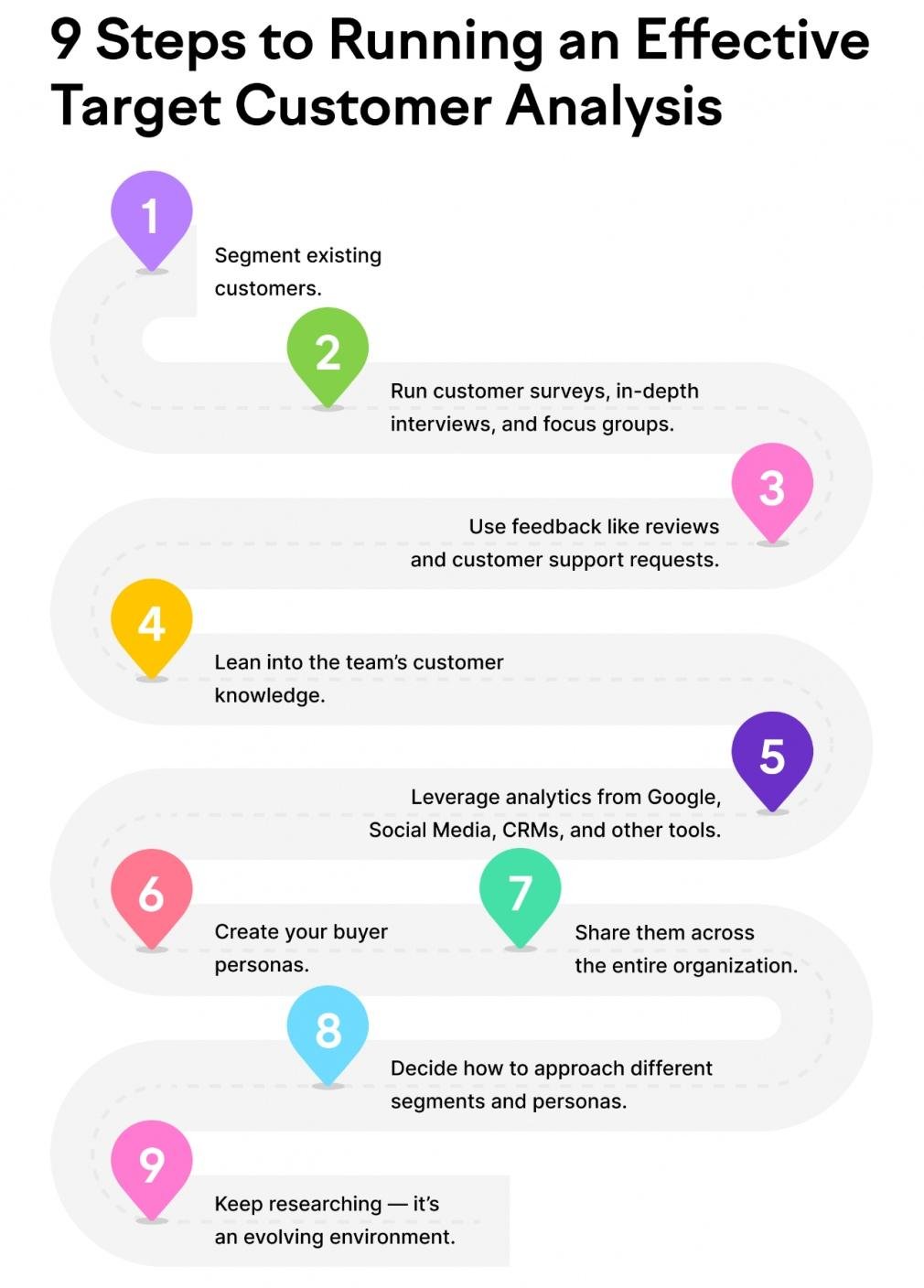
Source: Semrush
These are the details your first SEO decisions will depend on. Also, consider your resources. Most startups are lean; they start small, and making gigantic plans at this stage may sound impressive, although it won’t be realistic. For instance, a founder doing the work alone will need a different plan from a startup with a writer and developer available every week.
How to choose which keywords to target
Imagine you’ve found a keyword that gets plenty of searches and seems related to your business. It looks like a good choice. But when you check the results, you realize people are looking for a free download that your software doesn’t offer.
This is why choosing keywords takes a little more than comparing search volumes. Here’s how to work through it:
- Make a list of relevant topics. Use the problems your customers bring up and the tasks your software helps them complete. If you sell a tool for managing staff leave, start with things like holiday requests and absence tracking.
- Find the phrases people use for those topics. Search suggestions and keyword tools can help here. You may find several ways of describing the same need, including terms your team hasn’t used before.
- Check the purpose of each search. Someone looking for “annual leave policy examples” needs different information from someone searching for “leave management software.” Both may be relevant, but they would usually need different pages.
- Consider your chances of competing. Look at the websites and pages already appearing. Are their answers detailed and useful? Could you add something based on your product experience? Use difficulty estimates as another piece of information.
- Select the best matches for your first pages. Give attention to searches your product can help with and your team can cover properly. Then weigh demand and competition to decide their order.
You can return to the rest of the list later. There’s no need to commit to every relevant keyword at once.
Which pages should you create first?
Think about the top of the sales funnel, where visitors need to know what your product is about. This is covered by the pages that contain information about your products, helping visitors understand your software and decide whether to try it. So, such pages should be your primary target.
More specifically, the first pages to consider creating for SaaS companies are:
- Product and pricing pages. Explain what the software does, who it’s for, and what customers get with each plan. If a customer needs to spend more than five minutes finding and digesting this information, you’d better rewrite and improve them before you start losing potential customers.
- Feature and use case pages. These help curious customers get more information about specific products and services. Video editing software needs clear examples and use cases for prospects to consider buying it.
- Comparison and alternative pages. If your startup offers several choices of products and services, you need comparison pages to explain all the differences and nuances. Practice shows that most SaaS customers like to choose among several alternative solutions.
- Articles that answer related questions. Once the product information is covered, add useful explanations around the tasks your customers need help with. This will be helpful for new customers and for those loyal ones who constantly need proof that their choice of software was the optimal one.
These pages help people at different stages. Someone exploring a problem needs an explanation; someone comparing subscriptions needs enough detail to make a choice. And after the purchase, customers still need reasons to stay. You can see how those needs fit together below, illustrated by a classic 3-stage marketing funnel:
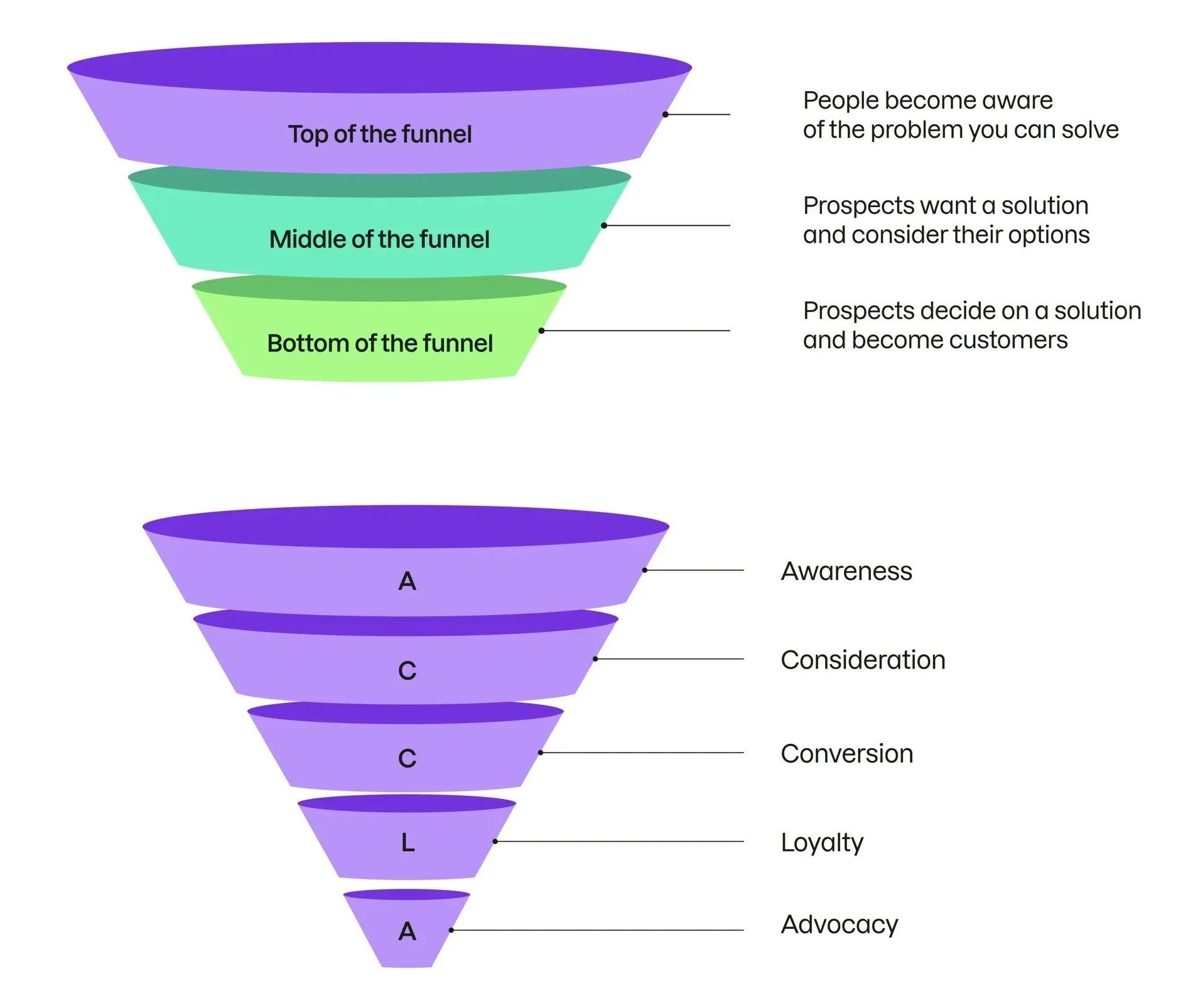
Source: Semrush
You don’t necessarily need a separate page for every SaaS feature. If two features make more sense when explained together, keep them together.
If you feel like that’s too much and you’re getting lost in where to begin, choose your first pages around what your product can already do well. A detailed page showing how tutors use your booking software will be more convincing than several nearly identical pages with different job titles.
Get the technical details right
Technical SEO can involve quite a lot of work, depending on the website. At the beginning, though, you can focus on the things that affect access and everyday use. The following checks give you a place to start.
Make sure search engines can find and index your pages
A page can work perfectly when you open it and still be excluded from search. This sometimes happens because the settings used during website development haven’t been changed.
Imagine your team has just published a page about a new integration. You can open it, read the explanation, and try the demo. But the page still has a “noindex” instruction, which tells search engines to leave it out of their index.
So, before assuming that a page needs more content, check whether it can be indexed at all.
For your first review, choose a few important pages:
- Your main product page.
- Pricing and plan information.
- Pages describing features or particular uses.
Enter each URL into Google Search Console’s URL Inspection tool. If a page isn’t indexed, review the information provided and pass any technical issues to your developer.
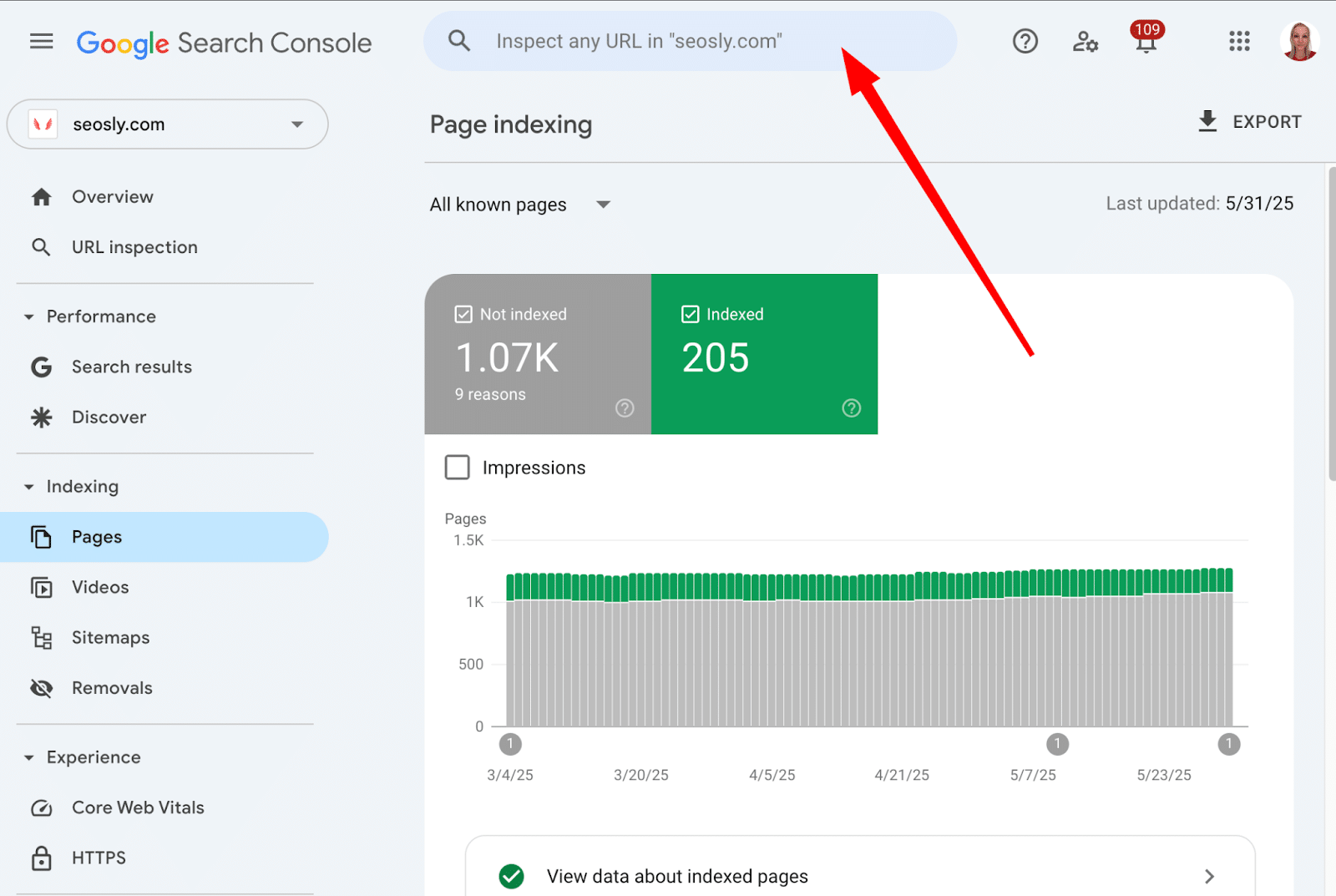
Source: Searchengineland
A sitemap is useful here, too. It gives search engines a list of public URLs to discover. However, they still decide which pages to index, so submitting the sitemap is only part of the process.
Fix slow pages and mobile usability problems
Some website problems only become visible when you try to do something. You open a menu, but it covers the whole screen. Or you start filling out a form and find that a pop-up blocks the next field.
This is why it helps to test a few tasks as part of your SaaS SEO strategy. Try checking a plan, requesting a demo, and creating an account from your phone.
You don’t need to inspect every page at first. Begin with the ones a potential customer is most likely to use, i.e., the main page, the key product pages, pricing, as well as sign-up and demo request forms. This is where the majority of your prospective clients may arrive, so you’d better make sure these pages load fast on both desktop and mobile devices.
Besides checking how they look, pay attention to how they load. Does the text appear promptly? Does a button move just as you try to tap it because an image has loaded above it?
Write down the problems you notice and share them with your developer. Include the page address and the phone you used. That gives them something specific to reproduce, fix, and check again.
Add internal links where readers need more information
Sometimes a visitor needs just one more detail before they can continue. They understand what a feature does, but want to know whether it works with their existing tools. Or they’ve read your instructions and need to check which subscription includes that option.
You can make those details easier to find by linking to the relevant pages directly from the text.
Begin with a page you’ve already written. As you read it, consider what someone unfamiliar with the product might ask. You may find opportunities to link to:
- Pricing information when you discuss a paid feature.
- Your earlier articles that explain some concepts or ideas in-depth.
- A page containing comparisons across similar products or services.
There’s no fixed number of links you need to add. Some pages will need several, while a short explanation may need only one.
The wording is important, too. If the link says “supported integrations,” it should open a page where visitors can check those integrations. Sending them to the homepage would leave them looking for the same information again.
Write content that shows you know your product and customers
To create great content, you don’t need to search all over the web for the truth, as there is essentially no commonly accepted truth in the SaaS industry. Every product is unique, and it deserves special communication. However, that doesn’t mean you need to invent a bicycle. Look closer and start with what is already available to you.
Your team knows things about the product that won’t appear in a general article about your industry. You hear why people sign up, what confuses them, and where they need help. Those details can give you plenty of useful material for your content.
Answer the questions your customers actually ask
There’s a difference between choosing a topic your customers might like and answering something they’ve already asked you. With the second, you have a person’s situation to work from. You know what they were trying to do and which part they couldn’t figure out.
Begin with a few recent emails or demo conversations. Keep the customer’s wording when you make your notes, as it may be more useful than the product terms your team uses.
You can then turn the questions into content:
- A question about an unexpected charge can help you improve the explanation on your pricing page.
- Repeated requests for setup help can become instructions with screenshots.
- Questions about a missing function can become an explanation of the available alternatives and their limits.
Choose the format according to the answer. There’s little reason to write a long blog post if two sentences beside a pricing table would solve the problem.
And when you do need a guide, let a colleague follow it in the product. You’ll soon see whether any steps have been taken for granted.
Include product examples, original insights, and customer results
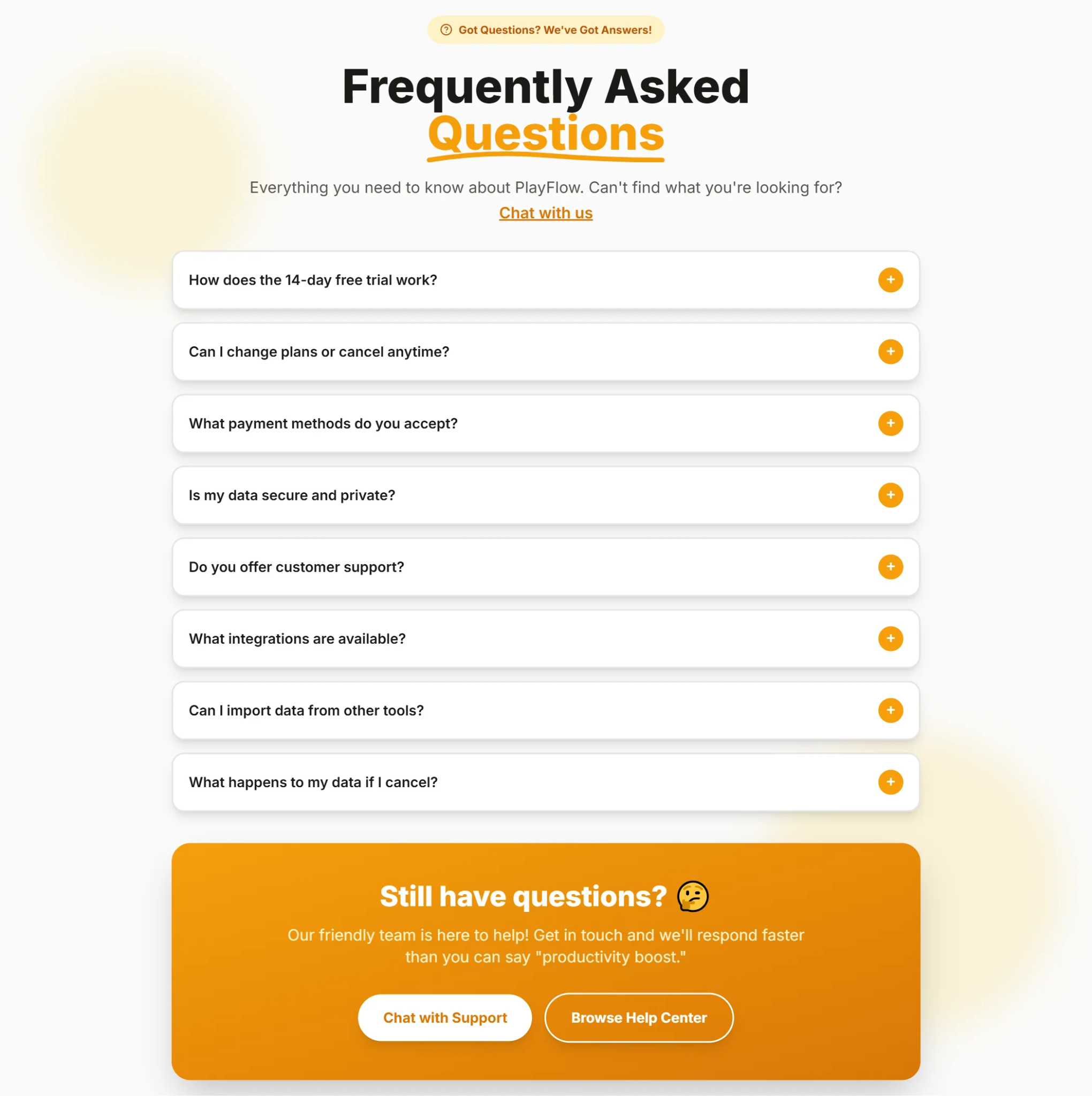
You probably answer some customer questions so often that you no longer think of them as content ideas. But someone visiting your website for the first time may need exactly that explanation.
Ask your colleagues to share a few recent conversations. The useful part is often the follow-up question. A person asks whether you offer an integration, hears “yes,” and then wants to know which information it transfers. That second question tells you what your page still needs to explain.
When you have several questions to choose from, begin with those that:
- Keep coming up in sales or support conversations.
- Leave people unsure whether they can use the product.
- Require a workaround or an explanation that isn’t on your website.
Source: LandingGo
It’s important that you give each answer proper positioning and details. If an integration transfers contacts but not their previous activity, say so. Explain what customers can do with the remaining information.
You may only need to add a paragraph to an existing page. A full article makes sense when there’s a process to walk through or several situations to discuss.
Cover related questions around your main use cases
Someone looking for a way to manage client reports may have several questions before they can choose software. They need to decide what to include, where to get the data, and how to explain the results to a client. Your product might help with part of that work, but the reader still needs to understand the rest.
Choose one use case your software supports well and follow the task from beginning to end. For client reporting, that could mean covering how to choose metrics, prepare a report, check the figures, and discuss them with the customer.
Let each page answer a distinct question that comes up during the work. “What should a client report include?” and “How do I explain a drop in results?” deserve different explanations. Two slightly different versions of the first question may belong on the same page.
This gives your SaaS SEO strategy a practical flavor. You’re developing useful coverage around something customers actually do. Start with the questions that leave them stuck, then add others as you learn where they need more help.
Get relevant websites to link to and mention your brand
You may already know a few businesses that could introduce your software to their audience. A consultant uses it with clients. Another software company has an integration with it. A customer has mentioned it in a blog post about how their team works.
Before searching for more websites, look at those connections. There may be something useful you can publish together.
For example, a consultant who helps agencies organize their reporting could show how they use your tool. They explain the work from their side, and you help with screenshots and product details. Readers get an account of how someone actually uses the software, with a link to explore it further.
Other opportunities will take more research:
- Find industry blogs that accept contributions and suggest a topic your team can explain from experience.
- Check software directories where customers compare products in your category.
- Look for articles that could use a resource you’ve already published.
- Search for mentions of your company and see whether a link would help readers find the product.
Choose the website and the page you want to share together. A general article about running an agency may have little reason to link to your pricing page. A tutorial about preparing reports could have a good reason to reference your reporting template.
SaaS link building involves making these connections clear. When you contact an author, explain what you found on their page and what yours would add. They should be able to understand the suggestion without having to work out the connection themselves.
Make your content easier to use in AI search
Your website gives you room to explain the product in detail. An AI answer may discuss only one part of it. Look at whether your explanations remain useful when they’re separated from the longer article or product description.
Write clear answers that make sense on their own
You may have already explained a product feature earlier in an article. So, when it appears again, it’s natural to call it “this option” or say that it works “as described above.” A person reading from the beginning will probably understand.
But people don’t always read that way. Someone may arrive with one question and go straight to the section that answers it.
Give that person enough context to understand the answer where they find it. Name the feature, explain what it does, and mention any condition they need to know about.
A clear answer doesn’t always mean a short answer. Sometimes you need a few more sentences to explain a limitation or tell someone how a feature works.
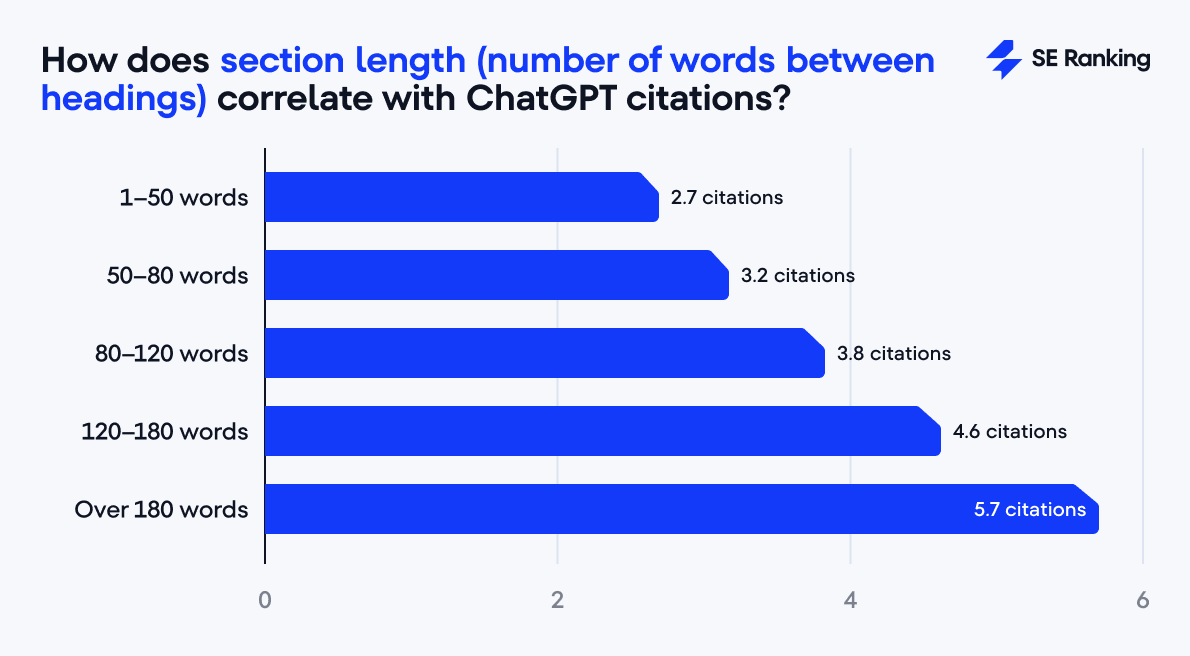
For instance, SE Ranking found that pages with longer sections received more ChatGPT citations than those with very short sections. That isn’t a reason to pad your copy, but it is a reason to keep details that help someone understand the answer.
Source: SEranking
Suppose a visitor wants to know whether clients can download reports. “Yes, if you enable this setting” would leave them looking for more information. You could instead explain that clients can download PDF reports when an account administrator enables downloads for their workspace.
That also gives you a natural starting point for the instructions that follow.
The following technique usually helps a lot. When reviewing your article’s section (a random one), read it without the heading. If what you read makes perfect sense on its own, and you can easily extrapolate the subject, that’s the result you want.
However, the subject of this section is unclear without checking the heading; you should consider revising that paragraph or adding a line or two to make it clearer. You don’t need to repeat the introduction or everything you’ve said before.
Keep product details consistent across websites and profiles
We live in a time when information abundance is the norm. As a result, customers become spoiled and increasingly picky when it comes to product offers, SaaS product offers in particular. Little is surprising that information only gets through a person’s natural defenses when it's repeated in an unintrusive way.
But what happens in reality is that quite often, we forget to update our information across multiple mediums. For instance, a SaaS website gets updated while directory profiles and partner pages are forgotten.
Start by checking the information that affects a purchase:
- Prices and billing terms.
- Free plans and trial conditions.
- Available features and integrations.
- Limits on users or usage.
The wording can vary, but the facts should agree. This is important for both your SEO performance and reputation as a SaaS brand.
If you find an outdated description on another website, send the owner a correction with a link to your current information. Keep a record of these pages, too. You’ll need to revisit them the next time your offer changes.
Monitor AI citations and referral traffic
One AI answer won’t tell you much about your visibility. Your brand might appear today and disappear when you ask again tomorrow. AI search is so dynamic these days, which aligns with how often AI systems receive updates (virtually every other month or week).
So, keep a record rather than relying on what you remember seeing:
- Which questions you tested, on which platform, and when.
- Whether your brand appeared and which pages were cited.
- How many identifiable AI referrals reached your website.
- Whether those visitors signed up or requested a demo.
Repeat the same group of questions over time. The results will vary, but you’ll have something more useful than a single screenshot.
However, a citation doesn’t automatically mean a visit or a customer. You need to check what happens after the mention, too.
This can be done with the help of specialized SaaS SEO tools.
For example, tools from Semrush, Ahrefs, or Perc AI can help you track mentions and cited pages. Then you can check identifiable AI referrals in Google Analytics 4 to see whether those visitors explore your product, start a trial, or request a demo.
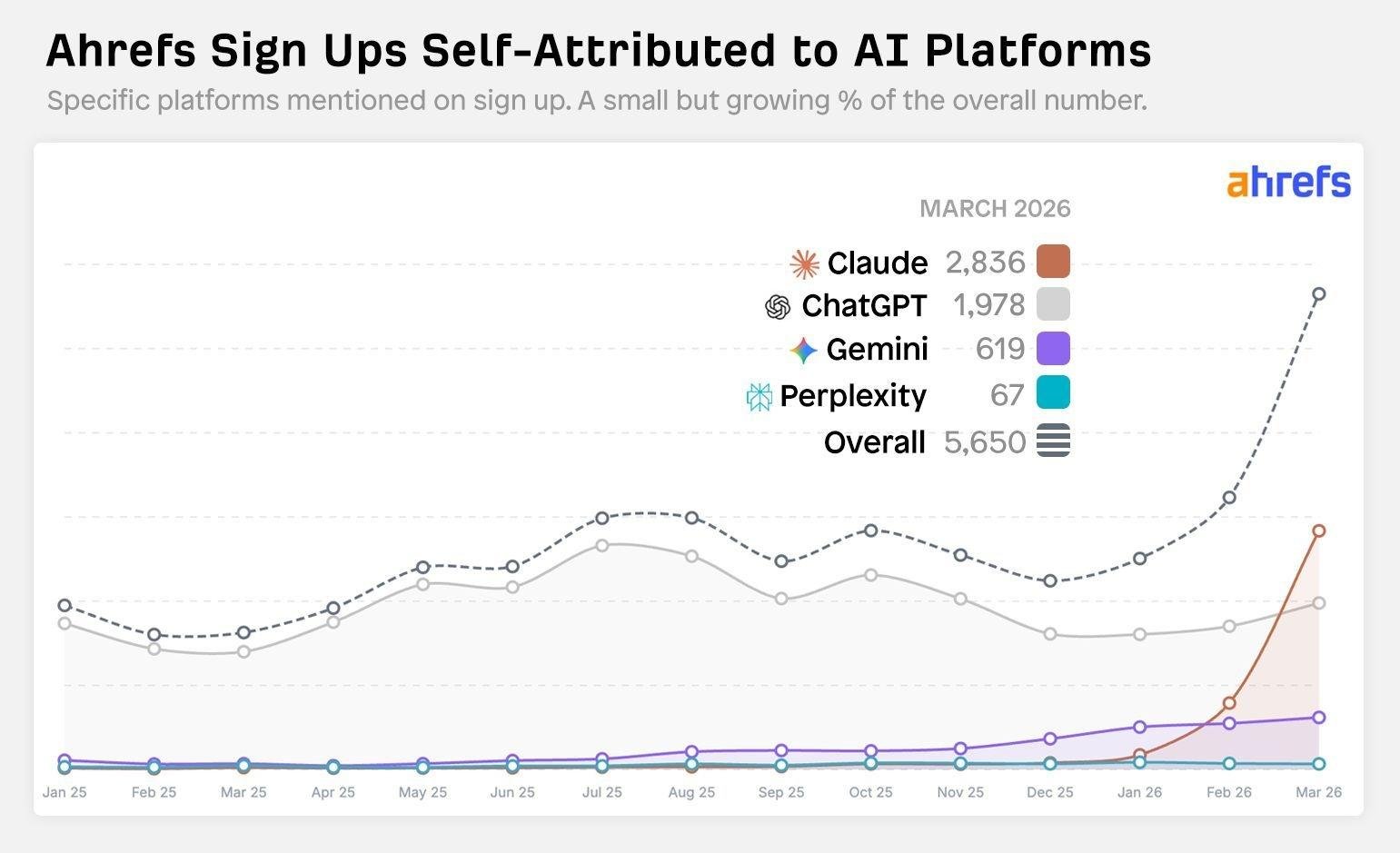
You can also ask new users where they heard about your product. Ahrefs does this during signup and tracks which AI platforms people mention. The illustration below measures what users reported, so it can add context to your referral data without replacing it:
Source: Ahrefs
What to prioritize in your first 90 days
A SaaS SEO strategy becomes easier to manage when you decide what belongs in the current month and what can wait. The following schedule gives you a starting point. Adjust it to the amount of work your team can actually finish.
Days 1–30: Research your audience and fix urgent website issues
Your first month may reveal that the website needs something different from what you expected. You planned to start a blog, but customers can’t find pricing information and the demo form fails on mobile.
Leave room to deal with those discoveries.
Talk to customers about why they chose the software. If you don’t have customers yet, speak to potential users about how they handle the task now. Review your main pages with their questions in mind.
Finish the month knowing whom you’re trying to reach and which website problems need fixing first. Save your initial traffic and conversion figures, too. You’ll need them when reviewing progress.
Days 31–60: Create and improve pages closest to a purchase
Since you already know more about your customers, it’s high time to put that research to work on your website. Begin with the pages people visit when they’re considering the software: product descriptions, pricing, and comparisons.
You may find that some already do their job well. Others need more detail about what’s included or how a feature works.
Spend an entire month answering the questions that still stand between interest and a signup.
But don’t overdo it. You don’t need to create a page for every question. In most instances, adding a screenshot and a clear explanation is enough. You only need to create a separate page and connect it to the relevant product information when a particular topic needs more room (and it’s important enough for the customers).
Days 61–90: Publish supporting content and pursue relevant links
With your main product pages in place, you can cover the related questions that need longer explanations. Return to your research and choose a few topics your customers have asked about. Connect those articles to the relevant product pages where it helps the reader.
This is also a good time to begin SaaS link building. Look at partners, industry blogs, and resource pages where your content would be useful.
To earn quality links, avoid being pushy and salesy. You need to persuade and create a natural desire to link to your pages. For that, give people a specific reason to reference your website. A tutorial or a useful template gives you something concrete to share.
At the end of the month, review what was published, which outreach received replies, and what needs more work.
How to tell whether your SaaS SEO strategy is working
More people finding your website is encouraging. But before calling that progress, check which pages they’re visiting and what happens afterward. The action is what matters, rather than a simple interest.
For instance, your SaaS article can attract plenty of readers, but those readers might have no reason to use your software. In other words, they are not your ideal target audience.
These nuances can tell whether your SEO strategy is really working, or your content merely makes an impression that everything is working fine.
A good way to verify the effectiveness of your strategy is to see whether your main goals were achieved. If you want more demo requests, find out whether organic visitors are submitting them and whether those requests come from businesses you can serve.
A complete SEO review should cover:
- Relevant search traffic. Identify which queries bring you visitors, and if these queries relate to problems your SaaS product solves.
- Product interest. Do readers move from articles to feature, pricing, or comparison pages? Or do they bounce?
- Signups and demo requests. Which organic landing pages contribute to these actions?
- Customer quality. Do those signups become active users or paying customers? Or do they simply get what they want short-term and never come back?
- Changes on individual pages. Pick a few important pages you created (or updated) recently and check their performance, e.g., do they receive more impressions, clicks, or conversions?
You should follow the visitor far enough to understand whether the traffic is useful to your SaaS business. A free account is a starting point; you still need to know whether that person uses the product.
Pro tip: Give new pages time to produce enough evidence. Don’t measure and make conclusions within a day or two, no matter how tempting it is. A few random visits won’t tell you much. Look for repeated patterns before deciding to expand a topic, update or refresh a page, or abandon it.
Conclusion
AI geeks like to say that with the new technologies by our side, we can do everything, but not anything. Our abilities, attention, and the ability to supervise these technologies are limited; it’s the bottleneck.
The same is true for doing SEO for SaaS startups.
There will always be another keyword to target or another page to improve. For a startup, the difficult part is deciding which work deserves your time now.
Your customers can help you make that decision: what they ask, what they struggle with, and what they need before signing up. They can essentially help you narrow down your list of SEO activities.
And the most realistic list based on what we’ve discussed in this article so far looks like this:
- Fix website issues that prevent people from finding or trying the product.
- Publish answers your team can support with actual product knowledge.
- Pursue links from websites your potential customers would read.
- Follow organic signups through to product use and payment.
SaaS SEO tools can help you track the details. But you can always do so much, even with the help of these tools. So, let what you learn from customers and results shape what you do at every moment in time.
FAQ
How long does SaaS SEO take to show results?
Expect to give it several months. Of course, some changes may show an effect sooner, but that doesn’t mean you’ll have a steady flow of customers by then. Google also notes that changes can take months to affect search results. You should monitor progress, tracking such SEO metrics as searches, visits, and signups.
How much should a SaaS startup spend on SEO?
There isn’t one amount that makes sense for every startup. You might have someone who can write useful content but nobody who can fix the website. Another team may have the opposite problem. So, first decide what you can handle internally. Then get quotes for the missing work and budget for several months of it.
Should startups prioritize SEO or paid advertising?
If you need to test whether people will pay for your product, advertising can help you get visitors sooner. But you still need a convincing offer and a working signup process. Meanwhile, you can develop your SaaS SEO strategy around the questions those potential customers ask. You don’t have to choose one channel forever.
Can a SaaS startup manage SEO without an agency?
Yes, but someone needs to have time for it. Knowing your product well gives you plenty to write about. Still, research, editing, website fixes, and reviewing results all take work. You can do these parts yourself, e.g., with the capabilities of your teammates, but outsource other, more time- and resource-consuming activities to specialized SEO agencies.
All trademarks, logos, images, and materials are the property of their respective rights holders.
They are used solely for informational, analytical, and review purposes in accordance with applicable copyright law.



 Sign Up
 Sign Up