






SEO Audit Report Sample: How Should Your Audit Look Like?

“Time for an SEO audit!” How did these words make you feel?
For many of us, it’s a painful task. But it doesn't have to be like that. Yes, putting it together requires skills, and it might be disorientating not knowing where to start.
Still, there is something that can really help: a good SEO audit report sample.
So, to make your reporting process more straightforward, in this guide, you’ll find:
- All the elements you need to create a good report.
- Our Notion template that you can use as a foundation.
- SEO issues that are worth looking into when doing your audit.
SEO audit report sample: What is it, and why do you need it?
An SEO report sample is basically a template with a summary of the most important SEO metrics that show how well your website is doing in SERPs.
The main idea behind building (or finding) a working template is that it really speeds up the reporting process.
If it’s good, you can simply adjust a couple of things and get it done much faster.
Running an audit itself is exhausting enough, as you have to pull out lots of information. But organizing all that can be even harder if you start it from scratch.
So, a template of your report simply helps you:
- Get a better view of all the data,
- Understand your wins and gaps,
- Clearly show your results to your clients or management, and so on.
Download our free Notion template
We know that reporting is a tedious task.
So, we created an SEO audit template that you can use for your SEO projects.
You can access it for free in Notion. And if you wish, you can either edit it directly there or copy-paste the same structure to any other document or tool.
Sure, we don’t know the nature of your projects, and, frankly, it’s hard to create anything universal. Still, we hope it’ll save you some time.
This sample report covers all the fundamentals:
- Traffic analysis,
- Keyword targeting,
- Off-page optimization,
- Content performance,
- Technical SEO,
- AI visibility,
- As well as overviews and recommendations,
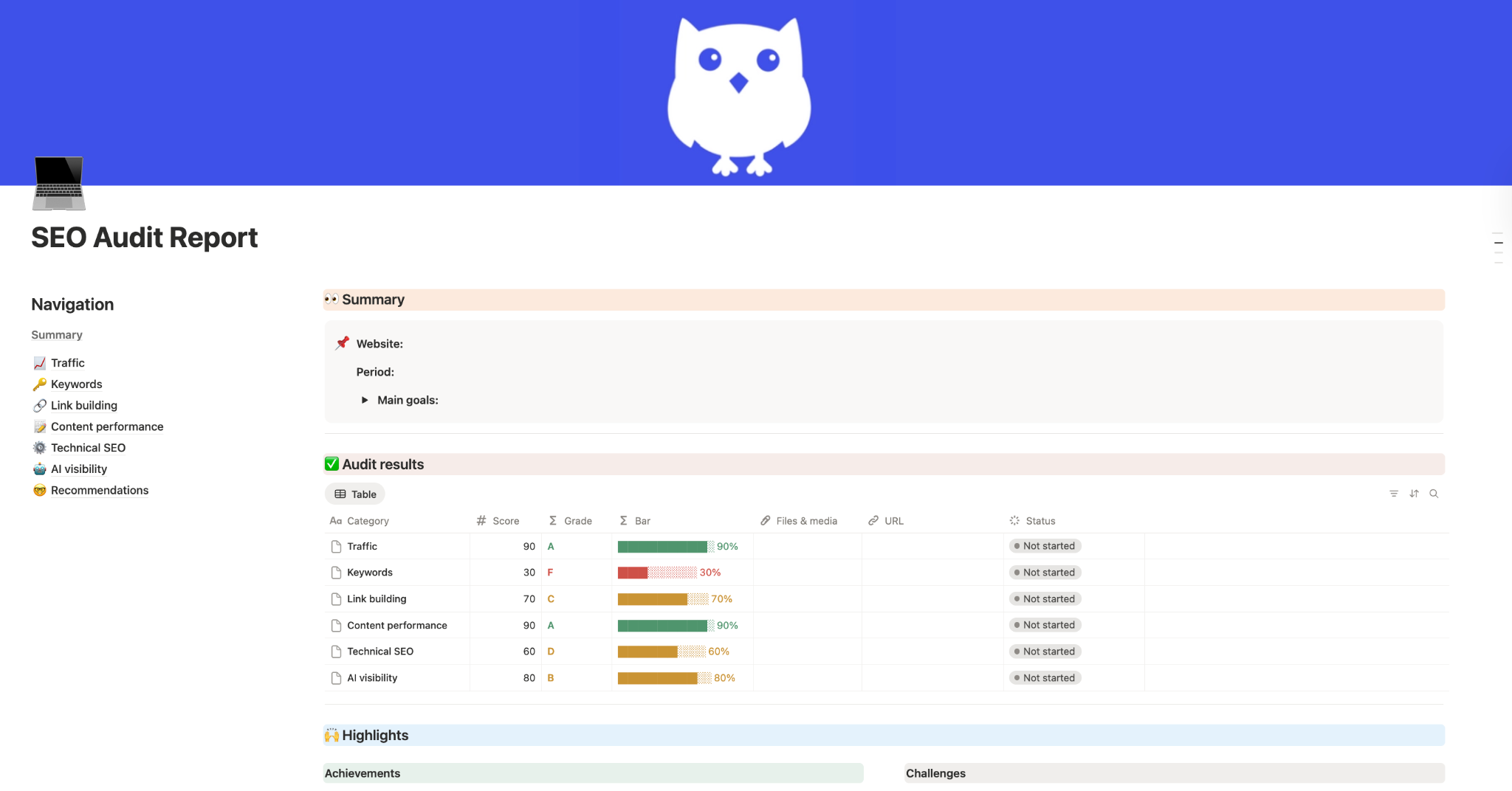
The goal of the template is simple: save time and keep your reports consistent.
Besides, when you follow the same structure for every audit, it becomes much easier to compare performance and track progress.
Must-have elements for SEO audit report
When building any report, structure matters just as much as the data itself.
A document full of screenshots and scattered notes won’t help anyone understand what’s actually happening with the website.
So, if you want to build your report from scratch without using any templates, let’s see the eight major elements that will help you shape the structure of your doc.
Element 1: Summary
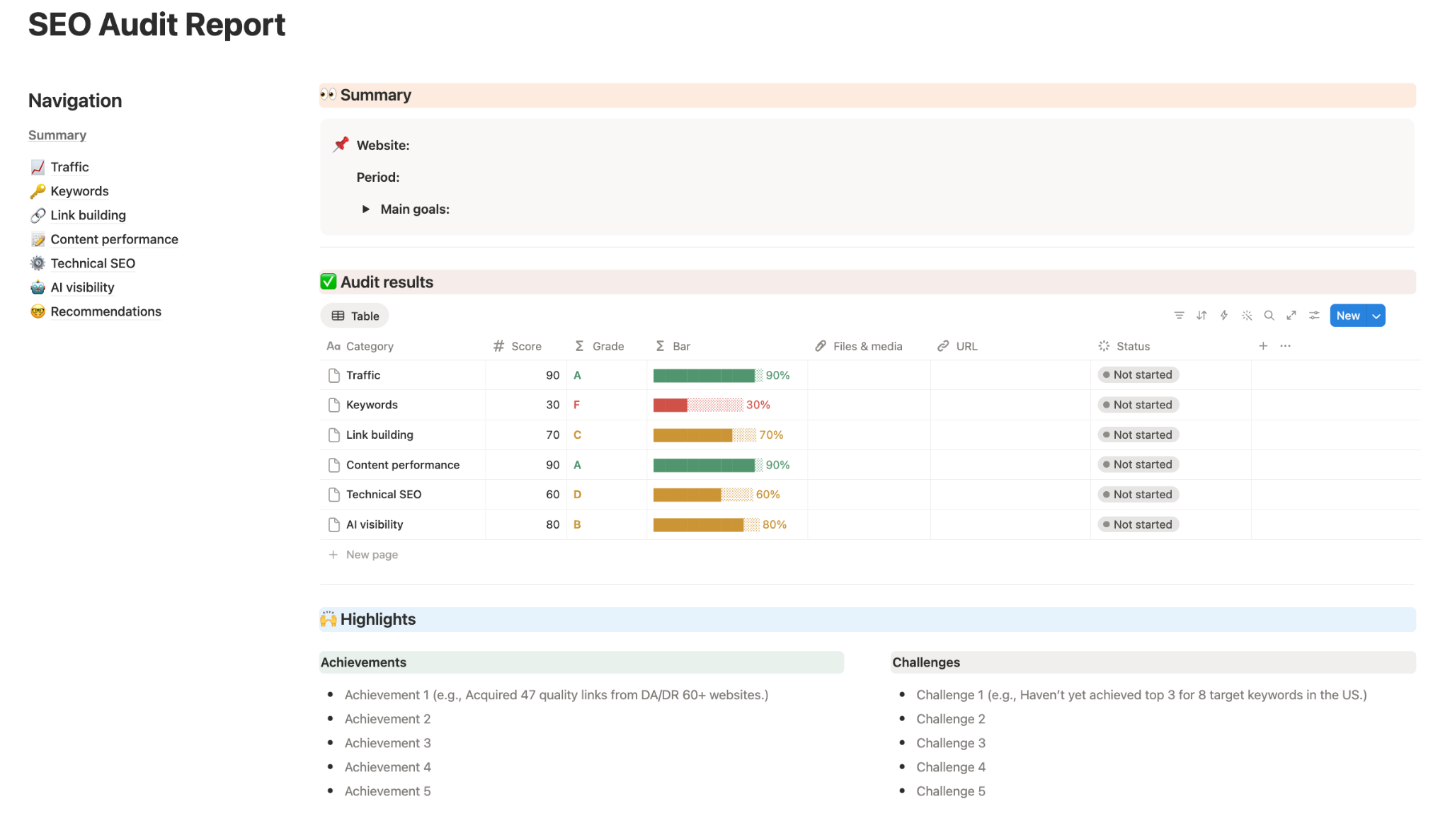
The summary section gives a quick overview of the entire audit. This way, readers don’t have to go through every page to understand what’s going on with the site.
A good summary typically includes the most important context about the SEO project, such as:
- Website being analyzed,
- Reporting period,
- Main goals of the audit,
- Key SEO results,
- Achievement and challenges (or tasks in progress).
This can vary, of course. But the main idea is to show what has been done and achieved during a particular period.
If you give a presentation, this slide can also support your intro.
Here, you can talk about what your task was or what the client requested and give a brief overview of the priorities you had.
Some teams also include a simple scoring system, using percentages or grades.
It helps see what areas are the most successful and the ones that you haven’t started working on, for example. This way, it’s easy to understand the performance at a glance (literally).
Another useful element is the summary of achievements and challenges:
- Achievements: This is anything that you really want to show off. Start with your biggest wins (like new backlinks, DR growth, keyword ranking improvements, etc.)
- Challenges: This is a great moment to talk about some bottlenecks or potential issues. Maybe your competitors have much higher link-building budgets, or you don’t publish any original research, etc.
This combination gives decision-makers a quick understanding of what’s working and what might be improved.
And it also shows that you’re transparent, not trying to “hide” things, making it look better than it is. Still, of course, try to add more achievements than challenges.
For a business owner or a manager, this section can be the most important part of the entire audit report. Simply because it shows them a bigger picture.
Element 2: Traffic overview
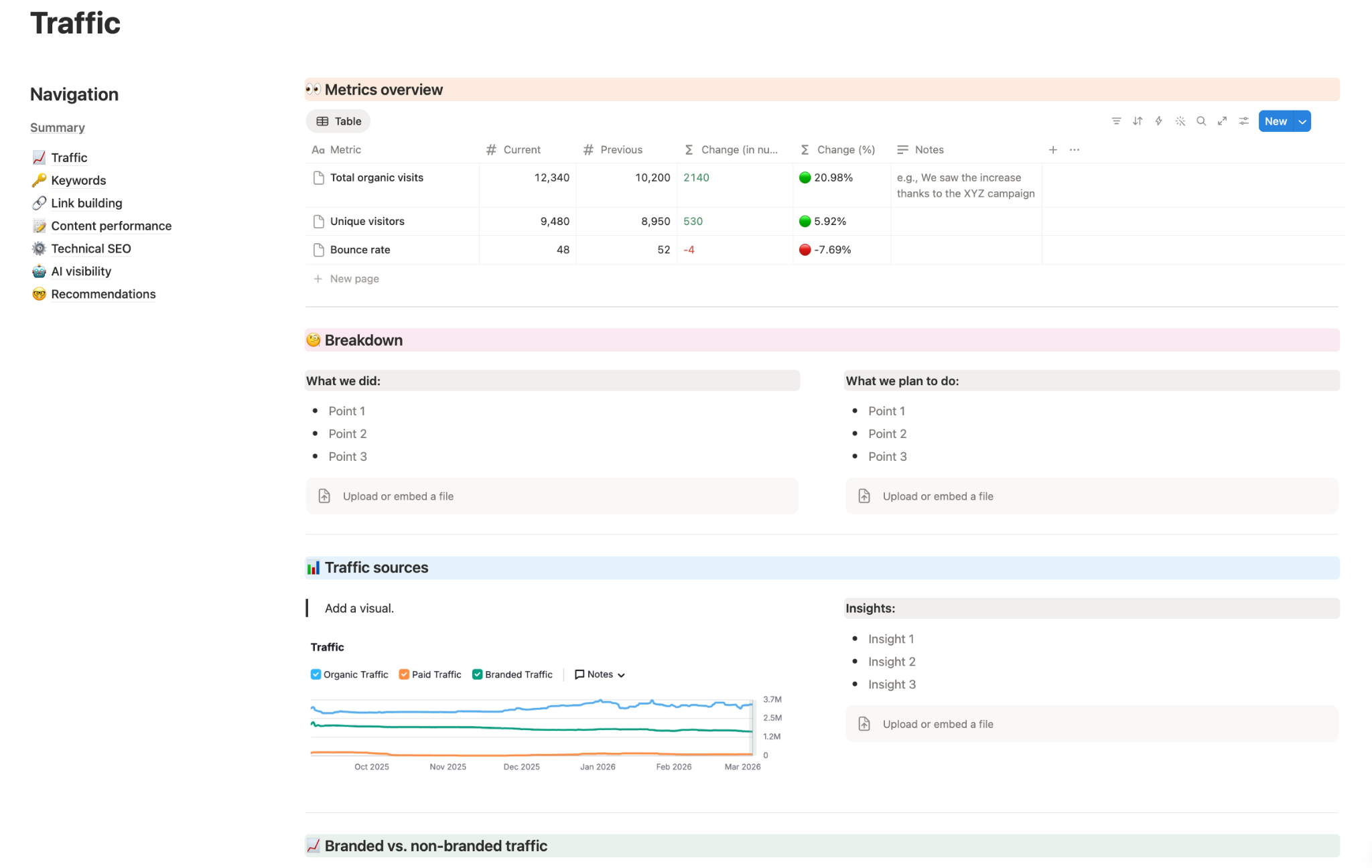
Most people start doing SEO because they want to get more traffic to their website. So, a traffic overview is an essential section.
These are the categories you can consider for this part:
- Metrics overview: The least you need to cover is the major metrics, such as Total organic visits, Unique visitors, Bounce rate, etc. It’s especially helpful to compare the current numbers with the previous reporting period. This makes it easier to see the trends.
- Breakdown: You can cover what you’ve already done for traffic improvement, and what you’re planning to do. Keep it in a format of short bullet points to make it easier to scan.
- Traffic sources: The majority of reports will focus on organic traffic, obviously. But depending on what you do and what your goals are, you can also cover other traffic sources.
- Branded vs. non-branded traffic: A good practice is to also include a comparison between branded and non-branded traffic. Especially when you have a strong focus on increasing one or the other.
A detailed document should also briefly explain what caused the changes. For example: “an increase in traffic comes from the new research that started ranking higher,” etc.
Besides, as much as possible, try to add some graphs and diagrams.
They really support your words and help make the whole thing more digestible. Besides, some people are much more visual, so a couple of charts won’t hurt, for sure.
Element 3: Keyword rankings
Up until now, you’ve looked at overall performance and traffic. Here, you’re answering a much more direct question:
“Are we actually ranking for the right keywords?”
You have to check this because no matter how you look at it, at the end of the day, rankings drive most things. Your visibility, clicks, and eventually conversions depend on it.
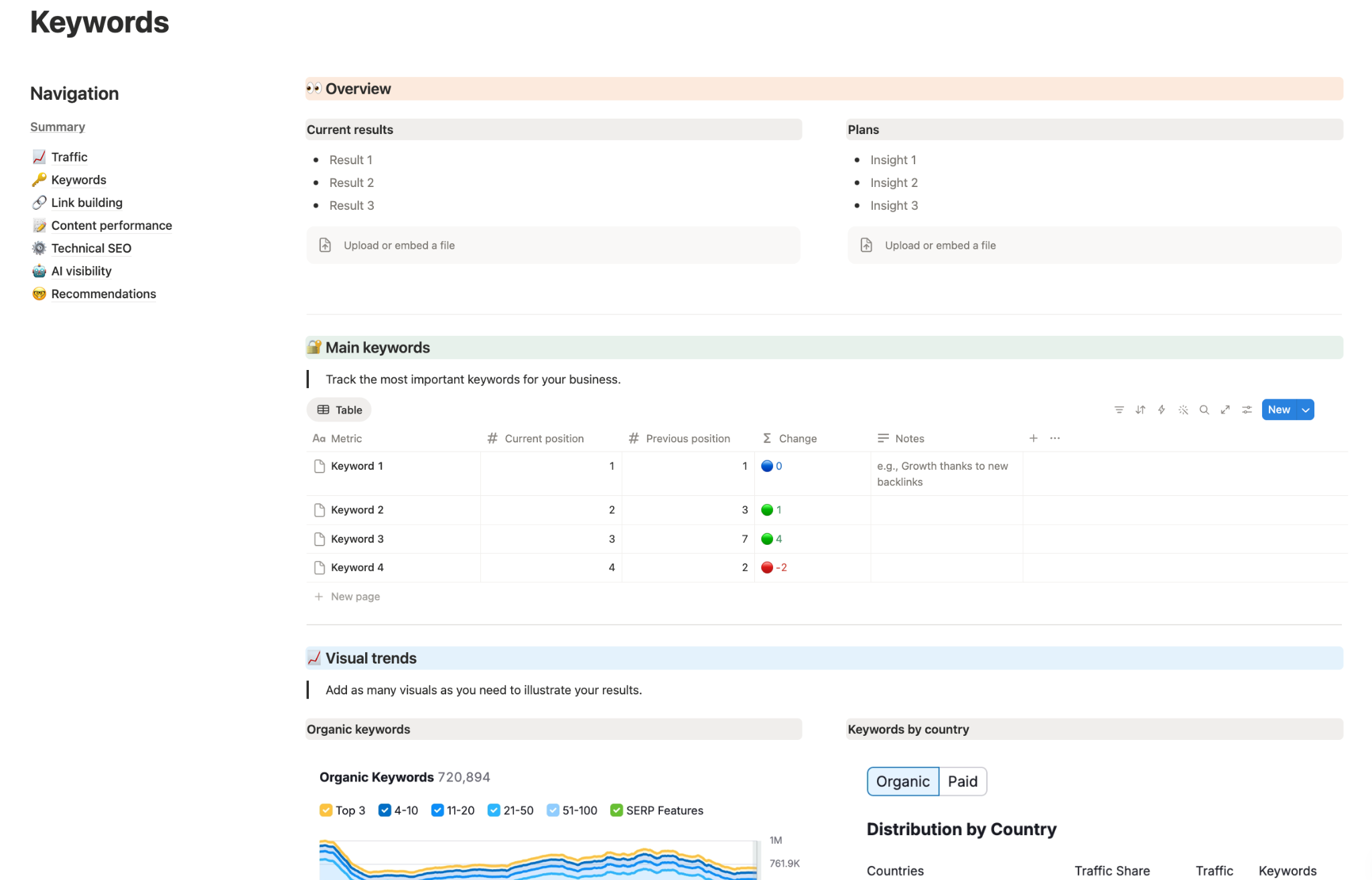
These are the categories that make sense here:
- Overview: Include a short summary of what’s happening with your keywords. Keep it simple. All you need to do is summarize the current situation and what it means. For example, you can write which keywords improved their positions, and which ones dropped. You can also add a short “plans” or “next steps” section right next to it.
- Main keyword tracking: Every company has a set of queries that are really important for its business. So, make sure to track them every month (or more often if needed). Cover the basics: the actual keywords, their current positions, previous positions, etc. You don’t need to follow hundreds of queries here. Focus on the ones with business importance. You can also include short notes, explaining why things changed.
- Summary (if possible with images): This can include things like the number of organic keywords your website has, the breakdown by country, keywords by intent, SERP features performance (“People also ask” boxes, images or videos in results, AI Overviews, etc.), and so on.
By the end of the keyword section, your readers should understand which keywords are driving visibility, how rankings are changing, where growth is happening, and what new opportunities actually exist.
Element 4: Link building results
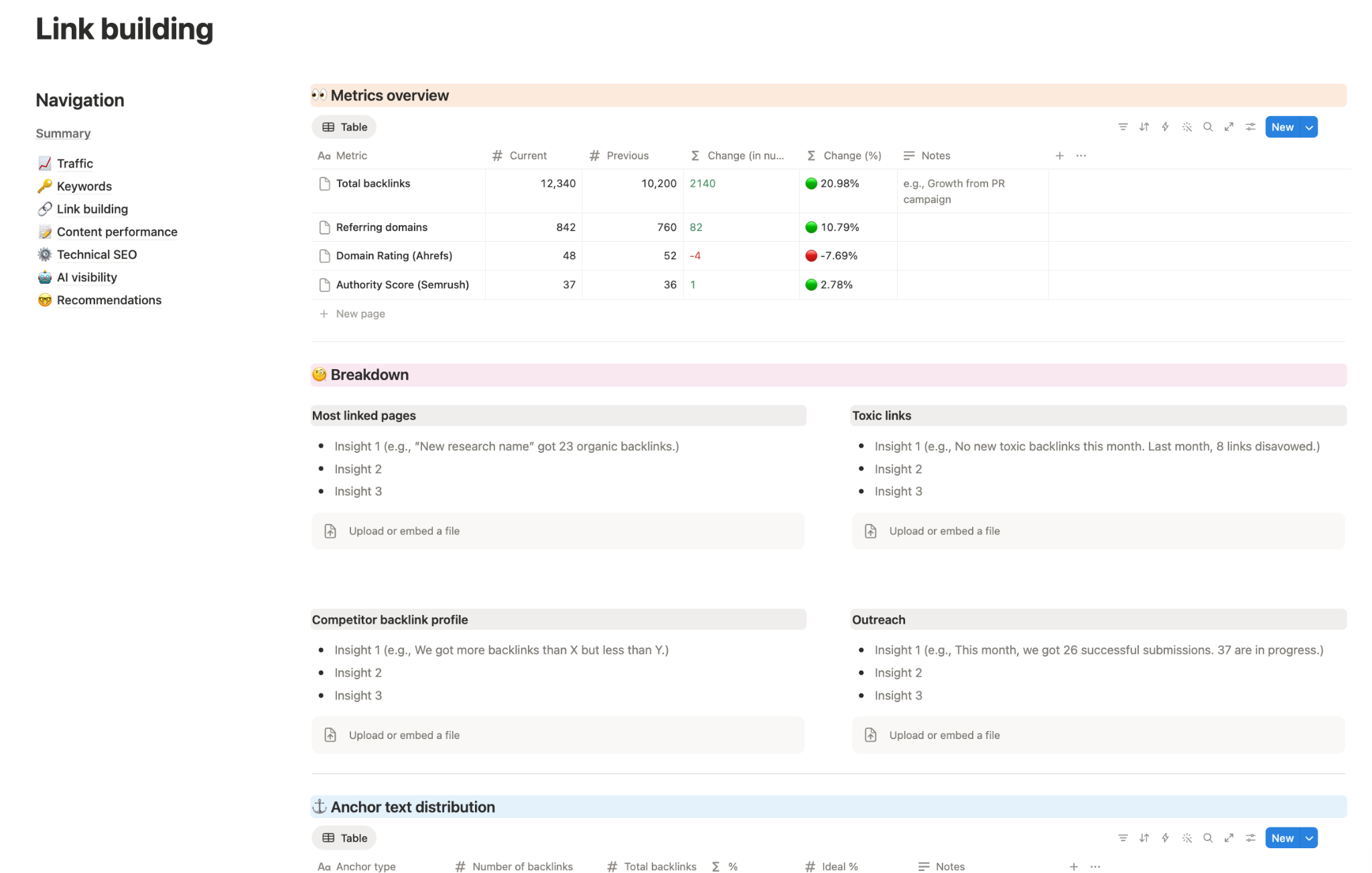
This section shows how your off-page SEO is actually performing. So, of course, it’s another must-have element in your report.
These are the basic things to include in your link building part:
- Metrics overview. The first thing you want here is a quick snapshot of your link profile. This is usually a table comparing current vs. previous data. Include total backlinks, referring domains, domain authority, authority score, etc.
- Breakdown. This is a section with the details. You can cover the most linked pages, toxic links, competitor backlink profiles, your outreach efforts, and so on.
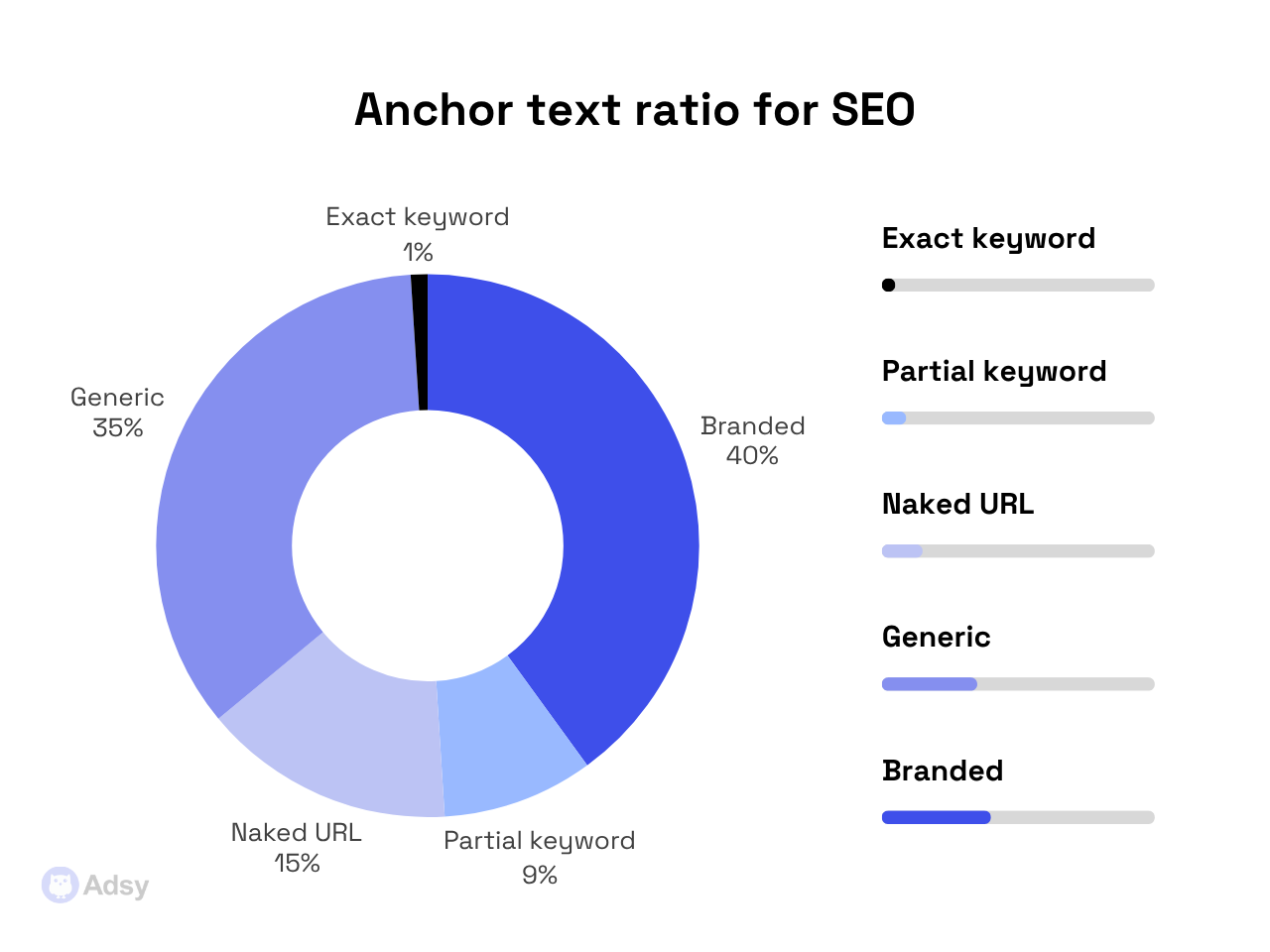
- Anchor text distribution. This is another important part that gets ignored way too often. You want to show how your anchor texts are distributed across branded, generic, naked URLs, partial match, and exact match. Even if your client doesn’t care much about this, you sure do care about a healthy ratio here.
- Visual trends. These often work best for management because they show exactly what you’re talking about. You can include things like authority score trend, new vs. lost backlinks, referring domains over time, follow vs. nofollow ratio, etc.
- Checklist (optional). Here, you can add your to-do list for the next month.
Element 5: Content performance
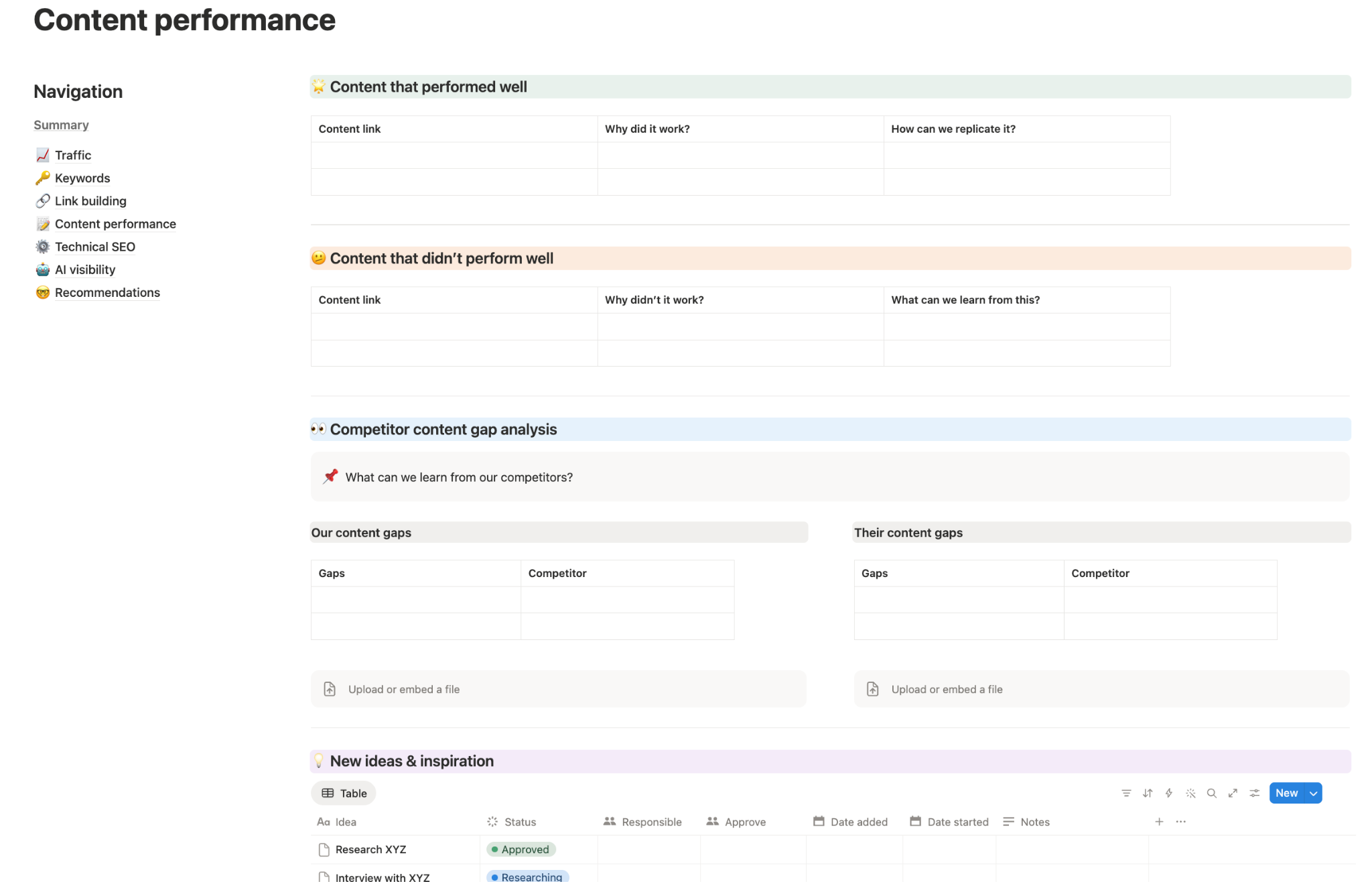
While SEO is a technical field, it can barely exist without content.
So, the next element is content performance. The main idea of this part is to understand what content actually works and what needs to be changed.
Everyone has different SEO strategies, but overall, these are the most important things to cover here:
- Content that performed well: Add a link, and analyze why it worked and how you can replicate that same approach (if possible).
- Content that didn’t perform well: Focus on understanding what went wrong, how you can fix it, and what lesson it teaches you for the future.
- Competitor content analysis: Find what they’re ranking for that you’re not. And see what you can learn from them. Maybe they cover more long-tail keywords, publish deeper, more structured content, or target topics you haven’t touched. It can be a goldmine of missed opportunities.
- New ideas and inspiration: Based on all the information you’ve analyzed, add an actionable part of what to add to your pipeline. That makes your document not just a passive walkthrough, but something that can move you forward.
By the end of the content section, it should be clear what type of posts drive results, what’s currently underperforming, what topics are missing, and what you should write next.
Element 6: Technical SEO
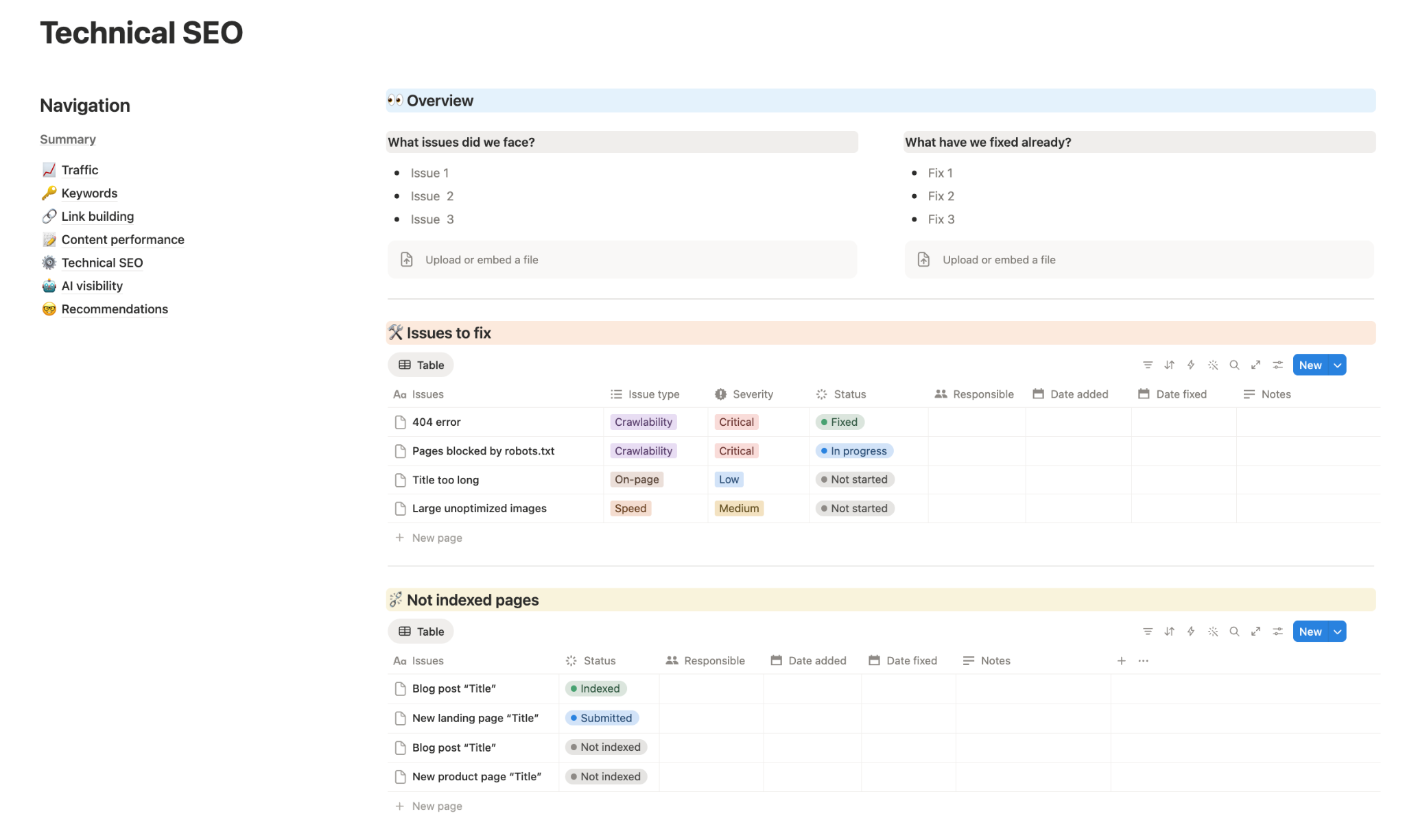
You might have great content, solid backlinks, and still struggle to rank. In most cases, the problem sits here, in the technical layer of your website.
A strong technical SEO audit makes sure that:
- Search engines can crawl your site properly,
- All the important pages are indexed,
- Nothing blocks your visibility,
- Performance issues don’t hold you back.
This section doesn’t need to be overly complicated, so you can simply include things like:
- Overview: Before listing the actual problems, give a quick snapshot of the situation. This helps readers understand the context without going through every detail. Focus on two things: what issues you’ve discovered, and what you’ve already fixed.
- Issues to fix: Add all the problems that require your attention. And make sure to create different labels for urgency (severity).
- Indexing issues: You don’t necessarily have to add this one as a separate section. But if you post a lot of content and you sometimes face troubles with indexing, it could be worth it to track this. Just note what you’ve already submitted for indexing and what isn’t indexed yet.
What can make this much more usable is smart tagging. When you add tags for issue type, severity, status, person responsible, date discovered/fixed, and so on, you make the whole process much more organized.
Element 7: AI visibility
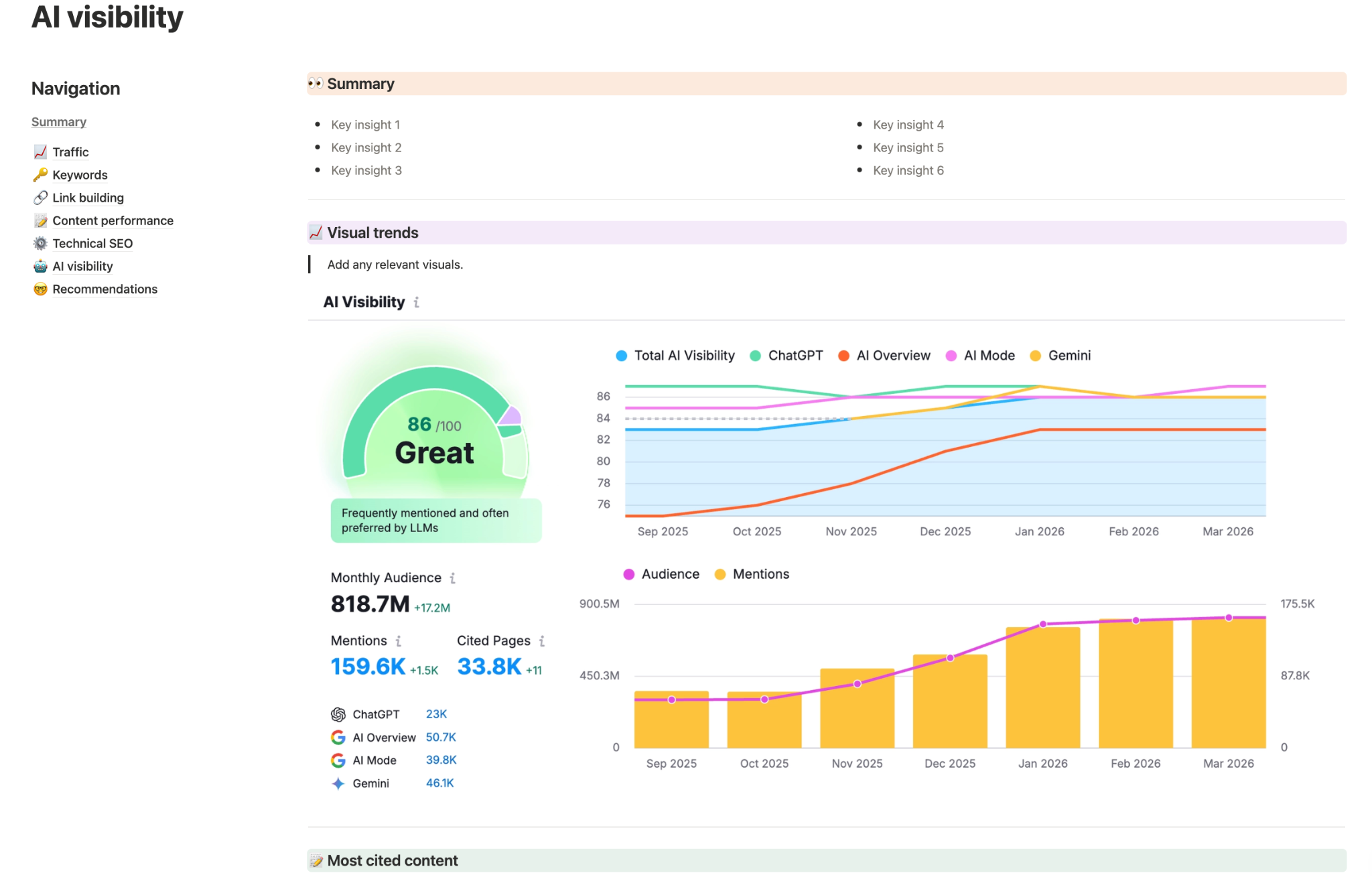
A year or two ago, we wouldn’t have added this as a must-have. But now, you can’t do an audit without paying attention to AI visibility.
Search behavior is changing right now.
It used to be all about ranking on the first page of traditional search results, but that's gone. Now, more people use LLMs and other types of AI search.
This means that your report should look beyond the classic SEO KPIs and assess how visible your brand and content are in AI systems.
These are the elements worth covering:
- Summary: Just add an overview of the key insights to quickly understand the situation. You can mention how frequently your brand is cited in ChatGPT and other LLMs, how often your content is referenced in AI Overviews, and so on.
- Visual trends: It’s really helpful if you can visually show your performance across different AI channels. You want to see how things change over time and try to notice patterns that will help you improve later.
- Most cited content: One of the most valuable parts of this section is identifying which pieces of content are actually being referenced by AI systems. Look at your most cited posts and break them down. You’re not simply looking into what performed well, but why it worked.
- Optimization plans: As it’s relatively new, many websites don’t really optimize for LLMs. So, it’s important to outline clear steps that will help you improve your AI visibility.
AI search, without doubt, isn’t replacing traditional SEO. At least, by now.
But ignoring AI visibility is also not an option.
A website can rank well but still miss a lot of opportunities if its content is not getting cited by AI. So, by including this section in your audit, you’re basically future-proofing your strategy.
Element 8: Recommendations and plans
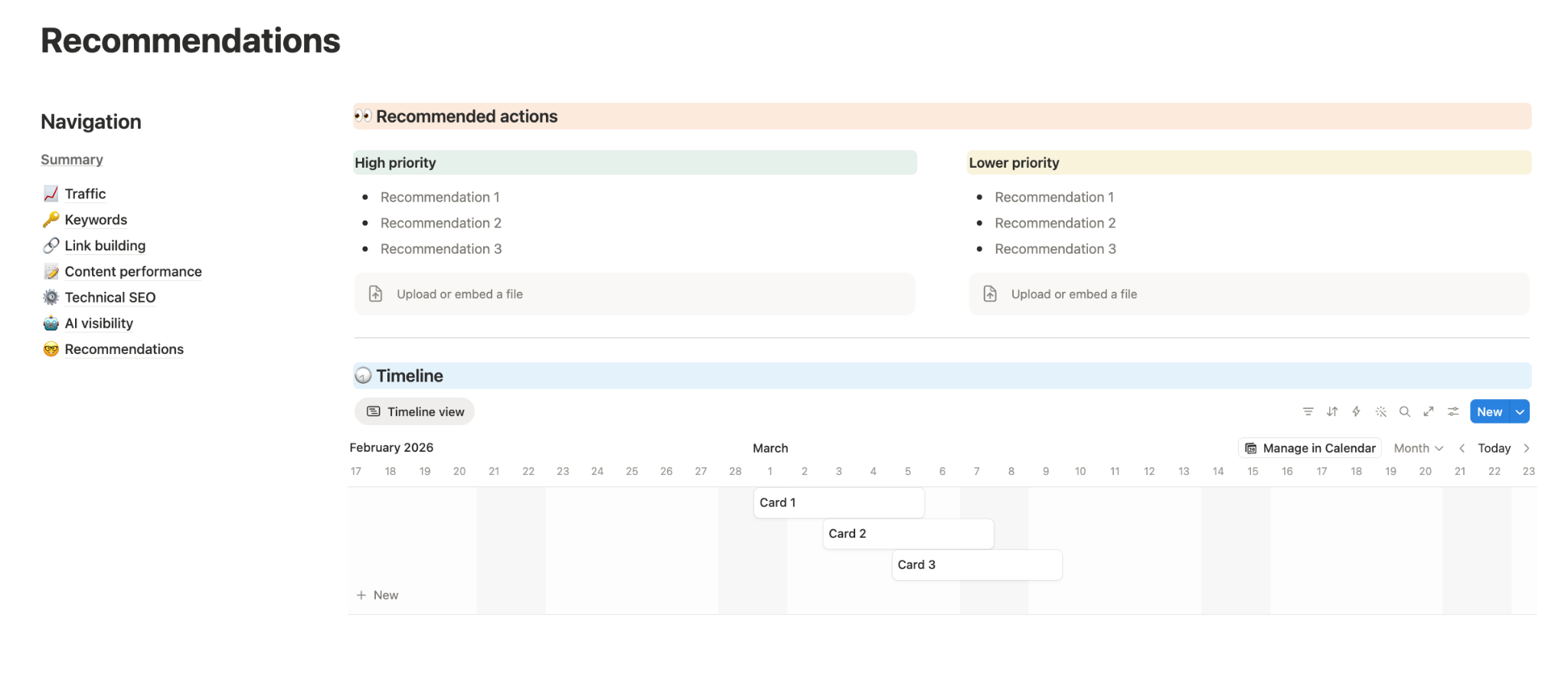
This is the section that makes your whole audit useful.
Everything before this point is analysis. You’ve looked at traffic, keywords, content, technical SEO findings, and off-page factors.
But none of that matters if it doesn’t lead to clear next steps, right?
So, the main goal of this section is to offer your recommendations for a particular project. Sure, your client or management might not agree to implement every single suggestion. But your task is to make it clear and specific anyway.
This part typically includes:
- Recommended actions organized by priority: It’s really necessary to highlight the most important tasks and fixes, so that everyone understands where to start. Some problems are actively hurting your website. Others are just small optimization details that can wait. And you have to make it clear.
- Suggested timeline: You won’t start implementing everything at once, so create a realistic timeline that can give your clients some estimations.
This section has to be waffle-free. It’s the most actionable part, so make it just that: clear steps that have to be implemented. That’s it.
A couple of things that can help here are focusing on:
- Making your recommendations specific. Saying “improve content” or “build more links” isn’t helpful. What does it even mean? It sounds right, but it also says nothing. Every recommendation should be as specific as possible. For example, you can say something like, compress large images on XYZ landing pages to reduce loading time.
- Linking every recommendation back to something you’ve mentioned earlier in the audit. This is a simple way to keep your document consistent and logical. Since every suggestion is backed by actual data, you're adding a layer of trust, too.
- Keeping it realistic. It’s tempting to include every possible improvement in your SEO checklist. But too many recommendations make things way too hard to implement, and might leave you chasing the wrong priorities. So, a better approach is to focus on what will actually bring results right now with your current resources.
Essentially, this section is there to help you and your management or client understand what needs to be done, what your top priorities are, how you’re planning to do that, and what the approximate timeline is.
SEO issues to look out for in your audit
You already know what to include in your SEO site audit to make it both structured and informative.
Now, let's take a look at the common issues that you want to keep an eye on when auditing any website.
Basic SEO oversights
1. Zero strategy
Unfortunately, doing SEO-related activities without a real plan is a very common practice.
Many companies optimize something. They post a blog post here and get an occasional backlink there. It’s a typical situation because everyone is doing what they can.
But it won’t be nearly as effective as an actual strategy.
It doesn’t have to be extremely pricey. You can build a structure for pretty much any budget.
Yes, the results may be slower if you don’t want to go all in. But you’ll still get some positive results, instead of simply doing random things here and there.
Solution:
- Define your goal. Picture what success actually looks like for your website (more traffic, better rankings for specific terms, more conversions, etc.).
- Do some “reverse engineering”. Think of what strategies can directly help you with your objective. This is a good approach that can become an actual foundation of your strategy.
- Hire people who know what to do. And if you’re on a budget, get a consultation with an SEO specialist, tell them how much you’re ready to invest in this, and ask them to build you a plan. Then, start implementing those steps with your internal resources or some outsourcing.
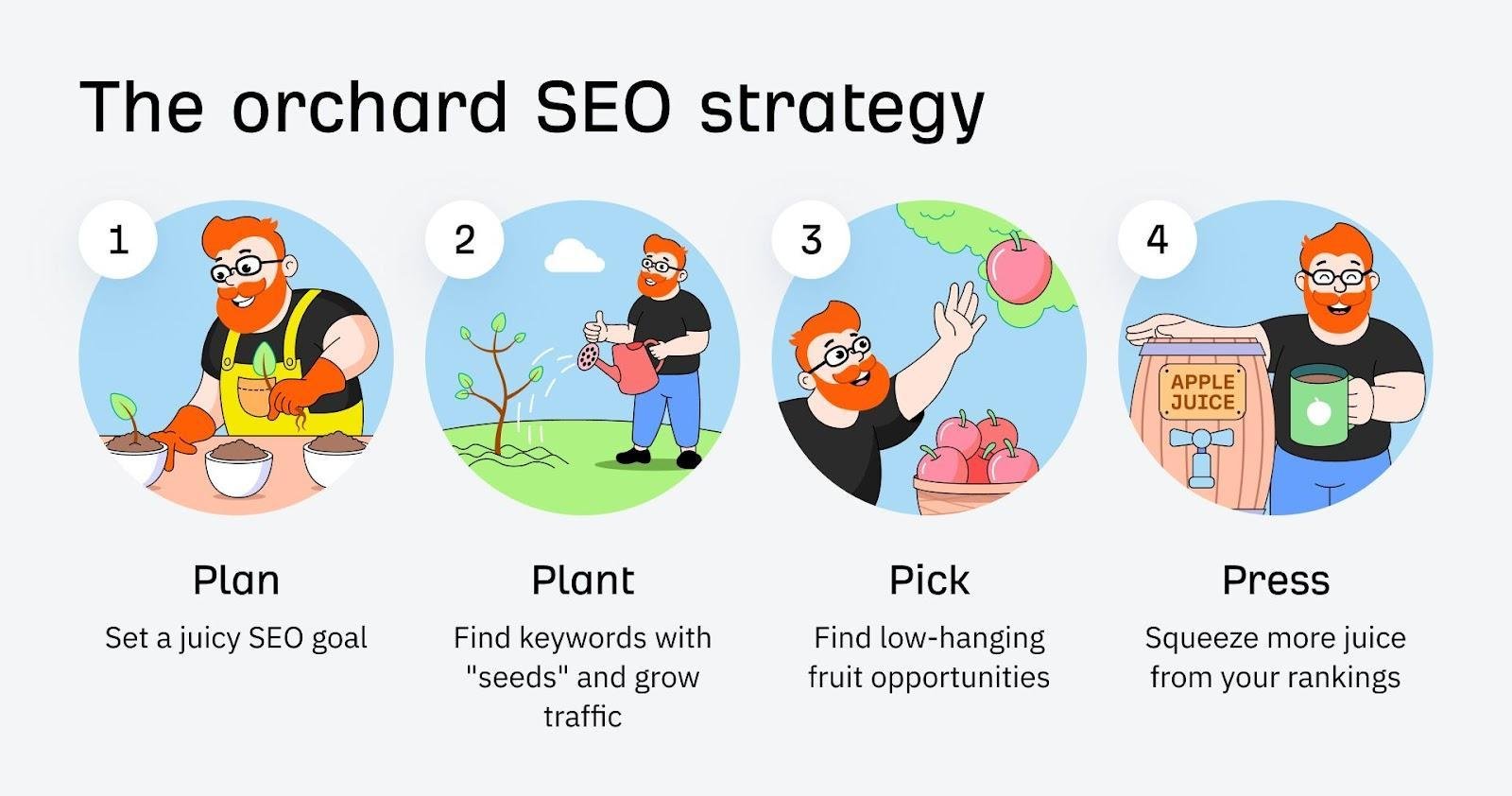
Source: Ahrefs
A quick word of advice: keep your goals grounded in reality. Wanting to rank #1 for every keyword in your niche is almost impossible. And do you really need it?
Instead, focus on smaller, more measurable goals, and make sure everyone on your team knows exactly what they're responsible for.
2. Lack of monitoring
It isn’t just about the lack of strategy. Lack of monitoring can be just as harmful.
The thing is, SEO is constantly changing, especially now with AI. So, when you do things “blindfolded,” you can’t really track what’s working and what’s not.
Solution:
On a practical level, you don't need anything extraordinary: just a good, tested SEO tool.
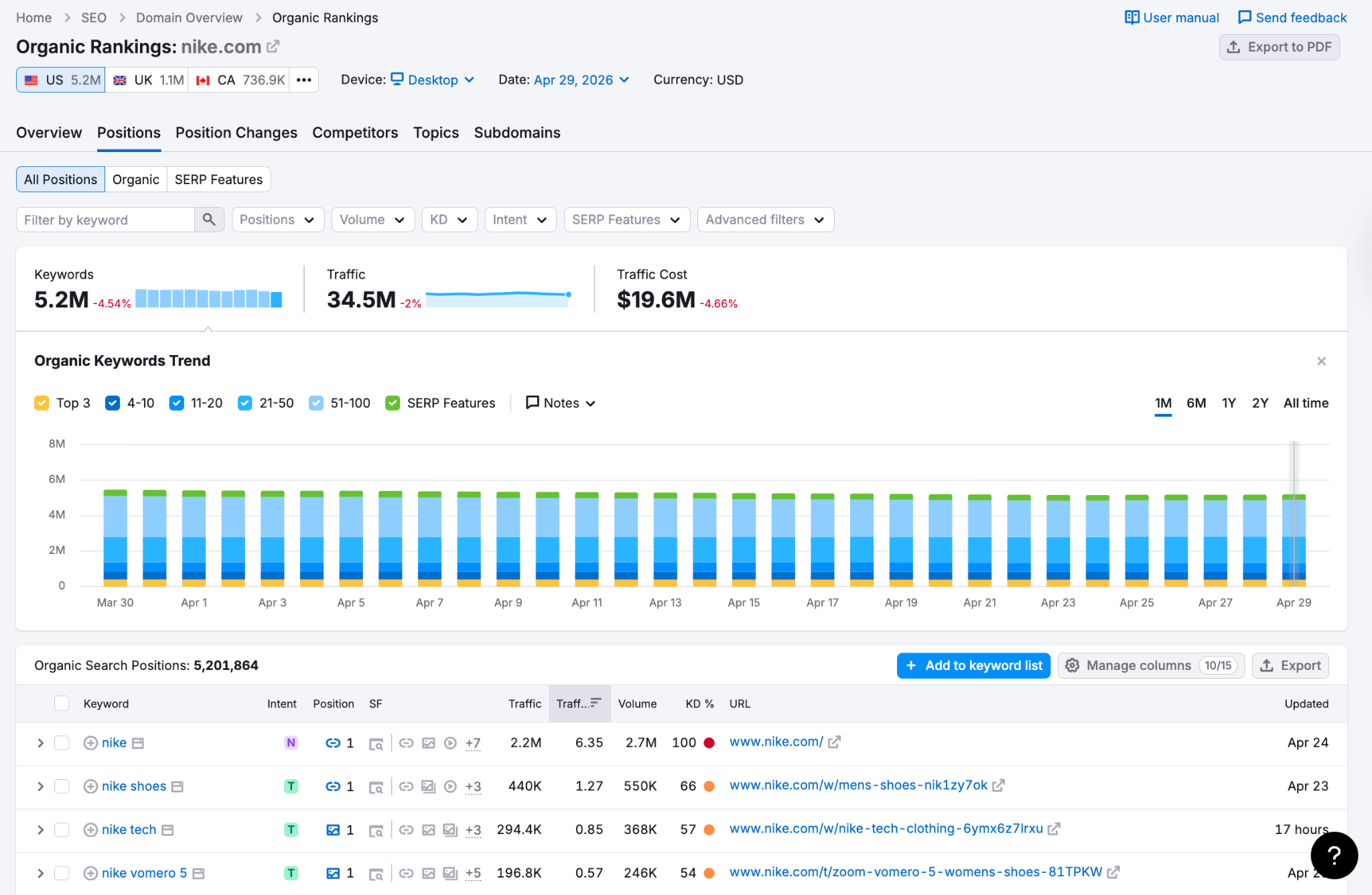
At first, you can even use free options like Google Analytics and Google Search Console. Later, you can find paid software that works better for your needs. These are the basics you should be monitoring:
- Rankings. You need to track how your website ranks for your target keywords. The easiest way to do that is by using any optimization software you prefer. Some of the most popular options are Semrush, Ahrefs, etc.
- User behavior. Knowing how users interact with your website gives you priceless feedback on what’s working and what doesn’t. This way, you can create better content and SEO strategies. You can start with Google Analytics and also add heatmaps (Microsoft Clarity, Hotjar, etc.).
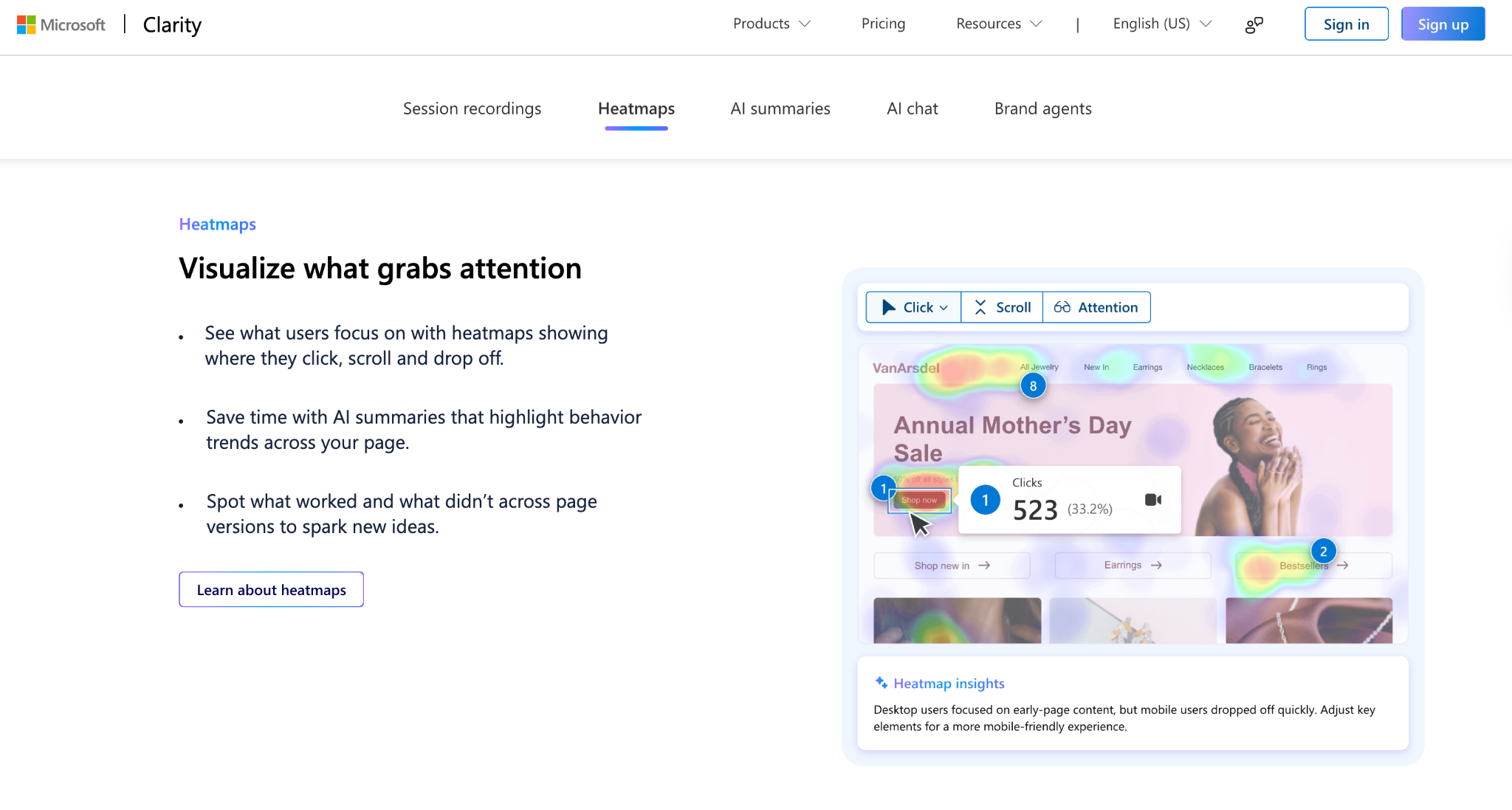
Source: Microsoft
- Technical issues. Even one serious technical error can affect your website's performance in Google search results. So, you want to catch and address them as early as possible. The easiest way to do that is by using Google Search Console.
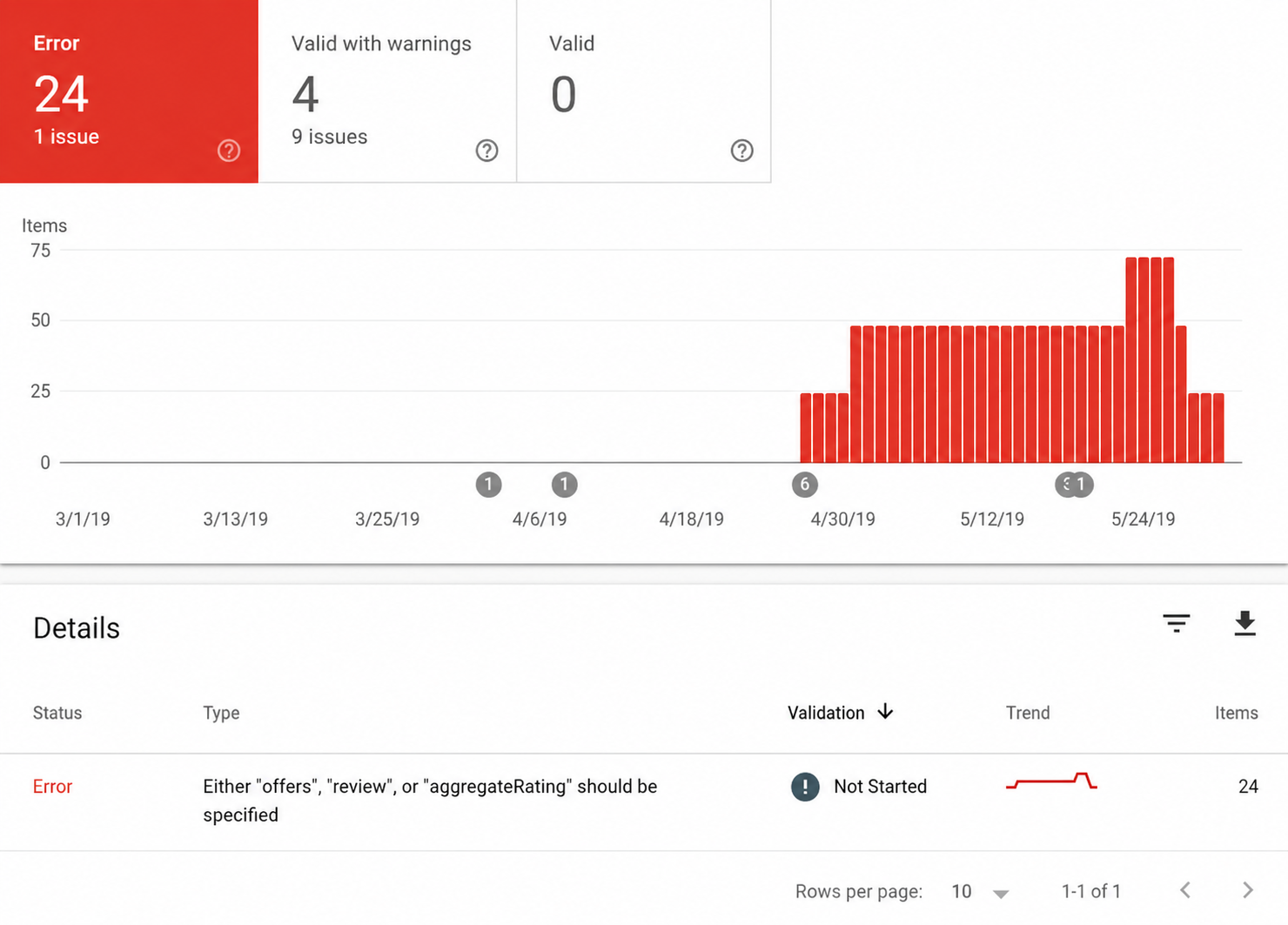
Source: GSC
3. Being spammy
Going to extremes when it comes to SEO is very easy. But the problem is that when you do too much of something, it quickly gets spammy. This can be anything:
- Having too many pop-ups on your website,
- Publishing low-quality, AI-generated posts,
- Spamming forums with your links, etc.
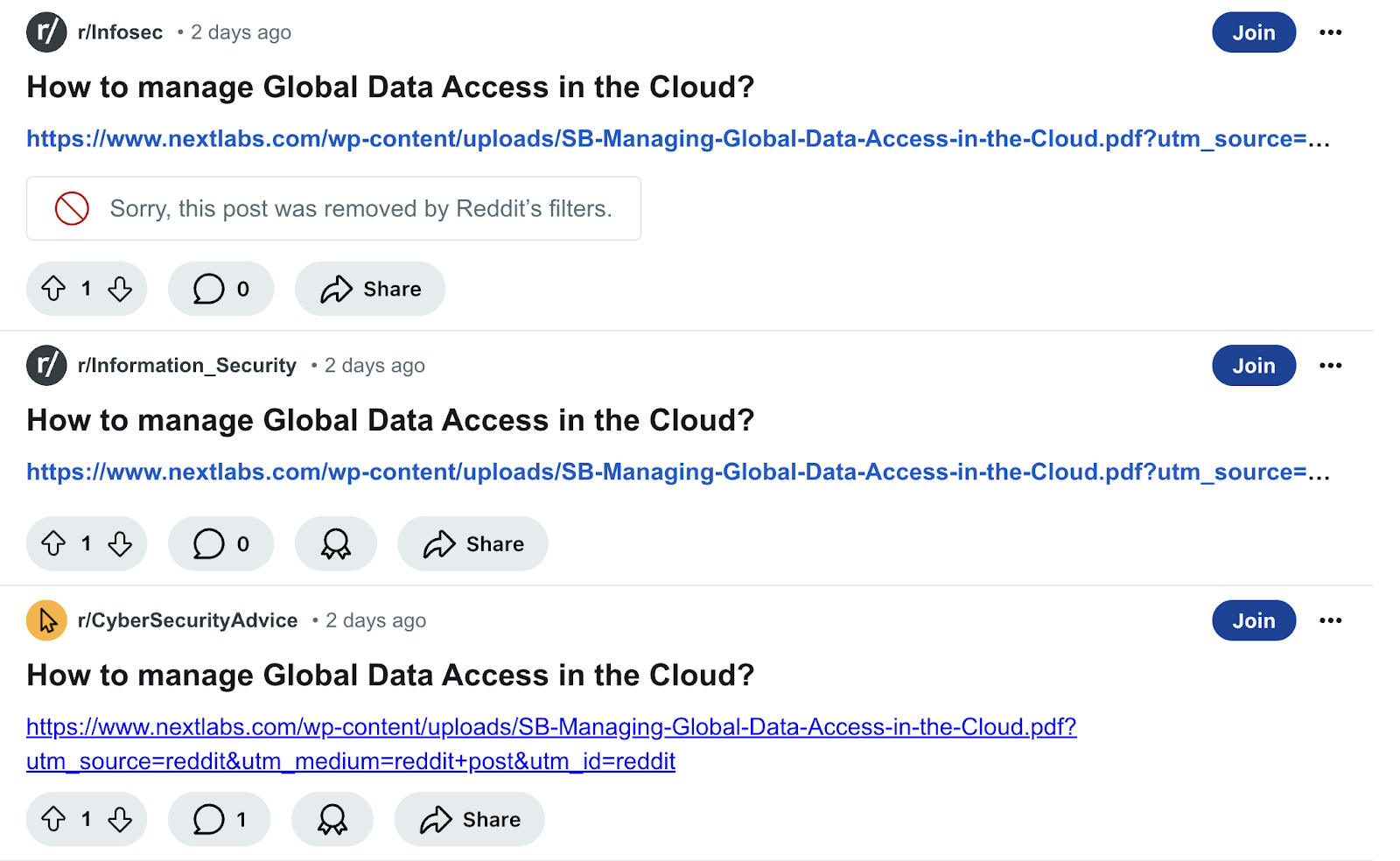
Source: Reddit
It isn’t really surprising that this approach leads to rather poor consequences.
People don’t like spammers. Probably you don’t either.
That’s why it will be nearly impossible to create any meaningful connections with new audiences. Besides, you can simply damage your brand reputation.
In worst cases, you might even get blacklisted in online communities if enough users complain about your profile.
Solution:
The best solution is to remember that more isn’t better. SEO takes time. So, accept this and don’t try to speed up the process where you know it won’t work.
4. Not doing competitor analysis
It’s hard to do anything these days without taking a look at your competition, including SEO. You have to know what other brands in your niche are doing and learn from them.
Otherwise, you’ll always be missing out.
Another common issue is that some businesses start benchmarking themselves against the big names in the industry. But, come on, that's usually not where your real competition is.
Wikipedia and Amazon aren't competing with you.
The brands worth watching closely are the ones going after the same customers, in the same space, at roughly the same scale.
And all those big players might serve as inspiration, but measuring your SEO performance against theirs isn’t really useful.
Solution:
Create a list of relevant competitors (they can be both direct and indirect). And then, check:
- What type of content they publish,
- Whether they rely on blog posts, research, a big set of landing pages, etc.,
- What keywords they cover (are there any gaps you can address?),
- Where they get their backlinks from, and so on.
Your main goal is to understand what works for them and what you can replicate in your own SEO strategy.
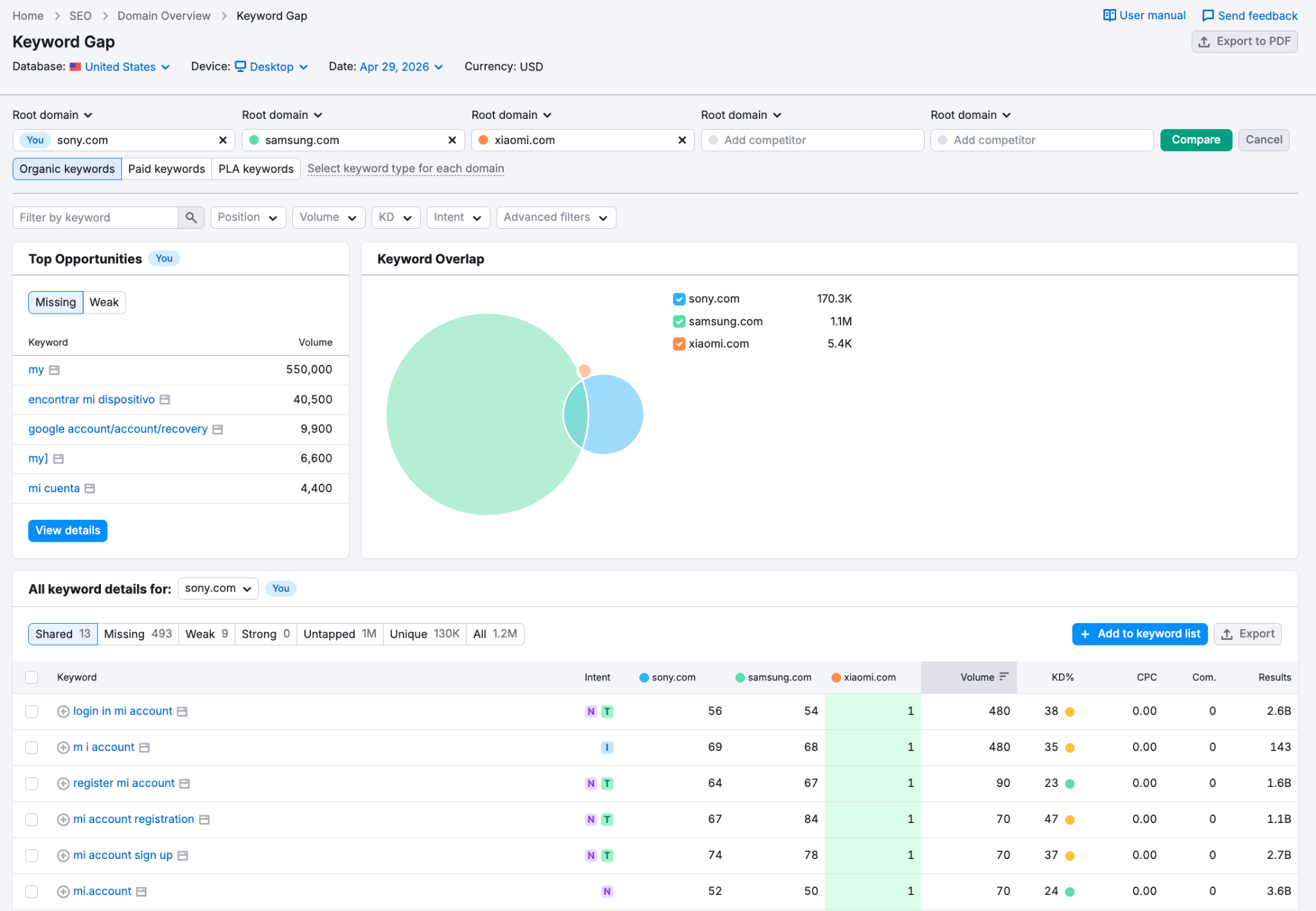
5. Not optimizing for local SEO (if you’re a location-based business)
If your company serves a specific area, ignoring local SEO means losing relevant traffic and potential customers.
Google once said that 46% of mobile searches have local intent. This stat might have changed over the last few years. But it’s still true that many mobile users are often looking for services/products near them.
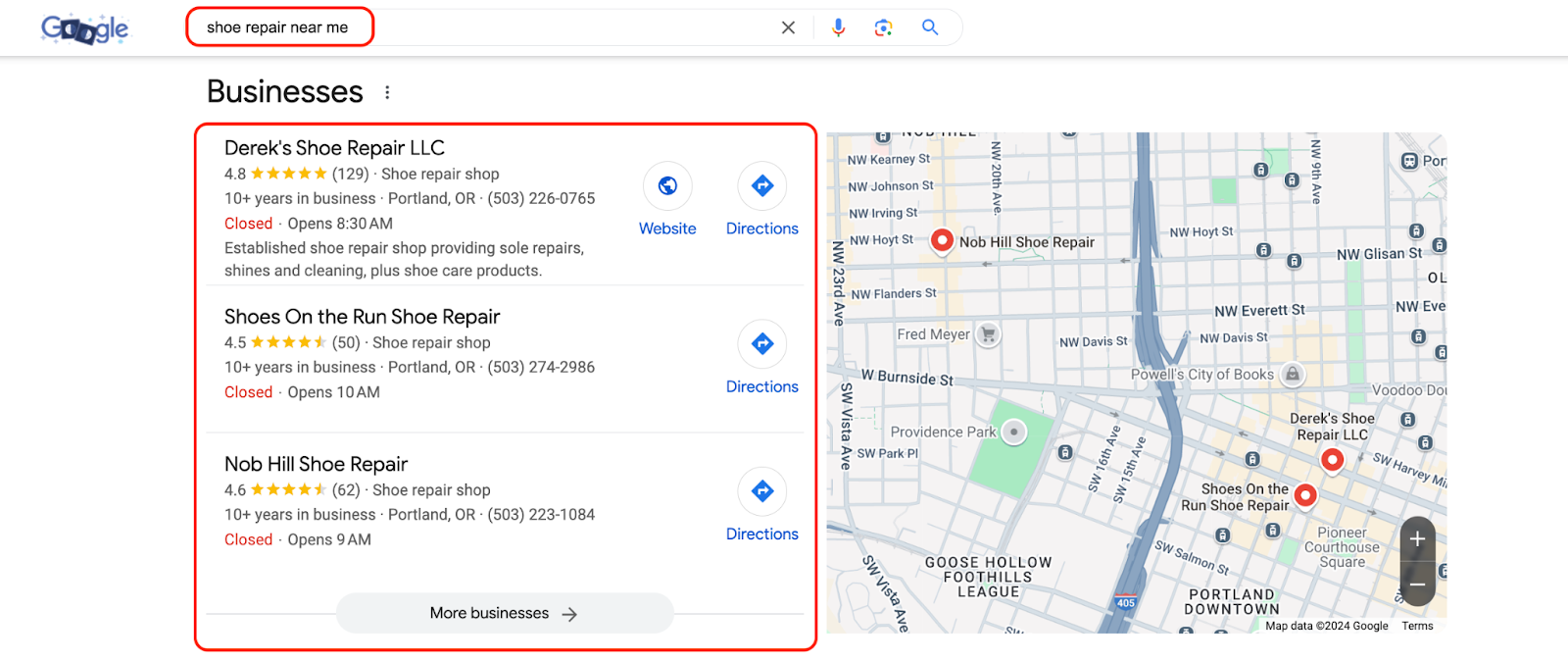
And if your website isn’t set up to capture that traffic, someone else will.
Solution:
There are many things you can do when it comes to local SEO. But these are the basics you have to cover:
- Claim and fully fill out your Google Business Profile.
- Make sure your name, address, and phone number are consistent across every directory and listing that mentions you.
- Add location-specific landing pages with unique copy for each.
- Make sure you naturally insert local keywords into your content.
- Encourage people to leave reviews, as it’s a good signal for Google and LLMs.
Content pitfalls that harm SEO
6. Poor keyword targeting and keyword stuffing
Keywords are one of the foundations of SEO. Still, if you get them wrong, it can really backfire. Two of the most common issues are:
- Targeting the wrong keywords. This usually happens when you choose search queries that aren’t relevant to your audience, intent, or your product/service. So, your pages might rank without bringing any relevant traffic or leads.
- Keyword stuffing. This was a normal practice for any website decades ago. But now, it’s one of Google’s spam policies. So, stuffing your page with search terms won’t help.
As for the latter, you might have seen a pretty viral case where The Verge posted a “best printer 2024” article that was sarcastically packed with keywords.
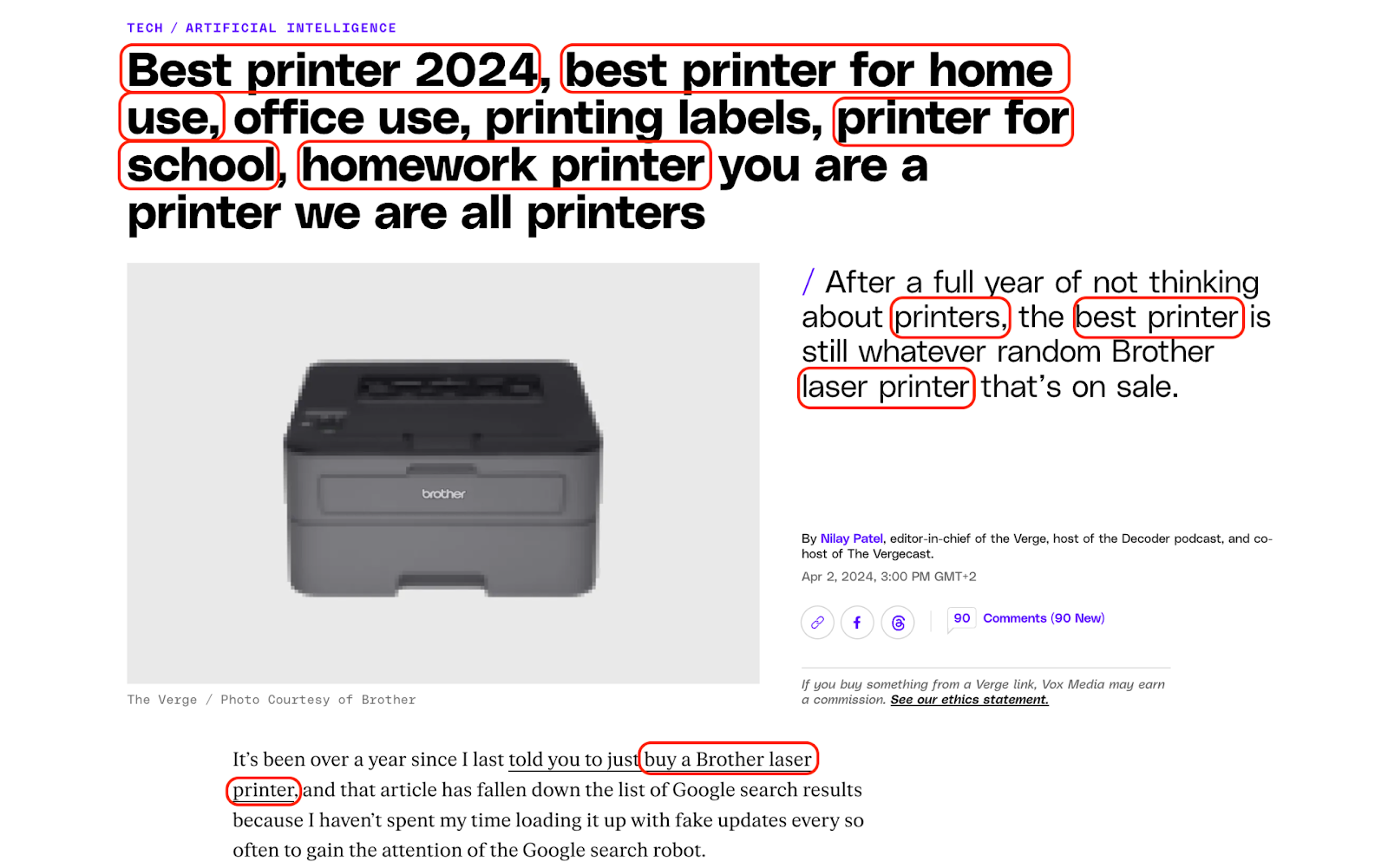
Source: The Verge
They did it to prove that the algorithms aren’t perfect.
Part of this blog post’s success was that people started sharing it online. And they got lots of organic backlinks. In fact, this article still ranks in the top 10 for some keywords:

But if you aren’t The Verge or Forbes, this won’t work for you because you simply don’t have that level of trust.
Frankly, if The Verge were to start posting this type of content only, it wouldn’t work for them either. But one spammy article in an ocean of high-quality content couldn’t really harm them.
So, while we had to mention this case, we should still avoid keyword stuffing.
Solution:
As for keyword targeting, focus on search terms that are relevant, realistic in terms of keyword difficulty, and aligned with the search intent you need to achieve your goals.
And as for keyword stuffing, it’s simple: only add your target search terms naturally. Google’s systems are much smarter now, and they will understand the context even if you barely mention your target query.
7. Duplicate content
There are several reasons why duplicate pages appear. But whatever that is, search engines don’t like them.
Google doesn’t know which page to prioritize, so your website can suffer from cannibalization. Besides, if you have any backlinks pointing to those, you won’t feel the full potential of that link juice. And on top of that, you simply waste your crawling budget for nothing.
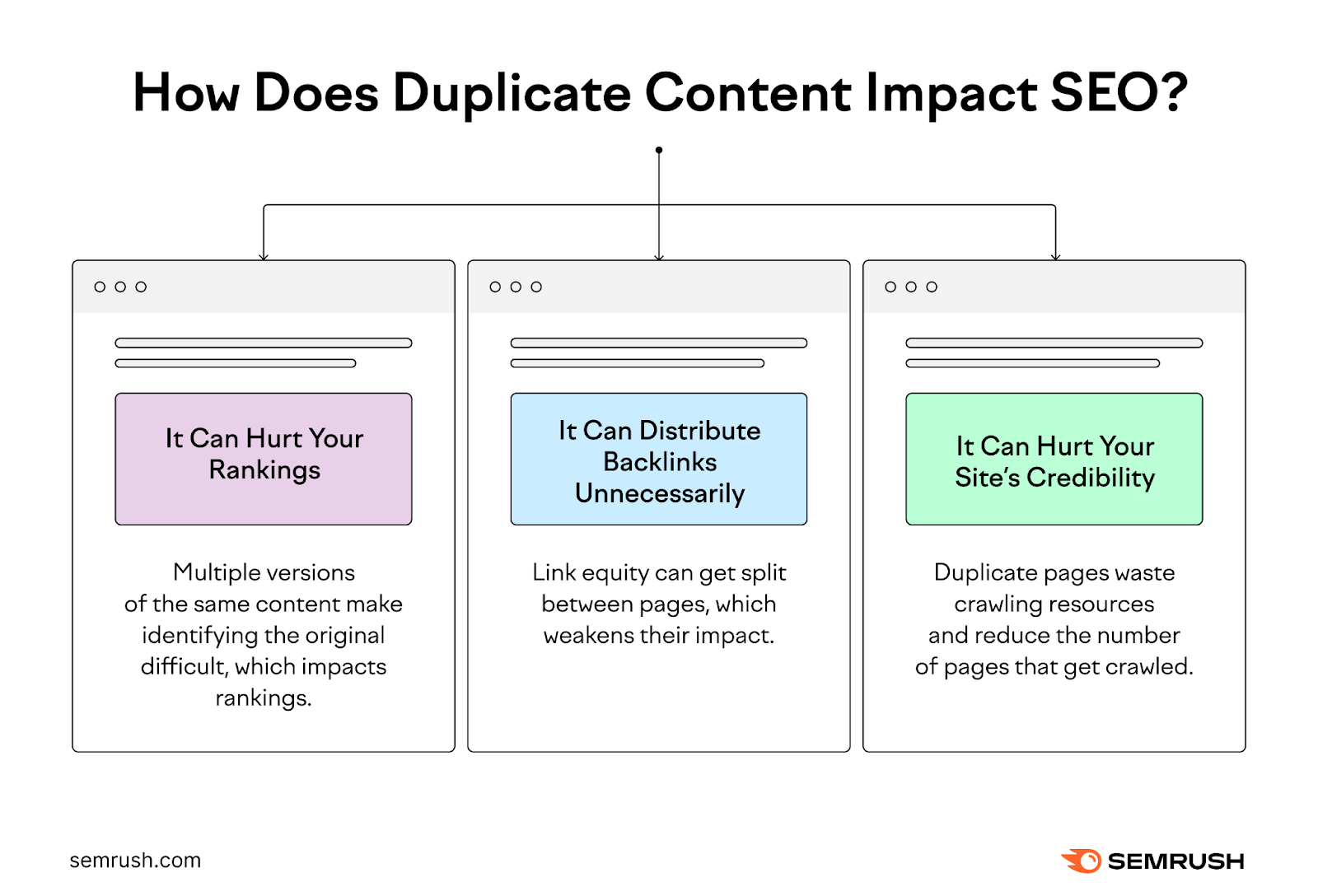
Source: Semrush
Solution:
First of all, find any duplicates you have by using an SEO tool you prefer (e.g., Screaming Frog). Then, analyze what’s wrong:
- If those pages were created by accident, remove or redirect them.
- If you don’t want a duplicate page to appear in search results, you can also use noindex.
- If you have duplicate/similar pages you can’t avoid, use canonical tags to help Google know which pages you’d like it to prioritize.
- If you simply published two pieces that are very similar, consolidate (merge the two pieces together into one stronger one).
- If the issue is that you copied and pasted the content, write original copy, even if that’s the same service for different locations, for example. It’s a lot of work, but it’s absolutely necessary.
8. Low-quality copy
When SEO gets overly technical, you might forget about the simplest thing: your content.
While search engine algorithms aren’t easy, Google definitely won’t rank bad content higher when there are better options out there. And by “better” we mean many things: more informative, better structured, more detailed, with more unique insights, etc.
The issue these days is that many generate random AI content.
While Google won’t penalize you purely for using AI, you won’t get anywhere if your content is thin and useless.

Source: Google
The biggest problem is that generative systems basically use what’s already out there, add their “signature” writing style, and offer you a seemingly new piece of content.
But remixing the same stuff that was already said millions of times before won’t help you rank. And this applies to both human and AI content.
Solution:
In the age of AI, the only real solution is to offer something unique in everything you publish. It’s called “information gain.”
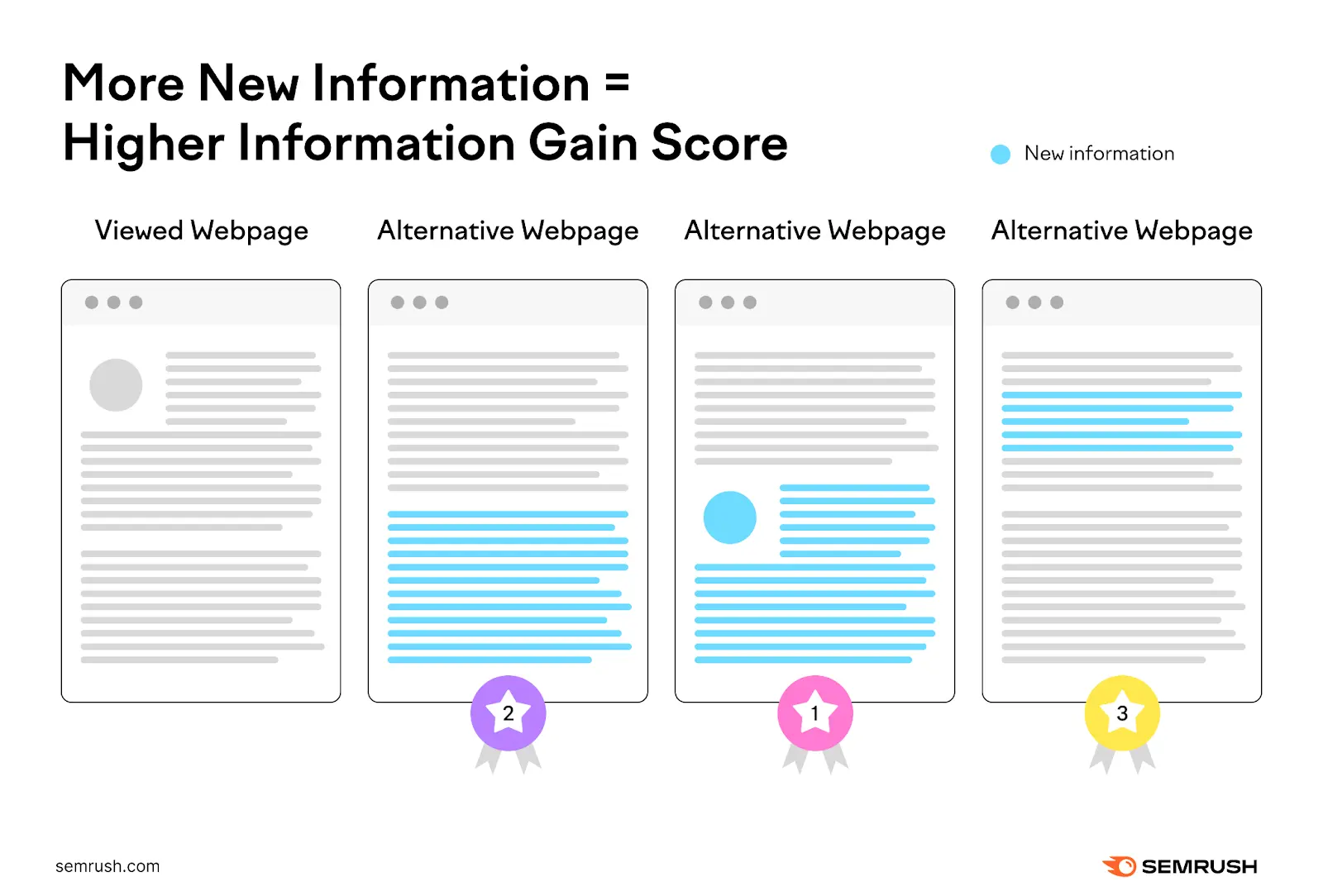
Source: Semrush
In simple words, it means adding some new information compared to other posts ranking for the same query.
What can it be?
- Any original approaches that weren’t mentioned in this context before,
- Real-life examples, case studies, screenshots you analyze, etc.,
- Original research and anything you’ve experienced first-hand,
- Contrarian takes, new sections that competitors don’t cover, and so on.
9. Writer authority
These days, anyone can type things. So, you have to show your expertise.
This is where the idea of writer authority comes from. A writer behind articles that you post should be experienced and credible.
Obviously, a blog post on skin conditions written by a dermatologist will instantly have more trust from the audience than the same thing written by someone random.
It’s just a matter of relevant expertise, that's it.
Search engines are getting better at evaluating not just the content itself, but the credibility behind it.
Solution:
So, what should you actually do?
Check whether your content has an author attached to it.
Anonymous articles or generic “admin” accounts don’t build trust. Showing a real name, with a real background, is a big thing that can make a difference.
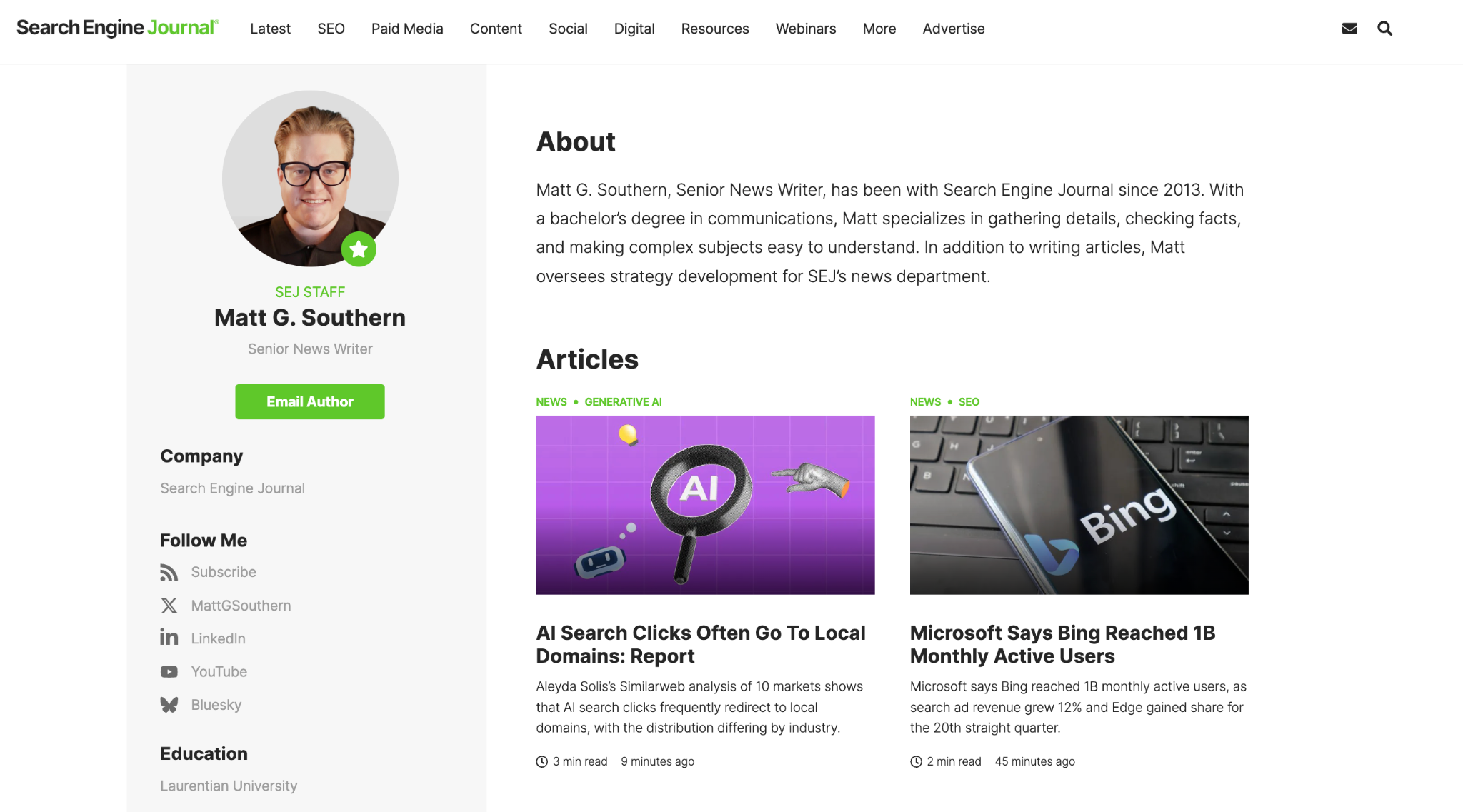
Source: Search Engine Journal
10. Ignoring content relevance
Your content has to be relevant to the search intent. Yes, we know it might sound like the most obvious thing to say. But you’d be surprised at how many websites forget about this.
Picture this: you see a restaurant advertising its signature steak. So, you convince your friends to go there with you. Except, instead of that steak, you find out that they only serve smoothies. Obviously, you are going to feel deceived.
The same thing happens when you write content without understanding what people really want from this query.
Solution:
Every content piece you post should match your audience's expectations and needs.
The easiest way to understand what those are is to search for what already ranks for your target keyword. Are those landing pages? Informational blog posts? Listicles?
Google is pretty good at figuring out what people want. So, if those content types satisfy the intent, you should also stick to them.
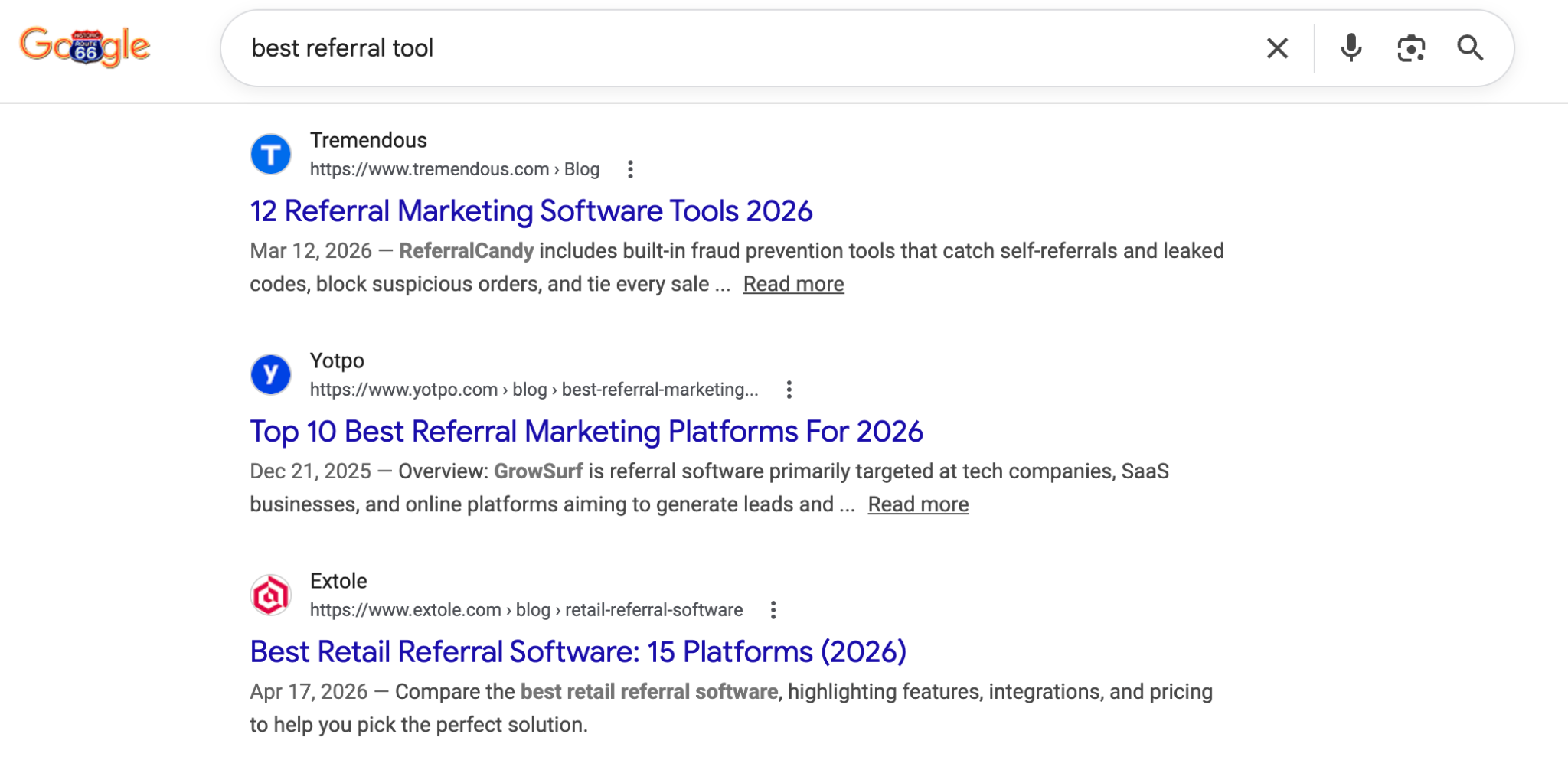
For example, it might seem like “best referral tool” is a perfect keyword for a landing page. But if we google that, we’ll actually see listicles ranking at the top.
So, optimizing your landing page for this keyword isn’t the best idea because that’s not what people expect to see.
11. Not updating old content
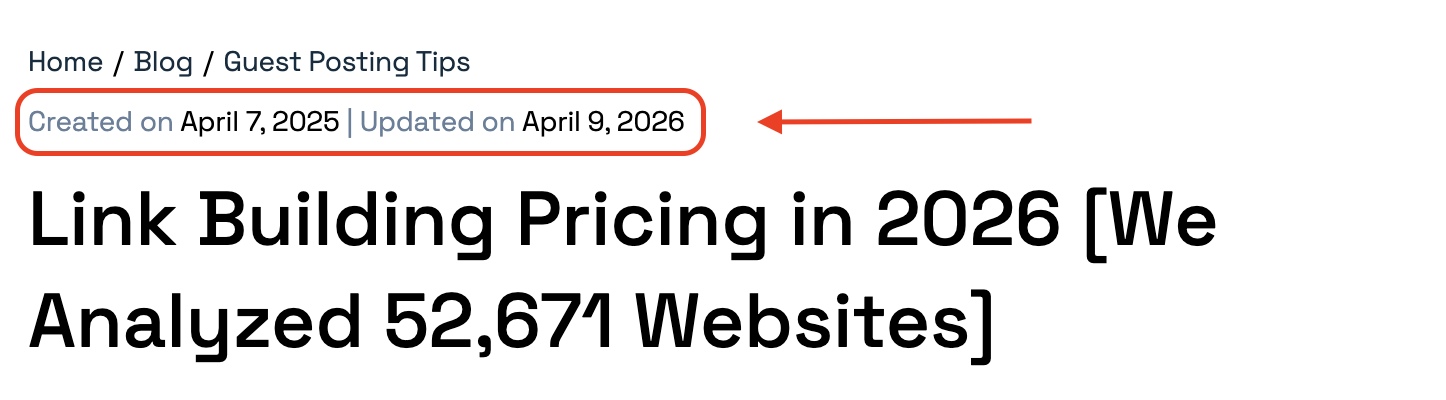
Publishing your articles and calling it a day is a common habit. But content has its shelf life. Especially in the era of informational overload, when everything seems to become irrelevant and obsolete in days.
Pages that ranked well a year ago likely won’t show the same results now. Because both Google and LLMs prioritize fresh content.
Solution:
A regular content audit should be part of your SEO workflow. Go through your older posts and try to understand whether:
- The information is still accurate,
- The keyword targeting still makes sense,
- The page can be improved by adding new data, better structure, updated examples, etc.
Besides, refreshing a strong existing page is often faster and more effective than writing something from scratch.
On-site mistakes
12. Not building a proper website structure
This might be one of the most common SEO issues. Especially if you’ve been expanding your website over the years without any actual strategy.
When people talk about site structure, they are referring to how organized your pages are.
This matters because if there is no clear order, it’s getting hard to understand your website for everyone, from your customers to search engines and AI systems.
Solution:
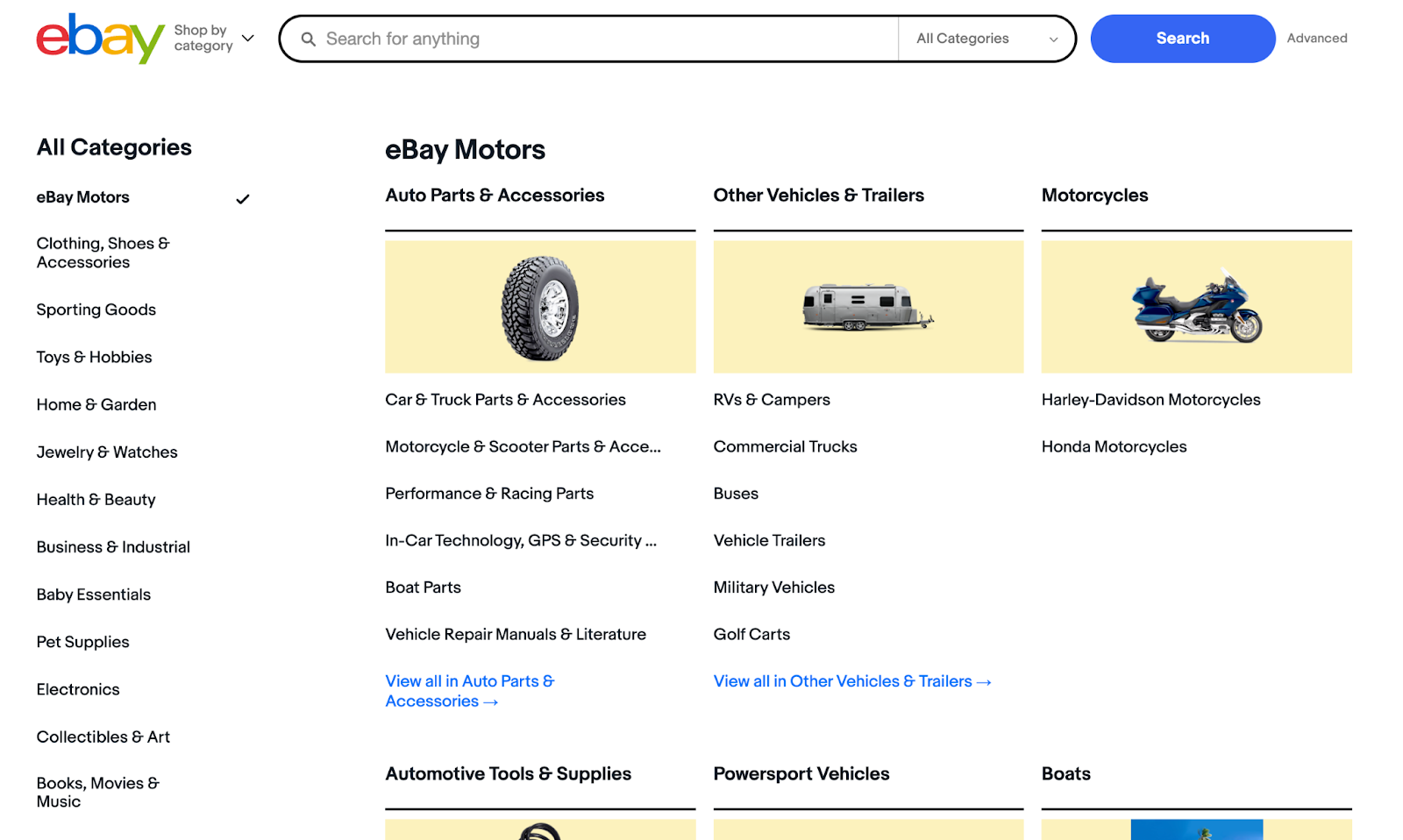
Decide on categories and sections you want to have from the start.
Also, make sure it’s easy for you to add new sections when needed in the future without disrupting the existing structure.
Source: eBay
The whole idea is to make it logical and easy to understand.
You might even want to test it with some people who aren’t involved in your business to see how fast they can find what they need.
13. Having complex navigation
Your website isn’t a maze.
If you ever read Google’s guidance, you’ll see that it always mentions how important user experience is. They are all about “users”. So, you should be, too.
And it’s in your best interest, really.
The longer it takes for people to get from point A to B, the more likely they are to give up and check out your competitors' web pages.
Solution:
It should be easy for anyone to find what they are looking for.
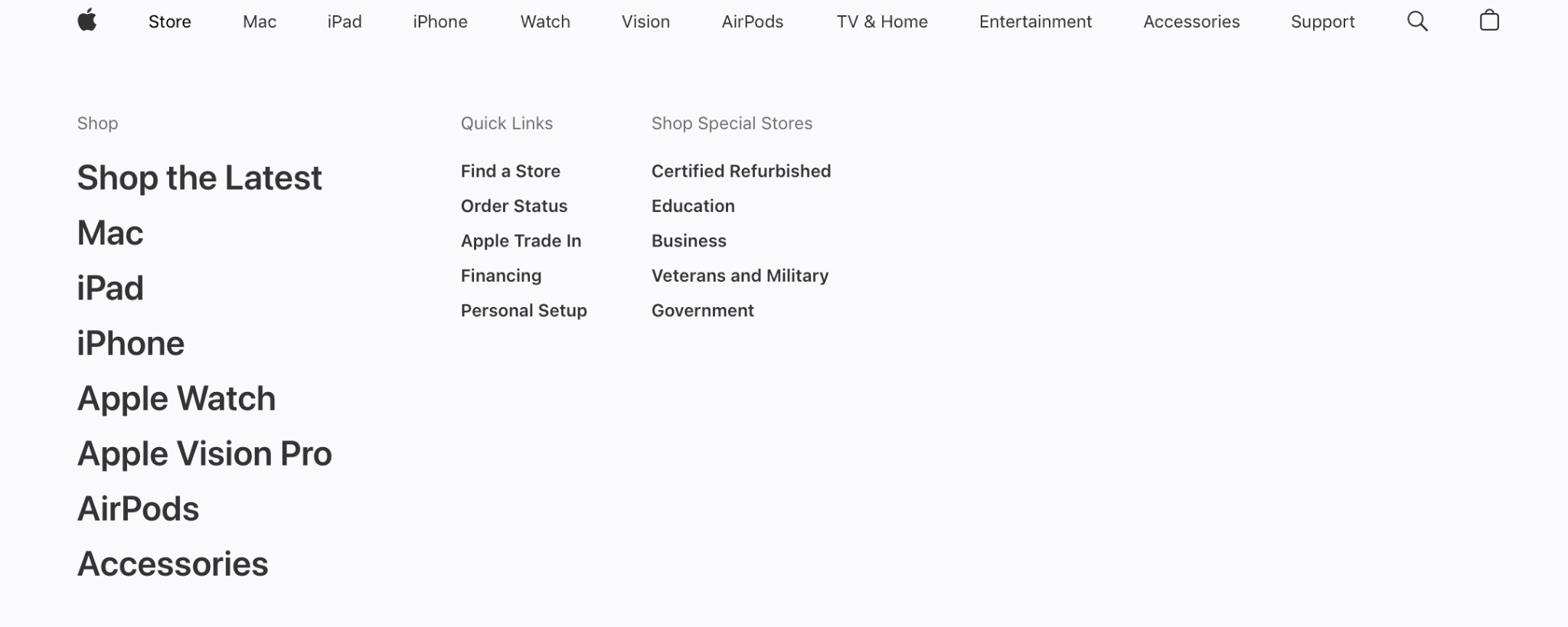
So, make sure that users can navigate in as few clicks as possible. There is a popular “3-click rule.” But it isn’t that strict if all those clicks actually make sense.
So, simply make sure you aren’t creating any unnecessary work for your website visitors.
Besides, try to avoid overly complex menus with too many dropdowns. Instead, keep it clean. And if you don’t know how to organize everything, get some inspiration from other websites:
Source: Apple
14. Forgetting about internal links
Most people underestimate how important internal links are. But they’re responsible for many things:
- Help search engines better understand your website structure,
- Distribute link authority between pages,
- Lead your user deeper into your content, and so on.
So, all this can get “disrupted” if you forget to link to other content on your site. Besides, it can create orphan pages (with no links pointing to them), which makes them harder for crawlers to discover.
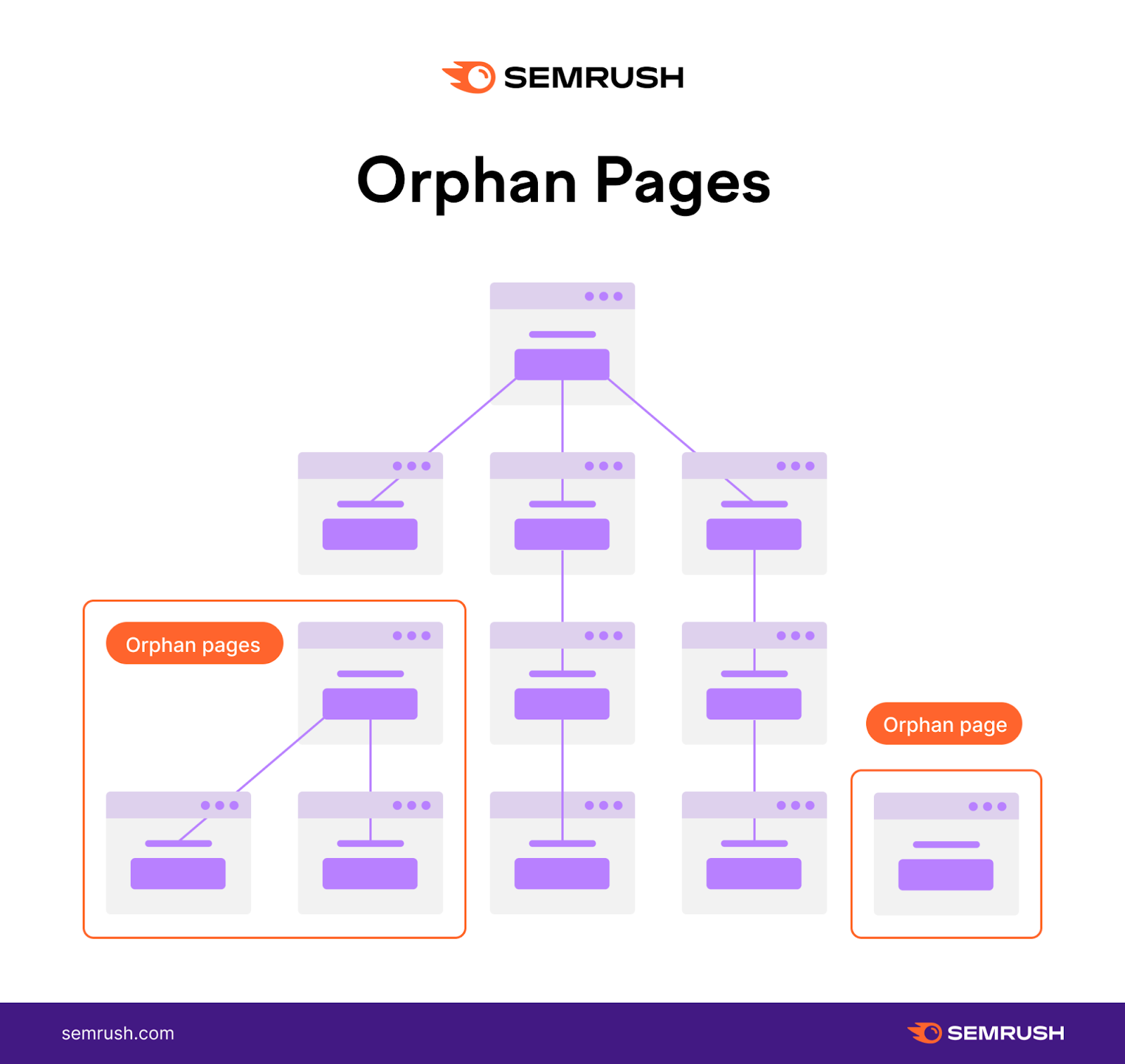
Source: Semrush
Solution:
Ensure that important pages (your homepage, landing pages, etc.) get as many natural internal links from other pages as possible.
Besides, interlink your relevant blog posts.
If you have a lot of content, and you really struggle to be consistent, you can create a spreadsheet where you actually track your internal links.
15. Having a bad page structure
Page structure is how you organize everything on your site: blog posts, service/product pages, your About page, all of it.
Get it wrong, and you're not just making things harder.
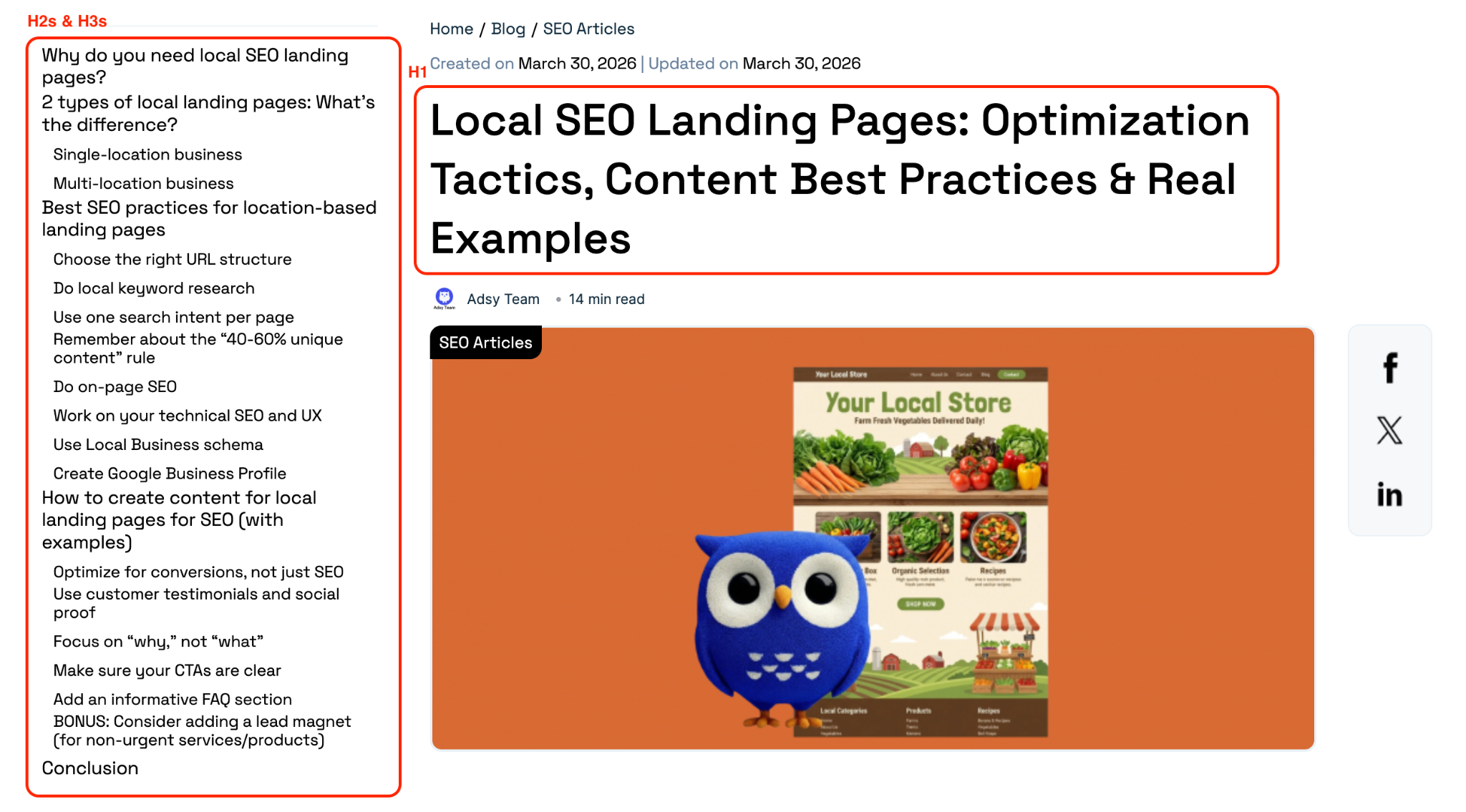
Most pages rely on heading tags (H1 through H4) to organize content by importance. In general, there should be one H1 at the top, H2s for the major sections, H3s and H4s for relevant subsections.
These rules are simple in theory.
But sometimes, you see pages with multiple H1s or none at all, or headings jumping from an H2 straight to H4. There are also other versions of this problem: no categories, no way to group related content, etc.
Solution:
Simply follow the classic H1 to H4 hierarchy. It is a predictable format that never gets too complex.
And make sure that you structure your content logically, so that there is one main idea per section and the most important information is at the top (inverted pyramid).
Off-site mistakes
16. Having an unnatural backlink profile
Backlinks are links from other sites to yours. Bluntly speaking, the more of them you get, the higher your domain authority and rankings become.
But it only works if those are high-quality links.
So, if you don’t pay attention to where those come from, you can end up with an unnatural backlink profile. What does it mean?
An unnatural backlink profile is filled with:
- Spammy or toxic backlinks,
- One type of links only (e.g., only dofollow links, only links from DA70+ sites, etc.);
- Overly optimized anchors (for example, mostly keyword-based),
- Too many links from niches that aren’t related to yours, etc.
All these things can make your backlinks look sketchy, and Google might flag your site for manipulative link practices.
Solution:
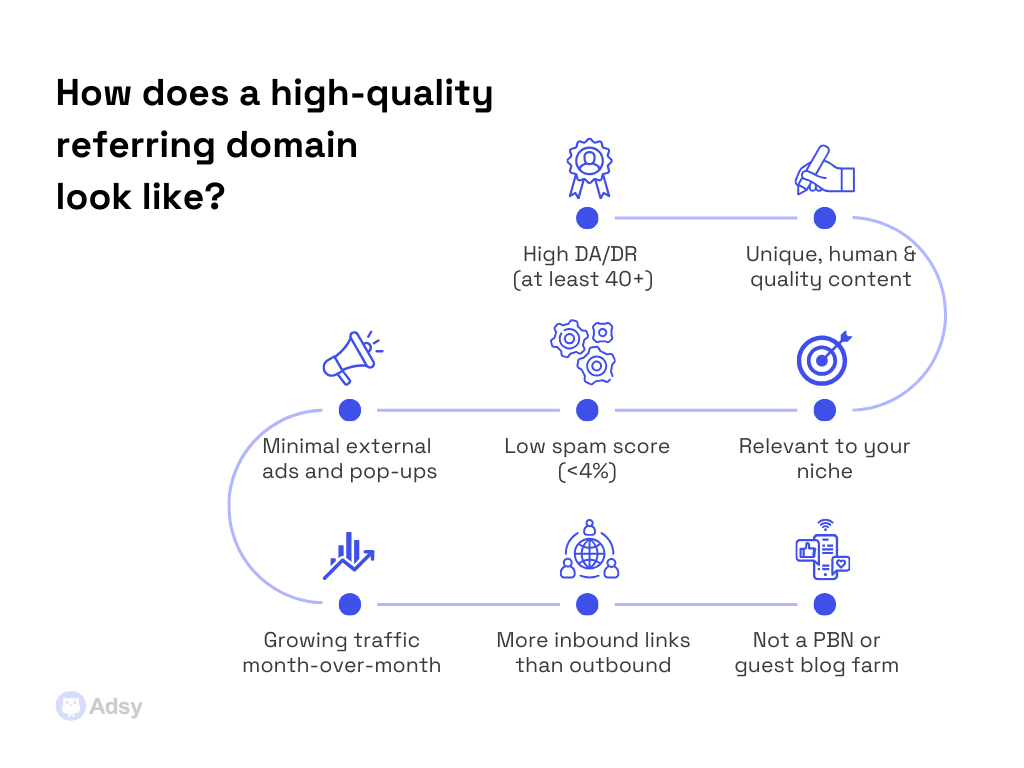
It's best to use relevant links from different sources. Check their SEO metrics and make sure that your anchors are diverse enough.
As for the referring domain quality, make sure it doesn’t:
- Link to websites in sensitive niches (casinos, crypto, etc.),
- Post low-quality, AI-generated content,
- Have too many pop-ups that are ruining the user experience,
- Have decreasing traffic over the last 3-6 months.
The more diversified your backlinks are, the more natural your link profile will look.
And if you don’t know where you can get that variety of quality links, you can always use a trusted backlink platform.
17. Not having a link-building plan
Link building is already one of the most time-consuming parts of SEO. And going into it without a plan just makes it all harder than it has to be.
If you don’t know what you want from your links, you will be disappointed, whatever the results are.
So, think about your goals. Do you want to improve rankings for particular pages? Do you want to get more brand visibility? Or do you want more referral traffic?
Solution:
A link-building plan doesn't have to be complicated. It's just a breakdown of what you have and what you need:
- Your current situation, budget, timelines, priorities, etc.
- How many links you approximately need for each page, which anchor texts work better, what are the best pages to target, and so on.
Ideally, build a plan for every page you want to rank well.
To get better estimations, look at the link building strategies of the high-ranking pages for your target keywords.
18. Rushing link building
That's another side of the previous point.
In competitive niches, links can be really hard to earn. And that frustration pushes some people toward getting into weird link offers. You know, when you get 20 guest posts for $100 overnight.
In reality, that’s an unrealistic price for a guest post. Besides, you shouldn’t get this many backlinks at once unless you’re a giant website.
Going from zero links to 20 in a moment is not even suspicious anymore, because everyone knows what that means.
You won't fool Google's algorithms with that.
Solution:
Look, we only have a boring answer here: you need time and patience.
Build links gradually and consistently. And even if you want to grow faster, you’ll still have to increase your volumes gradually.
19. Submitting low-quality guest posts
By now, most businesses understand that they have to choose better websites for link building. But some still ignore the fact that the content you submit has to be great as well.
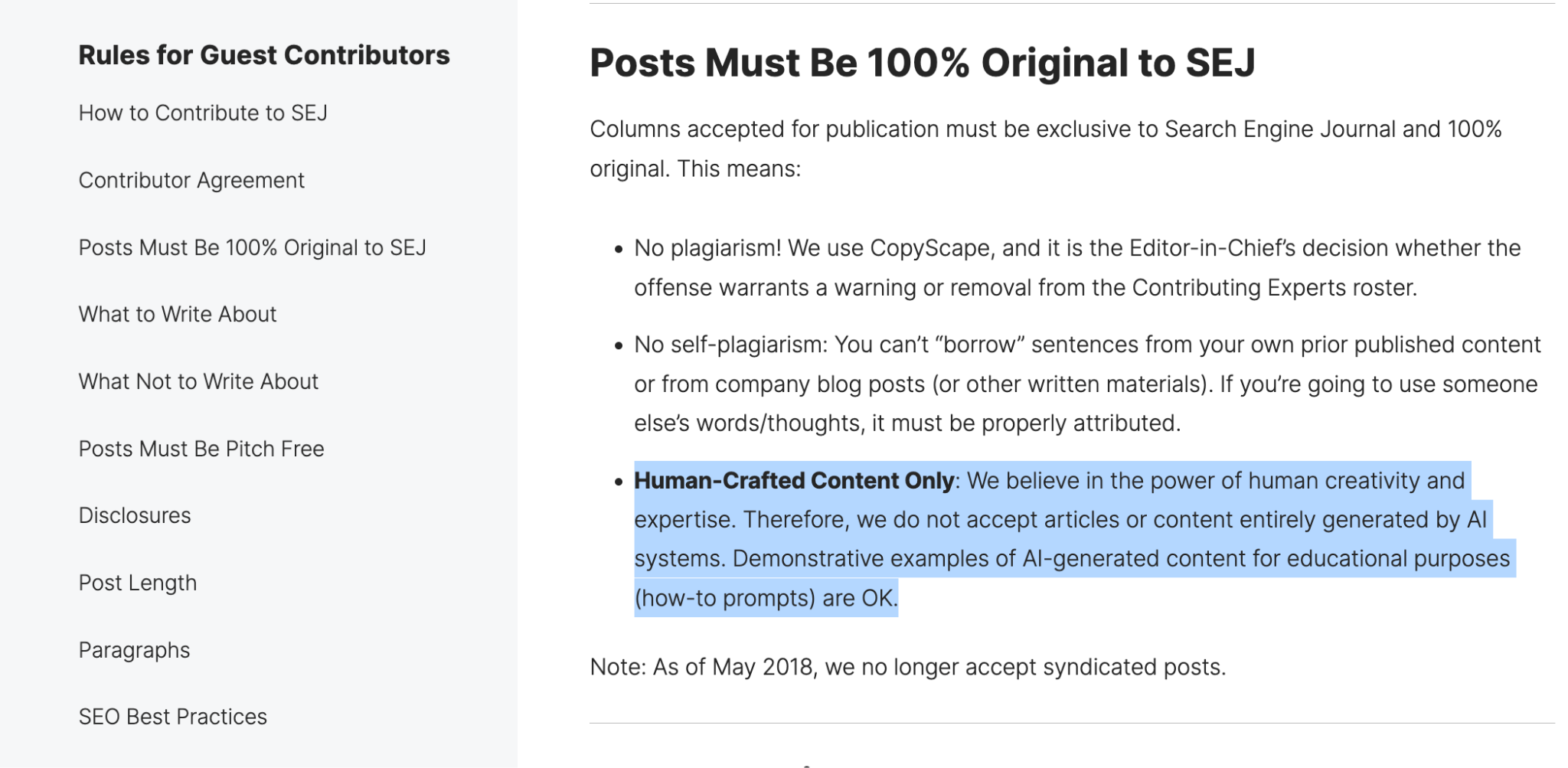
Now, with AI, some people started generating “whatever” and sending it in. Yet, it doesn’t work that way because:
- Low-quality content will never rank,
- You risk attracting penalties if all your backlinks come from low-quality pieces,
- Reputable websites won’t accept anything like this in the first place.
Source: SEJ
Solution:
Treat guest posts similarly to how you treat your own content. Sure, you might not put as much effort into it. But it still has to be valuable and well-written.
If you don’t have as much time, make it shorter. But make it good.
21. Using over-optimized anchors
Anchors are the clickable words or phrases you use as a hyperlink. They help search engines and readers understand what the linked page is about.
But Google also looks at your backlink anchors to build a “certain picture” about your website.
There is nothing wrong with that. The problems start when people decide to go overboard trying to optimize them. They stuff all the keywords they can to make the backlink “more valuable.”
But of course, that’s not how it works. It just looks spammy.
Solution:
Keep a natural ratio of different types of anchor texts. While there is no solid rule, here is an approximate healthy proportion you can keep in mind:
Technical search engine optimization issues
22. Not using noindex and robots.txt
These two serve different purposes but work toward the same goal: keeping crawlers focused on the pages that actually matter.
- Robots.txt tells crawlers which pages not to crawl.
- Noindex tells them not to index a page even if they do visit it.
You have to use them to avoid wasting your crawl budget. Because if there is some content you don’t want to rank, why not “inform” Google about that and let it focus on your important pages instead?
Solution:
Review your current pages, and list the ones that have duplicate content or content that shouldn’t be indexed in the first place (e.g., personal data, outdated information, admin pages, pagination, etc.).
Also, keep in mind that if you block a page in robots.txt, Google may not be able to crawl it and see the noindex tag. So, if you want to remove a page from search results, don’t block it with robots.txt, use noindex instead.
23. Not dealing with 400/500 errors
Getting a 400/500 error message means the server is not able to process the request.
- 4xx errors mean something went wrong on the client side.
- 5xx means the server couldn't handle the request.

Source: Pixar
Either way, leaving them unfixed isn’t the best option. It doesn’t just hurt user experience, but also damages your rankings.
Solution:
Run your site through Screaming Frog or any other tool you prefer to find these errors first. Then fix, remove, or redirect the broken links.
24. Having empty pages
A page with no content wastes crawl budget and risks triggering soft 404 errors. Besides, it doesn't look good for your brand and doesn’t feel right for your users.
These mostly happen due to technical issues or simple mistakes. And depending on what your situation is, the fix will vary, too.
Solution:
Audit your site for empty pages. Based on what those are, fill them with content, delete them, block them from indexing, or create a temporary “Page under construction” note.
25. Not prioritizing mobile optimization
Most users now search online from their phones. Besides, Google uses mobile-first indexing, meaning that if your website isn’t optimized for smartphones, you’ll be behind no matter what you do.
And of course, you want more people to read your content, check out your products/services, book calls with you, and eventually convert.
But all that will underperform unless both your desktop and mobile versions are doing well.
Solution:
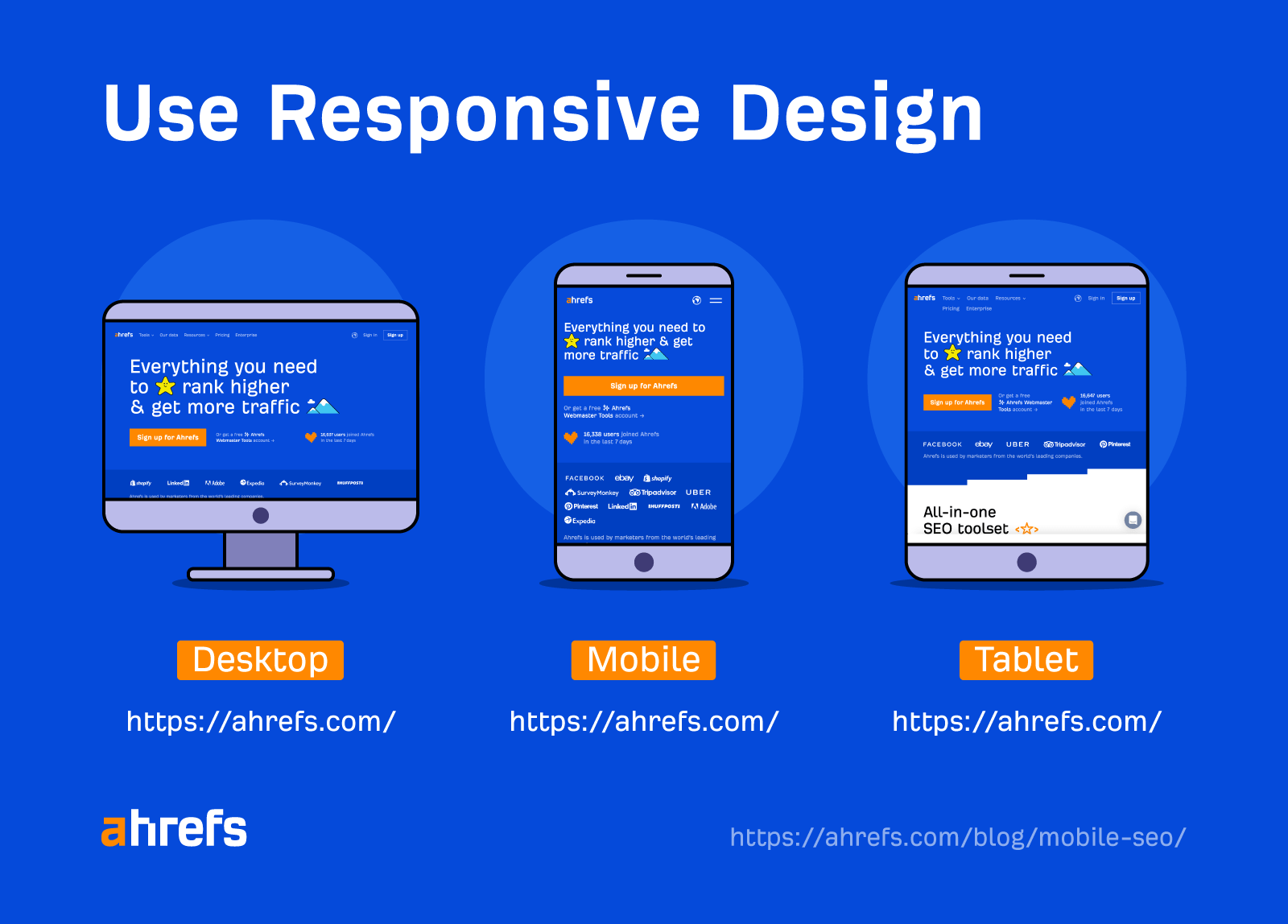
Start by making sure your website has a responsive web design and is easy to navigate on phones.
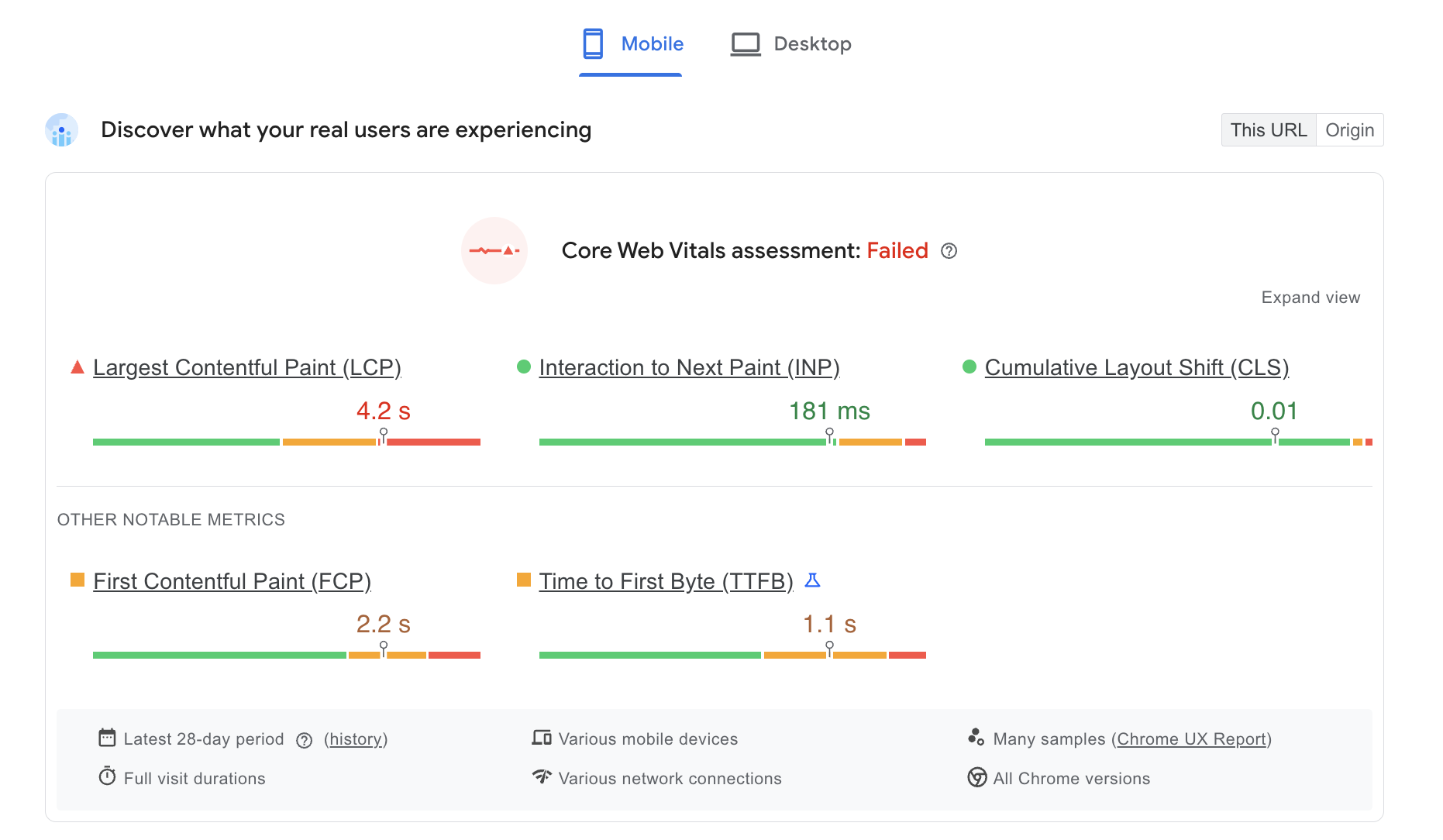
Then, check mobile performance with PageSpeed Insights for free, and see what you can fix.
Source: PageSpeed Insights
Next, take an actual smartphone and test how your website feels on mobile. Make sure that:
- The text is big enough to be readable,
- The icons are clickable and distinctive enough,
- The image size is adjusted to look proportional,
- The design elements are tweaked to fit into the smaller scale.
Source: Ahrefs
26. Ignoring slow loading speed and Core Web Vitals
Both speed and Core Web Vitals are technical metrics that are the foundation of SEO.
If your website’s performance is weak, no amount of original research and quality backlinks will help you reach your full potential.
The longer your site takes to load, the more visitors leave before seeing anything. And when many visitors bounce, search engines understand that something is wrong.
Loading speed is self-explanatory. But what are Core Web Vitals all about?
It’s basically Google's way of measuring real user experience on your site. It’s based on three metrics:
- LCP measures loading performance. It basically helps search engines understand how long it takes to load a major visual element on the site.
- INP measures responsiveness. This refers to how quickly your page reacts to any user actions (e.g., clicks).
- CLS measures visual stability. This essentially measures whether elements jump around as the page loads. It’s probably more annoying than it sounds. If a button shifts right as someone is about to tap it, that's a bad experience, and Google knows it.
Solution:
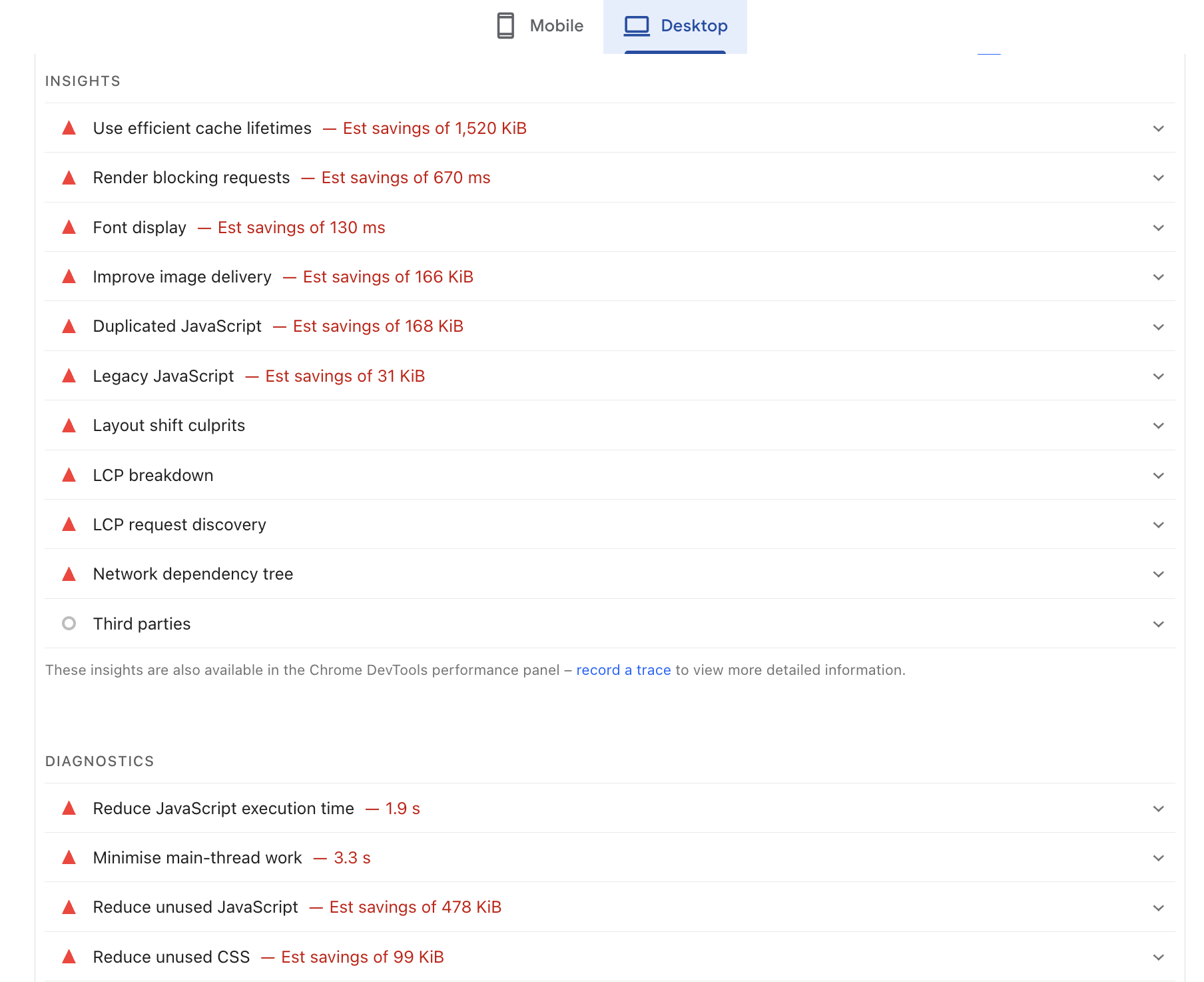
The best place to start is your PageSpeed Insights report (again). Scroll down to see the actual issues and some of the fixes you can implement.
Usually, you see things like this:
Of course, you might need to tweak other things too. But this is already a good start.
Some of the problems might be obvious, like images that are too big. Others can be more technical, so it might be worth it to talk to a developer or maybe ask ChatGPT or Claude (at least).
27. Missing or incorrect schema markup
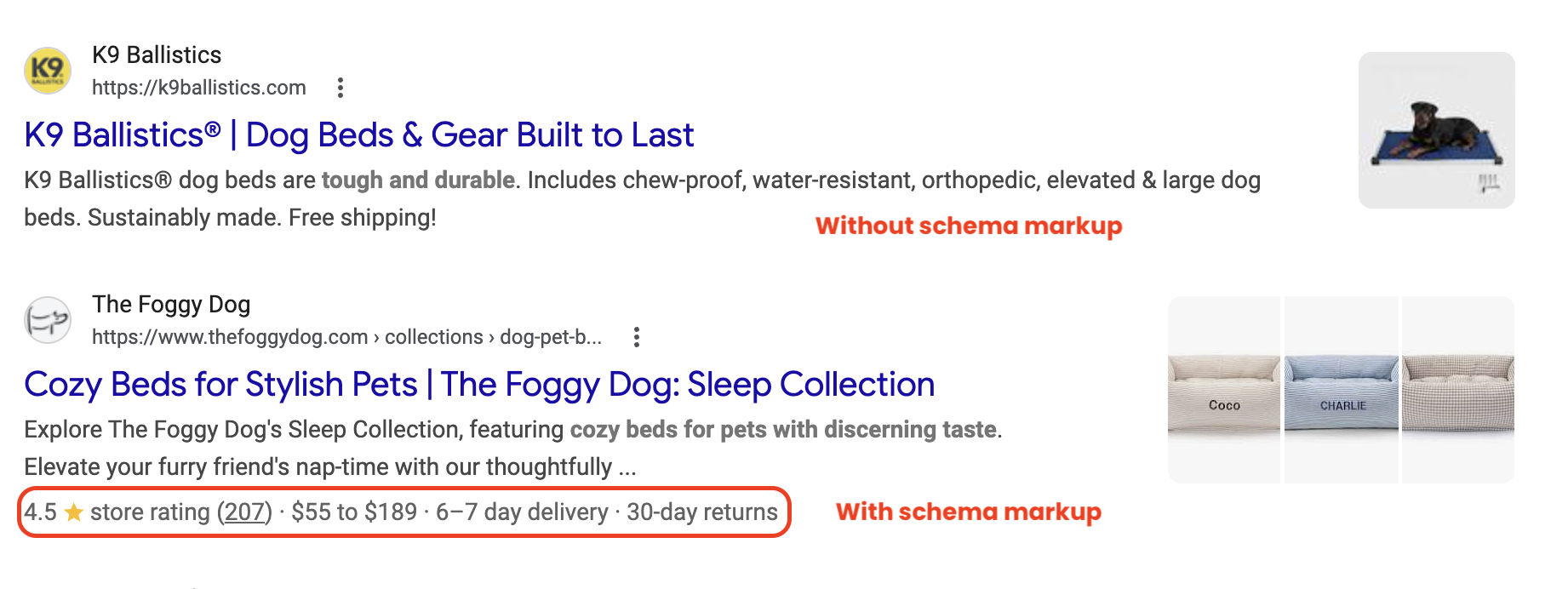
Schema markup is structured data (basically code) that helps search engines understand what your content is actually about.
Without it (or with it implemented incorrectly), you miss a chance to become eligible for rich snippets and other search features that can improve visibility and click-through rates.
On top of this, when you use schema, you can also make it easier for AI systems to better understand your content. This way, your visibility in LLMs might also improve.
Solution:
Review your web pages to see where it’s worth implementing your schema. Then, create your schema:
- Use Google’s Structured Data Markup Helper or ask any AI tool you prefer to help you generate your schema.
- Add it to your website.
- Use Google's Rich Results Test to check for any errors.
If you already have some schema markup added, go through it and make sure that you’re using the correct type and all the information is accurate.
28. Bad security
While this is a technical point, it’s also very much emotional. Imagine yourself in your user’s shoes: you enter a website, and what you see is an alert like this:
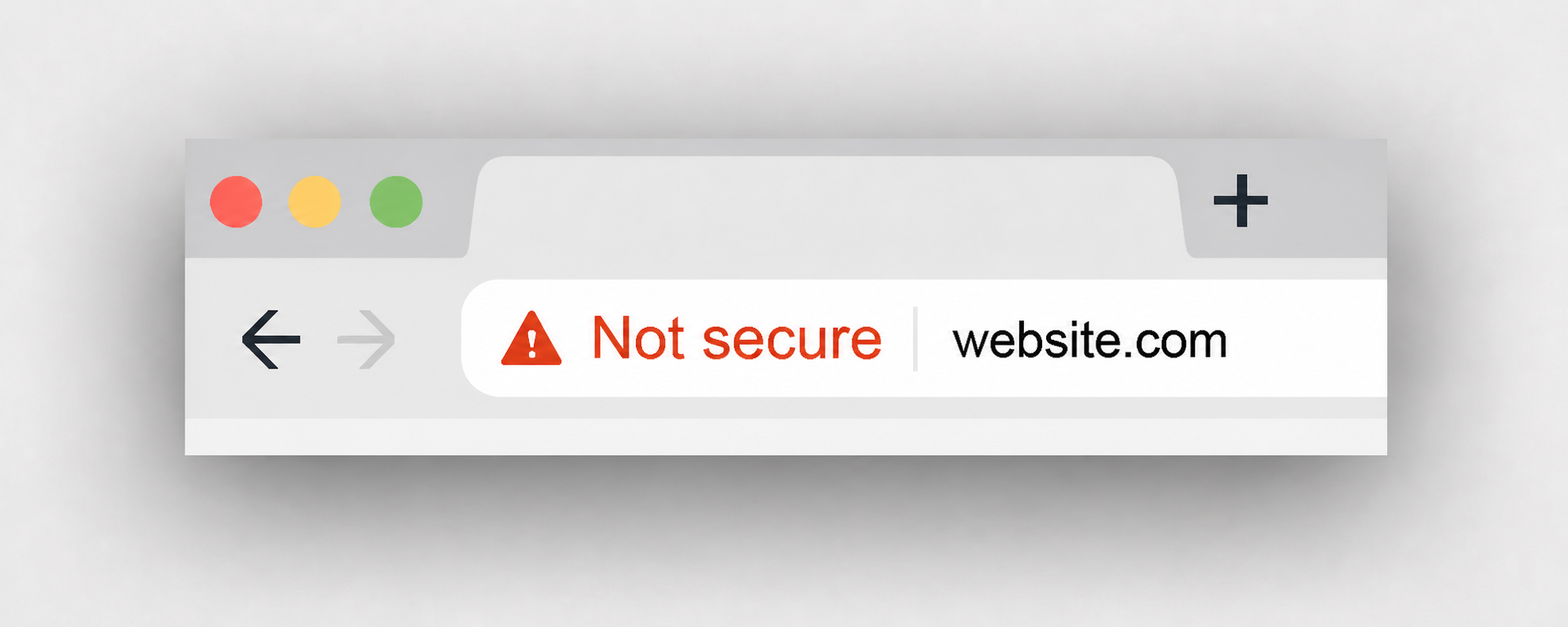
Doesn’t look too trustworthy, right?
But of course, an unsecured website is a problem for Google too. You won’t really rank well if you don’t have HTTPS.
Solution:
Most website builders and CMSs already have TLS/SSL certificates by default. So, start by checking whether your website has HTTPS in the URL.
But this alone won’t make your website fully secure. So, implement at least basic cybersecurity best practices:
- Keep your CMS, software, and plugins updated,
- Back up your site regularly,
- Audit for vulnerabilities on a consistent schedule,
- Don’t give any unnecessary access to the employees who don’t need it,
- Enable 2FA/MFA where possible,
- Make sure anyone with admin access is using strong passwords and understands at least the main security practices.
29. Indexing issues
If a page isn’t indexed, it can’t appear in search results. That sounds obvious, but it’s one of the most common problems in any technical SEO audit.
You can’t get any real outcome from your SEO optimization if Google doesn’t index your pages.
Depending on your website, indexing can take from minutes to weeks. So, while it’s okay to wait, if your pages don’t get indexed and you don’t monitor them, it isn’t good.
Solution:
Use Google Search Console to check your indexed pages. If some content isn’t indexed, submit it for indexing. But if this happens too often, resubmission isn’t a real solution. You need to figure out why this happens in the first place.
Some common causes are:
- Weak or duplicate content,
- Poor internal links,
- Incorrect canonical tags and issues with redirects,
- Low overall site authority, etc.
Fixing indexing issues is often one of the fastest ways to help you grow quickly. Especially when you’ve already created optimized pages, but they weren’t indexed.
30. Forgetting about image optimization
Images are one of the most overlooked technical SEO areas among beginners. Generally speaking, there are two things that can go wrong with your images:
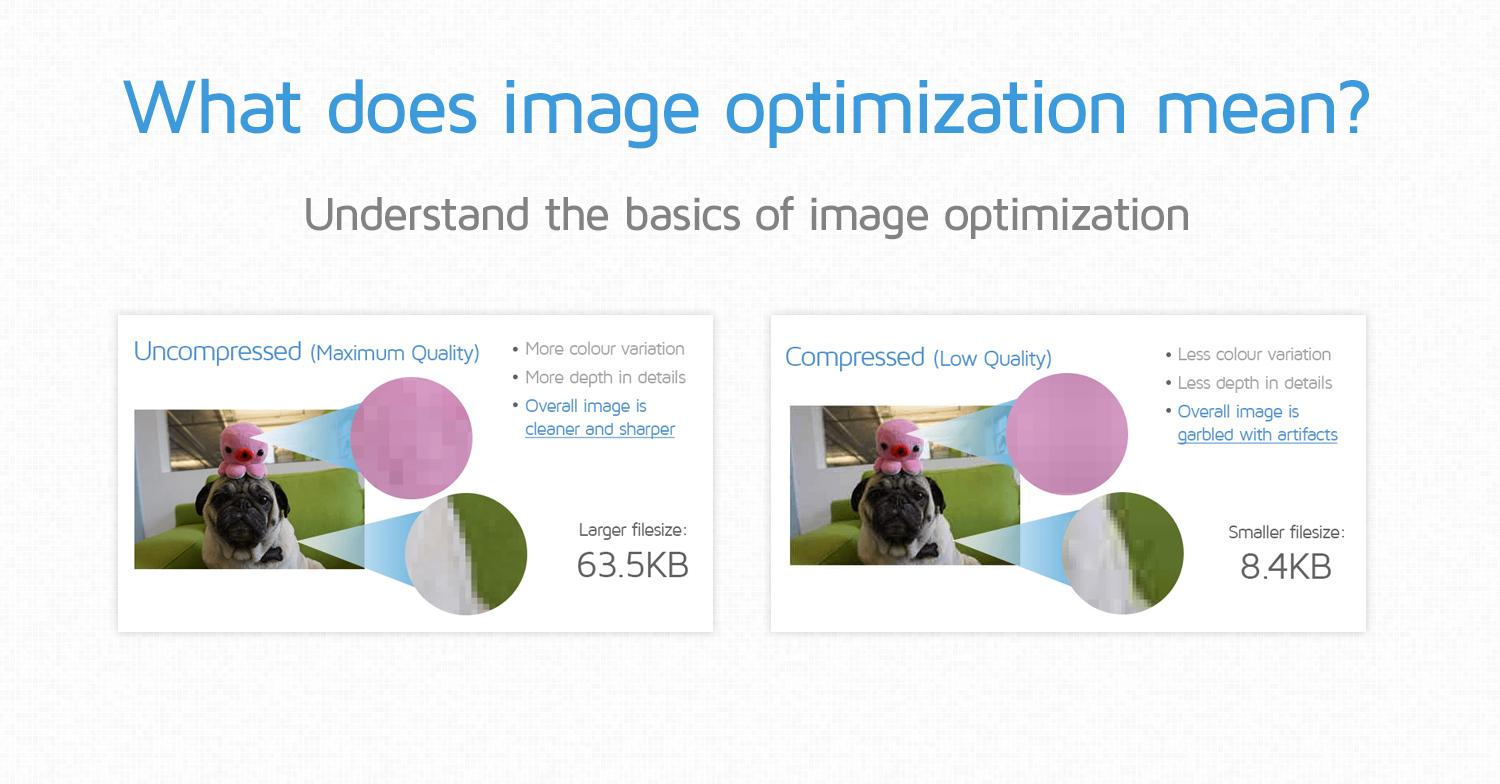
- Large, uncompressed files slow down load times, and they do that quite dramatically.
- Missing alt text means search engines can't interpret what the image is about. And it’s also a small missed opportunity to rank in image search.
Solution:
Every visual should have a descriptive alt tag that is clear and relevant. It’s important for accessibility and image rankings. Ideally, make sure your file name is also suitable and optimized, instead of something like “IMG847595003”.
And before anything goes live, compress your images. You can do that for free with a tool like iLoveIMG, TinyPNG, etc.
Source: GTmetrix
AI search optimization issues
31. Not optimizing your content for AI Overviews and LLMs
You simply can’t ignore AI search right now. While, of course, traditional SEO isn’t dead, you have to be future-oriented.
“Zero-click searches” are a real thing.
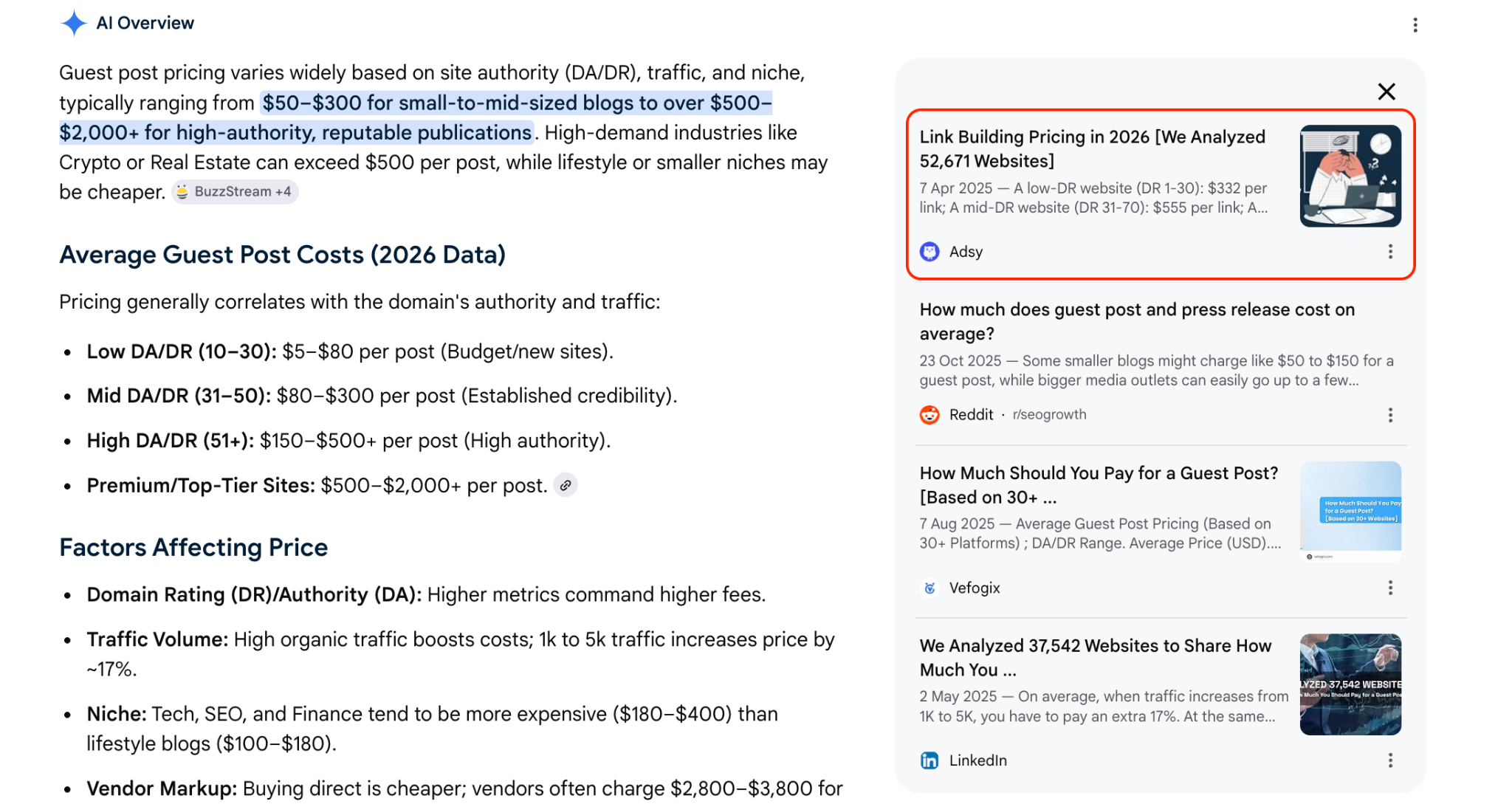
Besides, LLMs don’t offer readers 10 links to choose from. They simply mention what seems like “random brands” or cite what seems like “random content.” And if you aren’t mentioned there, that’s it.
Solution:
Here are the basics you have to do with your content to get a chance to be cited and referenced:
- Make sure your traditional optimization is on point. Because if your website’s security or loading speed isn’t there, your chances of being visible are much lower (in both search engines and LLMs).
- Organize your content well. While we’ve already covered this, and it also belongs to “traditional SEO,” it’s too important. Because AI is all about algorithms, and what they understand is the structure.
- Answer your questions directly. If your H2 is “What is information gain?”, your first sentence should be “Information gain is…” Avoid fluff as much as possible, especially when it comes to the most important points.
- Consider using summaries, TL;DRs, and FAQs. These aren’t a magicpill. But they can help you give clearer answers and summarize your content better for AI systems.
- Add examples and unique perspectives. These often add additional value and help you stand out from other websites. It can be anything from your real-life experiences to your original research. AI tends to pick up this content more often.
32. Ignoring unlinked brand mentions
Before, only links mattered for SEO. But now, with AI search, even unlinked mentions count.
Basically, LLMs don’t consider the same factors as traditional search engines.
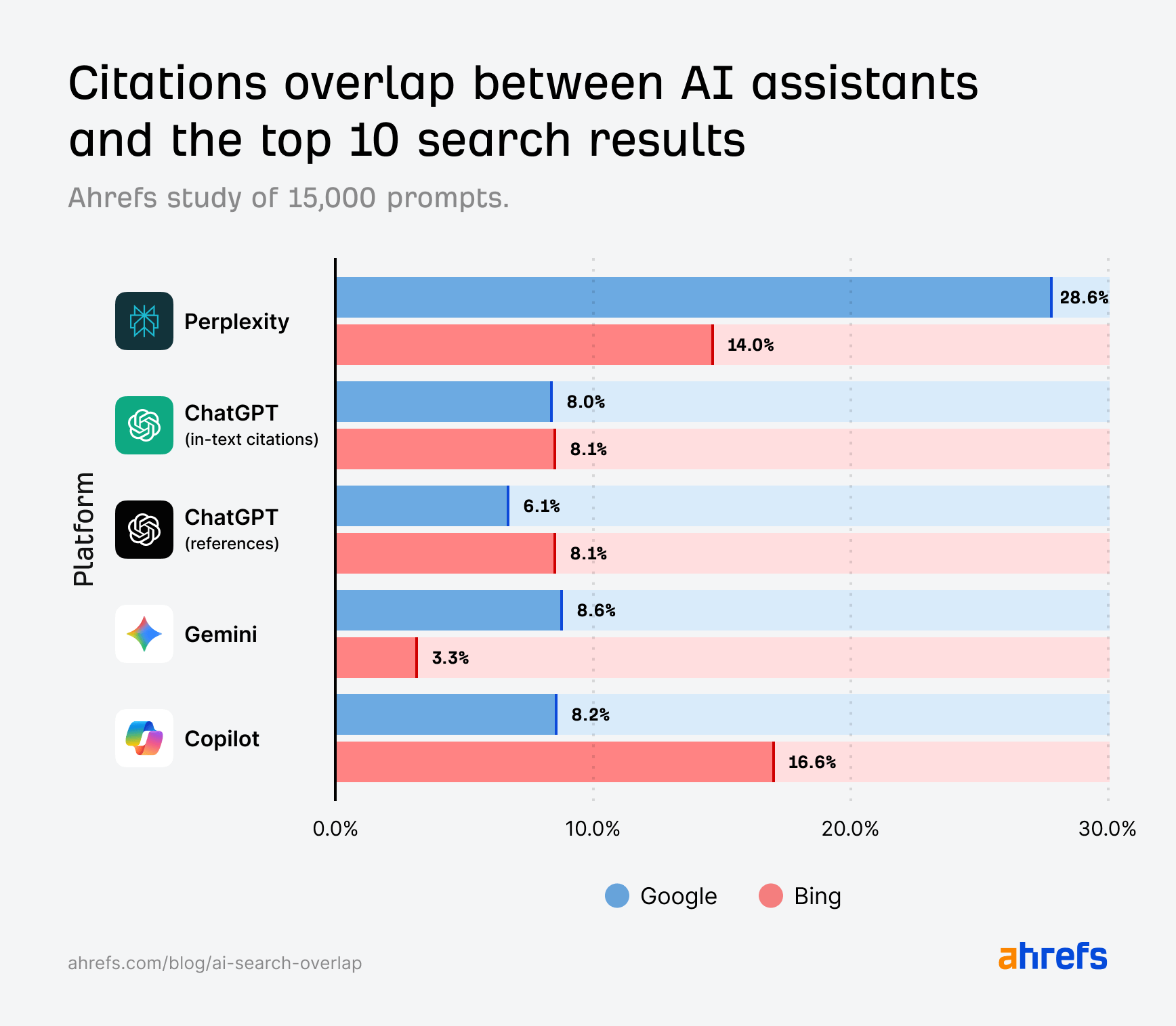
In fact, most suggestions and citations you see in AI systems don’t appear in the top 10 search results.
Source: Ahrefs
AI systems look at the overall credibility of a brand and how often it’s mentioned online. It means that now, you have to look broader at your online visibility.
Solution:
Apart from doing traditional link building, make sure you appear on:
- Quora, Reddit, and other relevant forums (if any),
- Listing platforms (G2, Capterra, and so on),
- YouTube, LinkedIn, and other social media,
- Listicles like “Top/best tools/products,”
- News platforms (so yes, PR works for your AI visibility).
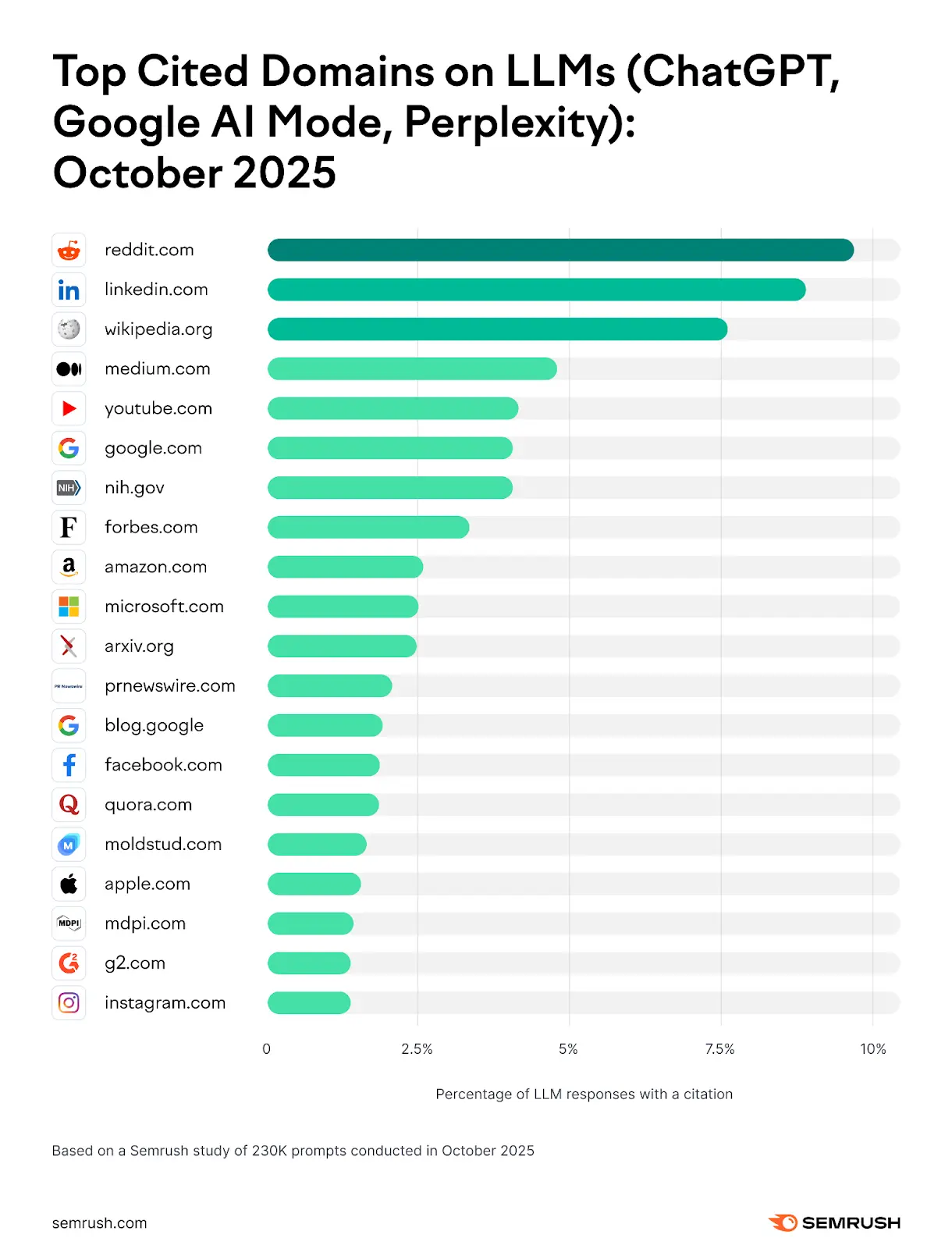
Overall, these are some of the most cited websites in LLMs. So, if you can, show up there.
Source: Semrush
But whatever you do, don’t get spammy.
All these mentions have to be (or at least look) organic. So, simply going on Reddit and writing hundreds of useless comments about how great your tool is won’t help.
33. Blocking AI crawlers without a clear plan
When ChatGPT first started gaining popularity, many websites simply blocked AI crawlers and forgot about that.
Sometimes, blocking access to some pages makes sense. For example, here Coursera blocked access to its lectures only, which is logical.

But if you do this randomly, you will be actively hurting your visibility in LLMs and AI systems.
Solution:
Check your current robots.txt. You can do that by simply typing yourwebsite.com/robots.txt. It’s a public file. When you open it, check whether you have things like this:
User-agent: GPTBot
Disallow: /
Instead of GPTBot, it can be ClaudeBot, PerplexityBot, etc. When you have Disallow: /, it basically means “don't crawl anything.”
And if you want your website to show up in AI answers, you have to fix this.
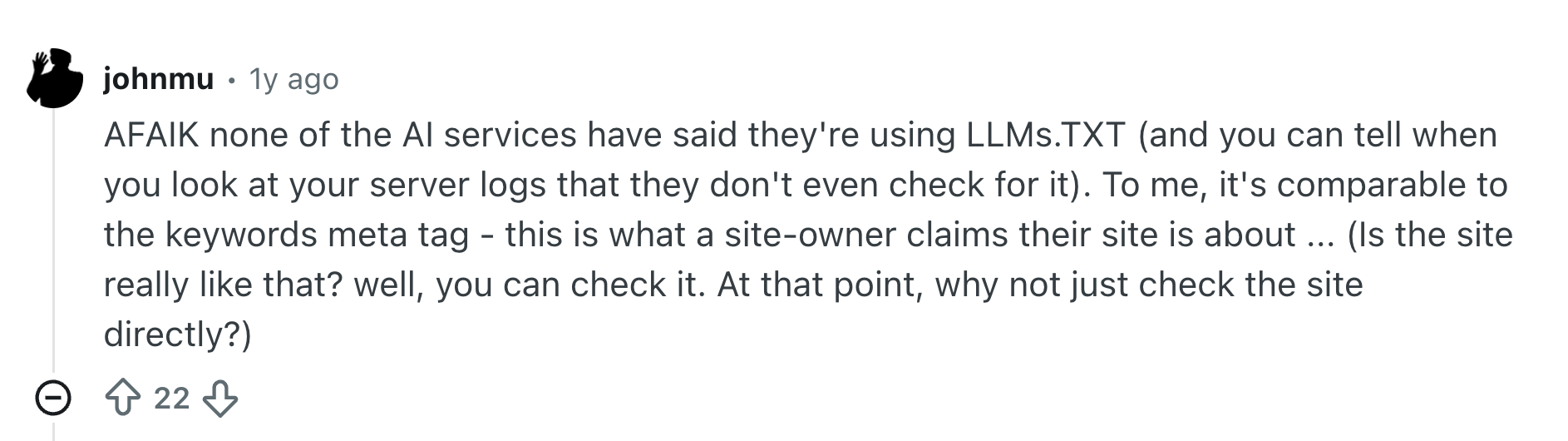
Note: While many now talk about LLMs.TXT, it isn’t really a standard LLMs use (at least for now). So, focus on your robots.txt as usual. This is what Google’s John Mueller said about that in a Reddit post:
Source: Reddit
Conclusion
Now that you have a solid foundation to work with, the real value comes from making it your own. Customize the SEO audit template sample we offered or create a new one from scratch.
But make sure that the structure you use helps you be more organized and actually achieve your goals.
Because at the end of the day, reporting isn’t about making your life more complicated. It’s about helping you understand where you are right now and where you’re heading.
And if you aren’t sure what you need right now, that's fine. Just start with something and adjust it later on. As with everything in life, audits get easier the more you run them.
FAQ
What is an SEO audit report?
It’s a summary of a website’s SEO performance.
Typically, it’s what optimization agencies or in-house SEO experts prepare monthly to show what was done, the progress of their work, and the plans for the upcoming month.
How to write an SEO audit report?
Normally, you would use an SEO tool (or several) to collect all the data first.
Then, over time, every SEO expert builds a template where they can insert all that information. This template often includes the analysis of traffic, keywords, content performance, link building, technical SEO, AI visibility, etc.
Once you have it in place, it’s just a matter of updating it monthly (or when needed).
Can ChatGPT do an SEO audit?
ChatGPT can help you do it. But it can’t analyze your web performance from scratch.
What you can do, for example, is export CSV files from your SEO tools and ask ChatGPT to analyze them and suggest fixes and priorities for each. Besides, you can ask it to compare your performance month over month.
It could also help you structure the report itself.
But unfortunately, it won’t be able to access your SEO metrics directly to do all the work for you. At least for now.
Note: If you use connectors or APIs, ChatGPT might be able to access your SEO data directly, depending on the tool and your plan.
All trademarks, logos, images, and materials are the property of their respective rights holders.
They are used solely for informational, analytical, and review purposes in accordance with applicable copyright law.



 Sign Up
 Sign Up